



Rising infrastructure costs, long lead times, and refresh pressure are forcing enterprise buyers to make tougher hardware decisions. Many teams still need to expand capacity, replace aging systems, or support legacy environments, but they also need to manage budget more carefully.
That is why Refurbished IT Hardware has become a serious enterprise buying option. It gives organizations another path to source servers, switches, storage, and related infrastructure without relying only on factory-new supply.
For buyers reviewing IT hardware procurement strategies, the goal is not simply to spend less. The real goal is to align performance, cost, timing, and lifecycle planning in a way that supports the business.
Why Refurbished IT Hardware Matters More Than Ever

Enterprise buying has changed. New equipment is still the right choice in many cases, but it is no longer the only practical route for growth, replacement, or infrastructure stability.
Today’s buyers are managing:
- tighter capital budgets
- longer procurement cycles
- pressure to extend asset life
- supply constraints on key product categories
- stronger focus on waste reduction and lifecycle efficiency
At the same time, the world generated 62 million metric tons of e-waste in 2022, and that total is projected to rise to 82 million metric tons by 2030. Only 22.3% of 2022 e-waste was documented as properly collected and recycled.
That makes refurbished infrastructure relevant for both cost and lifecycle reasons. It helps organizations reduce waste, improve asset use, and create more flexibility in how they deploy capital.
What Refurbished Really Means in Enterprise IT
Refurbished IT hardware is not the same as equipment sold as-is. In an enterprise context, refurbished hardware should be equipment that has been inspected, tested, repaired when needed, cleaned, and prepared for reliable redeployment.
That can include:
- rack servers
- blade servers
- switches
- storage systems
- GPUs
- other enterprise infrastructure components
The important point is process. A system becomes enterprise-grade refurbished hardware only when there is a defined method behind its preparation.
A strong process usually includes hardware inspection, diagnostics, replacement of failed parts, data sanitation where required, and final quality assurance. Buyers looking at a supplier’s refurbishment process should expect that level of structure.
The Business Case for Refurbished Hardware
Refurbished hardware is often chosen for one main reason at first: cost. But in real enterprise buying cycles, the business case is broader than that.
It can help organizations:
- reduce upfront acquisition cost
- deploy faster when new hardware is delayed
- support existing platforms already in production
- add capacity without overcommitting capital
- extend infrastructure life in a controlled way
Support costs can also shift the economics. Organizations can typically save 50%–60% on hardware support contracts by using used-hardware resellers or third-party maintenance, and in high-density environments savings can reach up to 85%.
That matters because total infrastructure cost is never just about purchase price. Lifecycle support, refresh timing, and replacement flexibility all affect the final decision.
Where Refurbished Hardware Fits Best

Refurbished hardware is usually strongest where the business need is clear and the latest generation is not required. It is often used for expansion, backup environments, test systems, secondary workloads, and support for mixed estates.
Common enterprise use cases for refurbished hardware
| Use case | Why refurbished fits well |
| Capacity expansion | Adds infrastructure without full new-hardware cost |
| Backup or disaster recovery | Keeps standby environments cost-efficient |
| Lab and test environments | Supports validation without overbuying |
| Legacy platform support | Helps maintain compatibility in existing estates |
| Branch or edge deployments | Balances performance with practical budget needs |
Some organizations also use refurbished systems in production when the platform is proven, the workload is stable, and the support model is clear. In those cases, refurbished is not a compromise. It is a deliberate buying decision.
Refurbished vs. New: A Smarter Buying Comparison
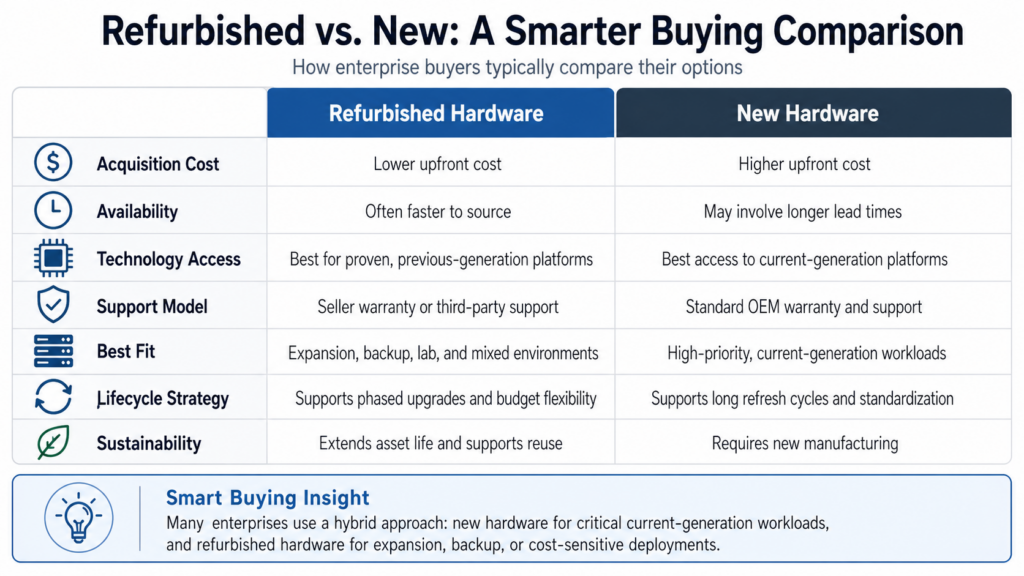
The choice between refurbished and new hardware should not be framed as old versus modern. It should be framed as fit versus overbuying.
New hardware usually offers the latest architecture, full OEM lifecycle coverage, and stronger standardization for long refresh cycles. Refurbished hardware usually offers better value, shorter sourcing timelines, and more flexibility for practical workload planning.
Refurbished vs. new hardware
| Factor | Refurbished hardware | New hardware |
| Acquisition cost | Lower | Higher |
| Availability | Often faster | Can involve longer lead times |
| Current-generation access | Limited | Strongest option |
| OEM lifecycle runway | Shorter | Longer |
| Best fit | Expansion, mixed estates, stable workloads | Current-gen, high-priority deployments |
| Sustainability impact | Supports reuse | Requires new production |
The better choice depends on what the workload really needs. In many environments, a hybrid model delivers the strongest result.
Cost, Performance, and the Reality of Enterprise Tradeoffs
Cost versus performance is where most enterprise decisions become more practical. Buyers are not just comparing technical specifications. They are comparing business value.
New hardware is often the better fit when the project requires:
- current-generation compute density
- maximum performance per watt
- long-term standardization
- full OEM support expectations
- the longest possible lifecycle starting point
Refurbished hardware is often the better fit when the project requires:
- lower capital expense
- faster deployment
- support for known workloads
- expansion without a full refresh
- compatibility with the existing environment
Practical cost vs. performance analysis
| Buyer priority | Better fit |
| Lowest acquisition cost | Refurbished |
| Fastest sourcing | Often refurbished |
| Highest current-gen performance | New |
| Best value for stable workloads | Refurbished |
| Longest OEM lifecycle runway | New |
| Budget and flexibility balance | Hybrid approach |
For many teams, the best answer is not one or the other. It is using new hardware where the premium is justified and refurbished hardware where it provides stronger value.
How Enterprise Refurbishment Should Work
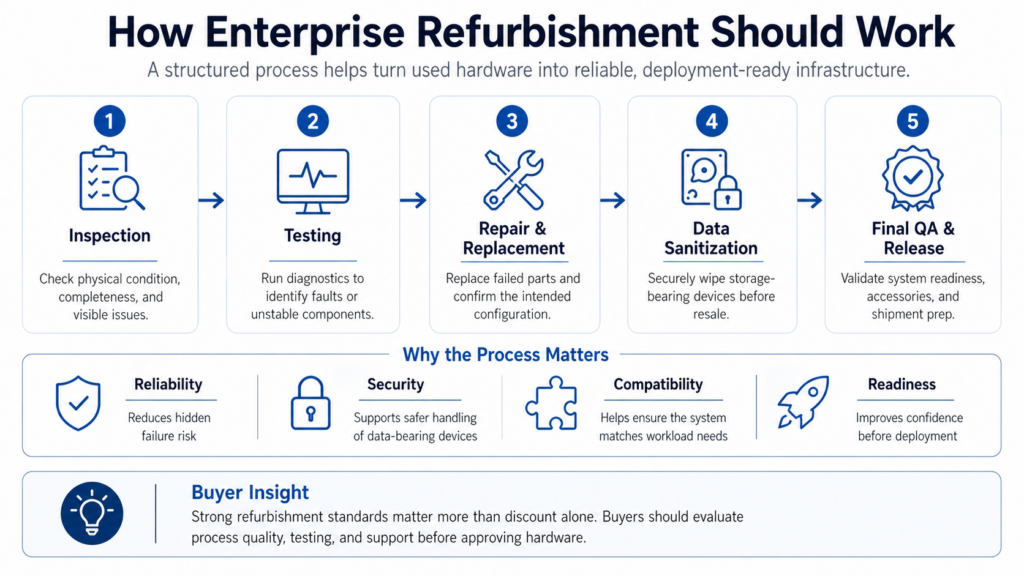
Enterprise refurbishment should follow a controlled process, not a simple resale model. The goal is to prepare used hardware so it is tested, reliable, and ready for business use. Buyers reviewing refurbishment standards should expect that process to be clear and repeatable.
Why the Process Matters
Refurbished hardware should be judged by preparation quality, not just price. A strong process helps reduce:
- hidden hardware faults
- missing or incompatible parts
- deployment issues
- security risks from previous data use
- unclear support expectations
Core Steps in Refurbishment
A reliable workflow should move through a few clear stages before the hardware is resold.
1. Inspection and testing
The equipment is logged, physically inspected, and tested to identify failed or unstable components. This helps catch problems before deployment.
2. Repair and configuration
Defective parts such as drives, memory, fans, or power supplies are replaced as needed. Firmware and installed components should also be checked to make sure the system matches the intended configuration.
3. Data handling and final QA
Storage-bearing devices should be sanitized before resale. After that, the system should go through final quality assurance to confirm stability, completeness, and readiness for shipment.
Table: Refurbishment process at a glance
| Stage | What happens | Why it matters |
| Inspection | Hardware is checked for condition and missing parts | Catches visible issues early |
| Testing | Systems are powered on and reviewed for faults | Reduces hidden failure risk |
| Repair | Failed components are replaced | Improves reliability |
| Data sanitization | Storage devices are securely wiped | Supports security and compliance |
| Final QA | System is validated before shipment | Confirms readiness for deployment |
A supplier that can clearly explain this process usually gives buyers more confidence in the hardware they are receiving.
Buying Servers and Switches the Right Way

Server and switch buying decisions should begin with workload requirements, not just model numbers. That is especially important in refurbished purchasing, where flexibility can be an advantage if the buyer knows what to prioritize.
For refurbished servers, focus on fit and configuration
Before buying refurbished servers, check:
- processor generation and compatibility
- memory capacity and future expansion
- storage interface and drive support
- network connectivity requirements
- power supply configuration
- included rails and accessories
- BIOS and firmware status
- virtualization or OS compatibility
Teams comparing server infrastructure options should also think about whether the hardware is meant for production, failover, testing, or temporary scale-out. That context changes what “good value” looks like.
For refurbished switches, focus on practical deployment details
Switches need a slightly different review process. Performance matters, but deployment fit matters just as much.
Before buying refurbished switches, confirm:
- port count and speed
- uplink type
- PoE requirements if relevant
- airflow direction
- software or licensing status
- module compatibility
- included power supplies and accessories
When organizations review network infrastructure categories, they should compare more than price. Missing modules, licensing gaps, or the wrong airflow can create avoidable delays after delivery.
Common Myths About Refurbished IT

Refurbished IT hardware is still misunderstood in many buying conversations. Some concerns are reasonable, but others come from outdated assumptions about quality, support, and enterprise use.
A clearer view helps buyers judge refurbished hardware based on process, fit, and supplier standards rather than on labels alone.
Common misconceptions buyers should look past
- Myth: Refurbished means unreliable
Refurbished hardware can be reliable when it has been properly tested, repaired, and validated before resale. The real issue is not whether the hardware was previously used, but how well it was refurbished. - Myth: Refurbished is only for small budgets
Many enterprises use refurbished hardware as part of a deliberate sourcing strategy. It is often chosen for expansion, backup, lab environments, and mixed infrastructure planning, not just for cost-cutting. - Myth: Refurbished hardware cannot be used in production
In many cases, refurbished servers, switches, and storage systems are used in production environments where the platform is proven and the workload does not require the latest generation. - Myth: Buying refurbished means giving up support
Support depends on the supplier and warranty model, not simply on whether the hardware is new or refurbished. Many buyers combine refurbished hardware with warranty coverage and third-party maintenance options. - Myth: Refurbished hardware is outdated by default
Not all refurbished equipment is old or obsolete. In many cases, buyers choose previous-generation systems because they offer the right balance of performance, availability, and cost for the workload.
Table: Myth vs. reality in refurbished IT buying
| Myth | Reality |
| Refurbished hardware is unreliable | Reliability depends on testing, part quality, and supplier standards |
| Only small companies buy refurbished | Many enterprise teams use it for practical cost and lifecycle reasons |
| It cannot support production workloads | It can be used in production when the platform and support model fit |
| There is no support after purchase | Warranty and maintenance options are often available |
| Refurbished always means outdated | Many previous-generation systems still meet enterprise needs very well |
The most useful way to evaluate refurbished IT is not by assumption, but by process. Buyers should focus on testing standards, configuration fit, warranty terms, and the supplier’s ability to support the hardware after deployment.
What Buyers Should Verify Before Approval
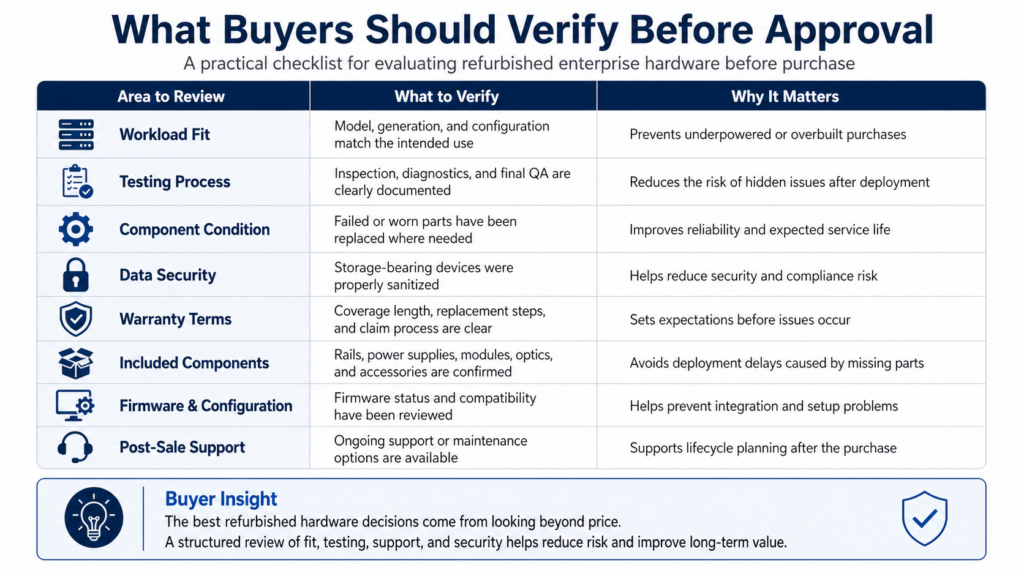
Buying refurbished hardware is usually less risky when the review process is structured. Instead of relying on price alone, buyers should check the areas below before approving the order.
| Review point | What to verify |
| Workload alignment | The hardware fits the actual performance and compatibility need |
| Refurbishment quality | Testing, repair, and QA steps are clearly defined |
| Security handling | Data-bearing devices were sanitized properly |
| Warranty coverage | Terms are documented and easy to understand |
| Included hardware | All required parts and accessories are included |
| Support path | The supplier can support issues after delivery |
These checks help buyers compare offers on actual business value, not just on unit cost.
Reliability Depends on Process, Not Assumptions
One of the most common buyer questions is whether refurbished hardware is reliable. The answer is yes, but only when it comes from a supplier with strong process controls.
Reliability depends on:
- the original hardware platform
- current condition of the unit
- refurbishment quality
- replacement part standards
- testing depth
- support after delivery
That is why enterprise buyers should focus on evidence. A lower price does not automatically mean higher risk. Weak documentation, poor testing, and unclear warranty terms are what usually create problems.
Warranty and Support Standards Matter

Warranty and support standards are central to enterprise confidence. If a supplier cannot explain what happens after shipment, the buying risk increases quickly.
Buyers should confirm:
- warranty length
- replacement procedures
- dead-on-arrival policy
- parts and labor coverage
- response expectations
- whether support is handled directly or through a partner
For organizations planning to keep infrastructure in use beyond standard OEM timelines, support strategy becomes even more important. In those cases, reviewing maintenance coverage options alongside the hardware decision often gives a more complete picture of lifecycle cost.
Need a Smarter Way to Balance Cost, Availability, and Performance?
Enterprise hardware decisions rarely come down to one simple choice. Some projects need current-generation systems with full OEM support. Others need reliable capacity faster, better value from proven platforms, or a practical way to extend infrastructure life without slowing down the business.
That is where Catalyst Data Solutions adds value. As a vendor-agnostic infrastructure partner, Catalyst helps organizations evaluate the right mix of new, refurbished, and hard-to-find hardware based on workload needs, timing, and cost priorities. Catalyst works closely across leading OEM ecosystems, including Cisco, Arista, HPE, and NVIDIA, while also leveraging distribution channels and secondary markets to widen sourcing options when availability is tight or requirements are more specialized.
FAQs:
1. Is refurbished hardware a reliable alternative to new?
Refurbished hardware can be a reliable alternative to new when it is properly tested, inspected, and backed by clear warranty terms. Many organizations use refurbished servers, switches, and storage systems for production, expansion, backup, and secondary workloads because they can deliver strong performance at a lower cost. Reliability usually depends on the quality of the refurbishment process, replacement parts, and post-sale support rather than the fact that the hardware was previously deployed.
2. Can Catalyst source hard-to-find or backordered IT hardware?
Catalyst works across OEM channels, distribution networks, and secondary markets, which allows access to both new and refurbished inventory. This is particularly valuable when standard procurement channels face delays, where lead times for new hardware can extend to 6–16 weeks or longer. In these cases, alternative sourcing options can help reduce downtime and project delays.
3. When should companies choose refurbished over new?
Companies usually choose refurbished hardware when cost control, faster availability, or lifecycle flexibility is a priority. It is often a practical option for infrastructure expansion, legacy platform support, backup environments, lab deployments, or projects where current-generation performance is not required. Many enterprises use a hybrid model, choosing new hardware for the most demanding workloads and refurbished hardware where proven performance and budget efficiency matter more.
4. How does Catalyst ensure quality in refurbished hardware?
Catalyst helps ensure quality in refurbished hardware through structured testing, component inspection, replacement of failed parts, firmware validation, and final configuration checks before deployment. This matters because enterprise buyers need more than lower pricing, they need confidence that refurbished servers, switches, and storage systems will perform reliably in real environments. Working with an experienced partner reduces risk by adding process control, hardware validation, and practical support around deployment readiness.
5: Can refurbished hardware be used alongside new infrastructure?
Refurbished hardware is often used alongside new infrastructure in enterprise environments where different workloads require different levels of performance, lifecycle runway, and budget investment. Many organizations use new hardware for critical or current-generation workloads while using refurbished systems for expansion, backup, testing, or secondary production roles. This hybrid approach helps balance cost optimization with operational flexibility.
6: What types of equipment are commonly purchased refurbished?
The most commonly purchased refurbished equipment includes servers, networking hardware, storage systems, and previous-generation GPUs. Enterprise buyers often look at platforms from OEM ecosystems such as HPE, Dell, Cisco, Arista, and NVIDIA when they need proven performance, faster availability, or better value than factory-new supply can offer. These categories are especially relevant in environments where infrastructure must scale without unnecessary delay or overspending.
7. How much can refurbished hardware reduce costs?
Refurbished hardware typically reduces upfront costs by 30–70%, depending on the product category, generation, and market demand. That makes it a practical option for organizations that need to expand infrastructure, replace aging systems, or support growth without increasing capital expenditure at the same pace. Cost savings are often strongest when buyers match proven platforms to workloads that do not require the newest generation.
8. Is refurbished IT hardware reliable for enterprise use?
Refurbished IT hardware is widely used in enterprise environments, especially for secondary workloads, testing environments, and cost-sensitive deployments. When properly tested and certified, refurbished servers, storage systems, and networking equipment can deliver performance comparable to new hardware at 30–70% lower cost. Reliability depends on sourcing, testing standards, and component quality, which is why experienced providers add significant value.