



Enterprise IT teams are under pressure to expand capacity without stretching budgets or waiting months for new equipment. Hardware refresh cycles, data growth, virtualization, backup needs, and edge deployments all create demand for reliable servers. But new infrastructure can come with long lead times, high upfront costs, and limited flexibility.
That is why many organizations now evaluate refurbished HPE servers as part of a wider sourcing strategy. For buyers comparing new and secondary-market infrastructure, a practical refurbished hardware guide can help frame the decision around performance, cost, availability, and lifecycle planning.
Refurbished HPE servers are not the right fit for every workload. But when selected carefully, tested properly, and matched to the environment, they can support enterprise use cases while improving budget control and deployment speed.
What Are Refurbished HPE Servers?
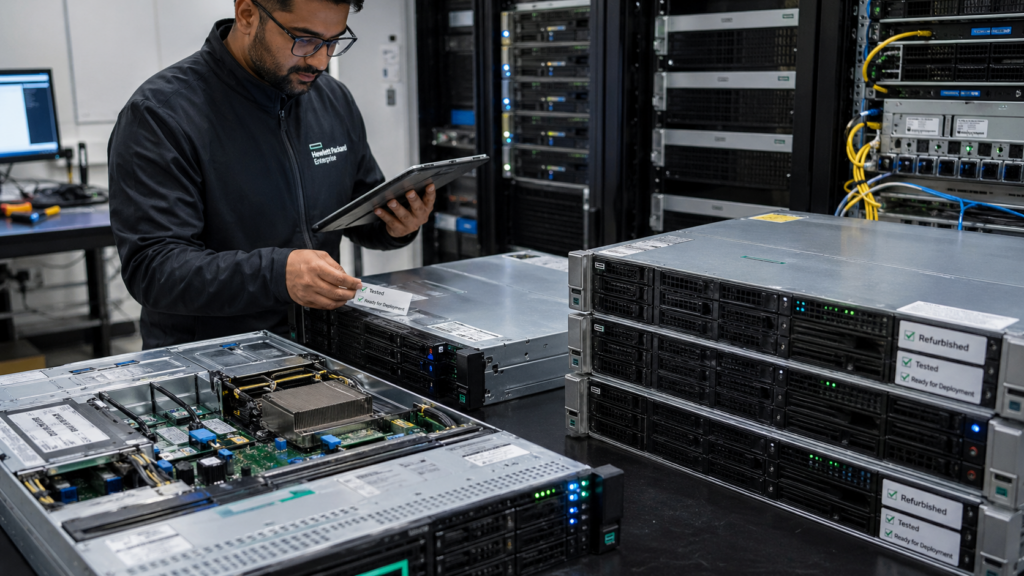
Refurbished HPE servers are pre-owned Hewlett Packard Enterprise systems that have been inspected, tested, cleaned, configured, and prepared for reuse. These servers may come from data center refreshes, lease returns, enterprise upgrades, or IT asset recovery programs.
They are different from used servers sold “as-is.” A properly refurbished server should go through a controlled process that verifies hardware health, component condition, firmware status, and system performance.
In most enterprise settings, refurbished HPE servers are used when the organization needs reliable infrastructure but does not always require the newest generation of hardware. This may include backup environments, development labs, virtualization clusters, storage expansion, disaster recovery, edge deployments, or workload migration projects.
Refurbished does not mean outdated by default. Many HPE ProLiant systems remain useful beyond their first ownership cycle, especially when configured with suitable CPUs, memory, storage, RAID controllers, and network adapters.
A common decision point is whether to buy new or refurbished. The right answer depends on workload criticality, deployment timeline, budget, and support requirements. A balanced new versus refurbished strategy often gives IT teams more flexibility than choosing only one path.
| Category | Used HPE Server | Refurbished HPE Server | New HPE Server |
| Condition | Sold as received | Tested and restored for reuse | Factory new |
| Testing | Limited or unknown | Hardware diagnostics and validation | OEM factory testing |
| Cost | Lowest upfront cost | Lower than new with better control | Highest upfront cost |
| Risk Level | Higher | Moderate to low with right supplier | Lowest |
| Best Use | Non-critical use or spare parts | Enterprise reuse, expansion, labs, backup | Critical new deployments |
Why Enterprises Choose Refurbished HPE Servers
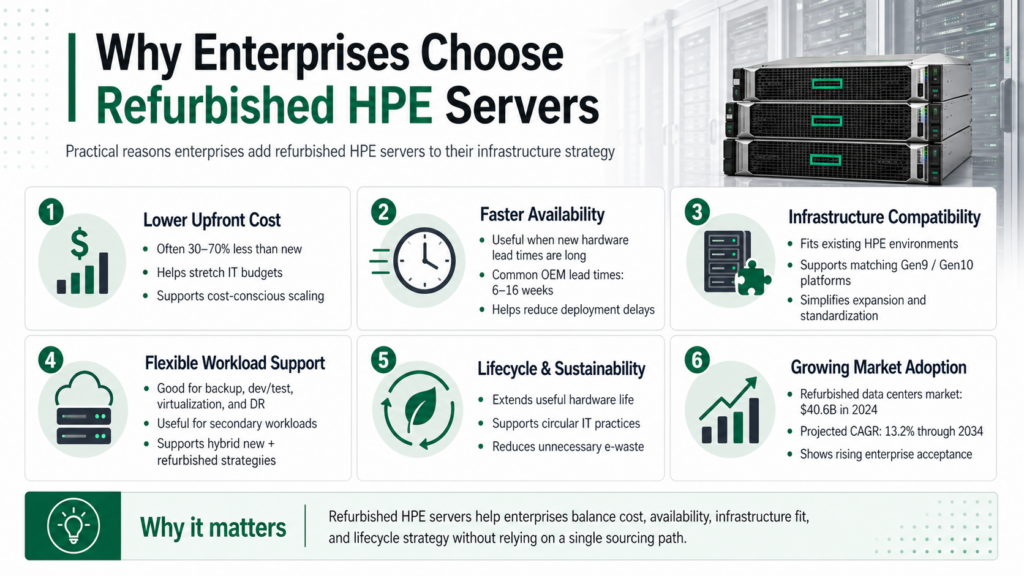
Enterprises adopt refurbished HPE servers for practical, operational reasons not just upfront savings. The decision is typically driven by cost pressure, supply constraints, and the need to maintain flexibility across the infrastructure lifecycle.
Cost Optimization Without Sacrificing Usability
- Refurbished HPE servers can reduce upfront costs by 30–70%, depending on model and configuration
- Helps extend budgets across multiple projects instead of a single large capital purchase
- Enables scaling infrastructure without increasing total capital expenditure
Faster Availability in Constrained Supply Environments
- Avoids long OEM lead times, which can range from 6–16 weeks in some cases
- Useful when projects cannot wait for new hardware procurement cycles
- Supports urgent replacements for failed or aging systems
Compatibility with Existing Infrastructure
- Allows organizations to match existing HPE environments (Gen9, Gen10)
- Simplifies integration with current racks, tools, and configurations
- Reduces operational complexity compared to introducing new platforms
Flexible Deployment Across Workloads
- Suitable for backup systems, dev/test environments, and secondary workloads
- Often used for virtualization expansion and storage-heavy applications
- Enables hybrid infrastructure strategies (new + refurbished)
Lifecycle and Refresh Strategy Alignment
- Supports phased upgrades instead of full infrastructure replacement
- Extends useful life of existing environments while planning long-term refresh
- Fits well into 3–5 year enterprise refresh cycles
Sustainability and Circular IT Benefits
- Reduces e-waste by extending hardware lifecycle
- Supports ESG and sustainability initiatives
- A UN-backed report estimates $62 billion worth of recoverable resources are lost due to poor e-waste handling
Popular Refurbished HPE Server Models
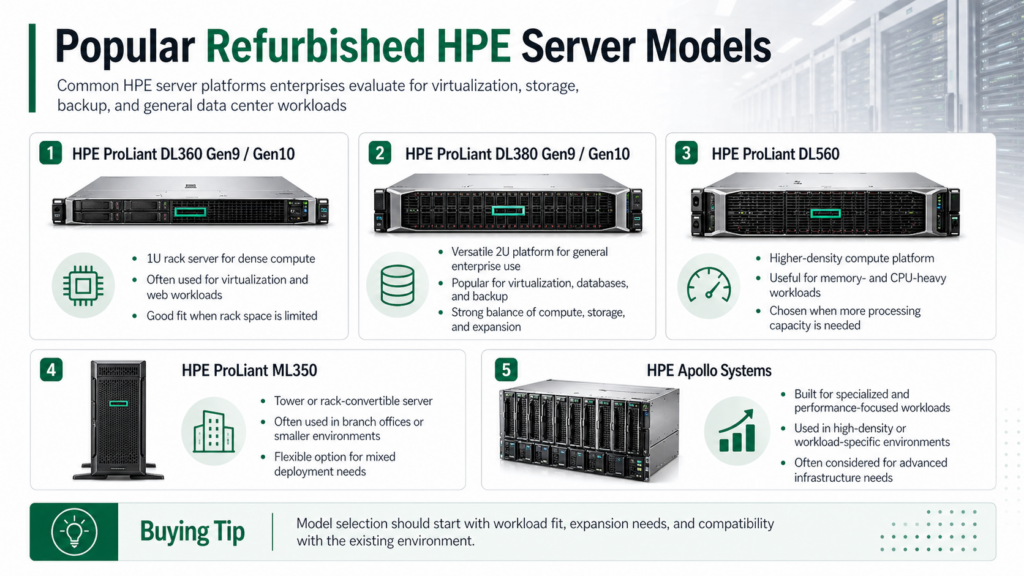
HPE ProLiant servers are common in the refurbished market because they are widely deployed across enterprise data centers. Availability changes based on refresh cycles, demand, and component supply, but several model families are frequently considered.
| HPE Server Model | Common Enterprise Use | Why Buyers Consider It |
| HPE ProLiant DL360 Gen9 / Gen10 | Dense compute, virtualization, web workloads | 1U form factor, efficient for rack density |
| HPE ProLiant DL380 Gen9 / Gen10 | General-purpose enterprise workloads | Flexible 2U platform with strong expansion options |
| HPE ProLiant DL560 | Higher-density compute | Useful for workloads needing more CPU and memory capacity |
| HPE ProLiant ML350 | Tower or rack-convertible deployments | Good for branch offices and smaller environments |
| HPE Apollo Systems | Specialized compute workloads | Often used where density and workload-specific design matter |
The HPE ProLiant DL380 is one of the most common refurbished choices because it balances compute, storage, memory, and expansion capacity. It is often used in virtualization clusters, database environments, backup infrastructure, and general enterprise workloads.
The DL360 is a strong option when rack space is limited and compute density matters. It may be better suited for environments where storage expansion is less important than efficient rack utilization.
For buyers upgrading existing systems, configuration details matter more than model name alone. Memory type, drive bay layout, RAID controller, processor generation, NICs, power supplies, rails, and firmware can all affect deployment readiness. Teams working through component-level planning may need guidance on HPE upgrade paths before finalizing a purchase.
Matching the Model to the Workload
The right refurbished HPE server depends on what the system needs to do. A virtualization host may need more memory and redundant networking. A backup server may need more drive bays and storage capacity. A branch office system may need a smaller footprint and simpler management.
Common workload matches include:
- DL360 for dense rack environments
- DL380 for general-purpose data center use
- ML350 for branch offices or flexible tower deployments
- DL560 for compute-heavy workloads
- Apollo systems for specialized infrastructure needs
This workload-first approach helps buyers avoid overbuying or selecting hardware that cannot support the intended environment.
Core Buying Checklist
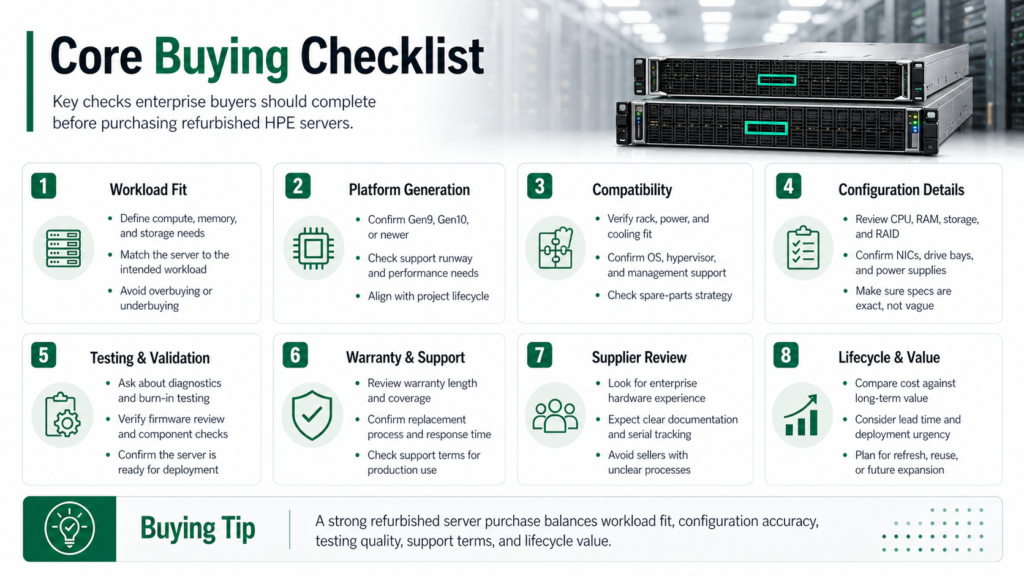
A strong buying process starts with clear workload requirements. Before requesting quotes, define what the server needs to support and how it will fit into the current environment.
The most important question is not “Which refurbished HPE server is cheapest?” It is “Which configuration solves the requirement with acceptable risk, support, and lifecycle value?”
| Buying Area | What to Check | Why It Matters |
| Workload Fit | CPU, memory, storage, network needs | Prevents underbuying or overbuying |
| Generation | Gen9, Gen10, Gen10 Plus, newer | Affects performance, compatibility, and support |
| Testing | Diagnostics, burn-in, component validation | Confirms hardware reliability before shipment |
| Storage | Drive type, capacity, RAID controller | Impacts performance and data protection |
| Memory | Capacity, speed, slot population | Affects virtualization and database workloads |
| Power | PSU count, wattage, redundancy | Reduces deployment and uptime risk |
| Firmware | BIOS, iLO, controller firmware | Supports stability and manageability |
| Warranty | Term, replacement process, coverage | Protects the investment after purchase |
Start with the workload. Know what the server needs to support, then check rack fit, power needs, management tools, hypervisor version, operating system, and spare-part compatibility.
Testing should be clear. A trusted provider should explain how each server is inspected, cleaned, configured, and tested before shipment. This includes diagnostics, component checks, firmware review, and configuration validation. Buyers should be cautious when a seller cannot clearly explain its refurbishment process.
Review the warranty before buying. Check the coverage period, replacement process, and support terms, especially if the server will support production or near-production workloads.
Think about lifecycle timing too. A refurbished Gen10 server may be a good fit for a three-year project, while workloads needing the newest platform or longer support runway may require new hardware.
Refurbished HPE servers can lower costs and speed up deployment, but only when specs, testing, and supplier terms are clear. A structured buying process helps avoid delays, mismatched hardware, and unnecessary risk.
Common Mistakes to Avoid
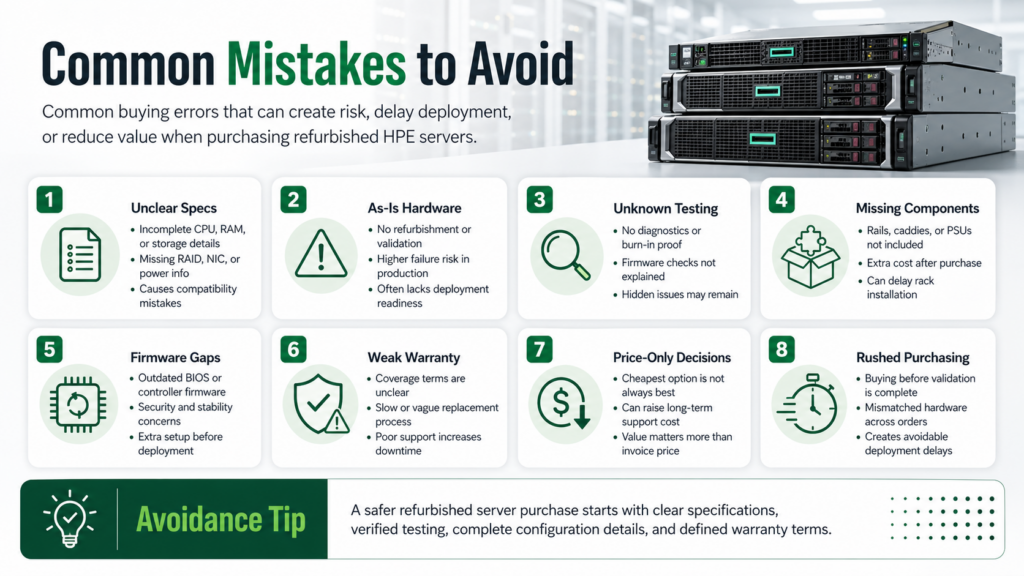
| Risk Area | What to Avoid | Why It Creates Problems |
| Unclear Specs | Vague or incomplete configuration details | Leads to compatibility issues and delays |
| “As-Is” Hardware | Buying without testing or validation | Higher failure risk in production environments |
| Unknown Testing | No proof of diagnostics or validation process | Hidden hardware issues may go undetected |
| Missing Components | No rails, caddies, or power supplies included | Increases deployment time and extra cost |
| Firmware Gaps | Outdated BIOS or controller firmware | Stability and security risks |
| Weak Warranty | No clear replacement or support terms | Difficult to resolve failures post-purchase |
| Price-Only Decisions | Choosing cheapest option without evaluation | Higher long-term cost due to failures or rework |
Red Flags During Evaluation
Shortlist suppliers carefully. These warning signs often indicate higher risk:
- No detailed bill of materials (BOM)
- Inconsistent configurations across multiple units
- No serial-level tracking or asset history
- Limited or unclear return policy
- Pressure to purchase without full validation
- No explanation of testing or refurbishment process
Configuration Risks to Watch
Even small mismatches can cause deployment issues. Pay attention to:
- Mixed memory types or uneven slot population
- Unsupported CPU combinations
- Incorrect RAID controller for storage needs
- Incompatible network interfaces
- Insufficient power supply redundancy
Why This Matters in Enterprise Environments
Mistakes in refurbished purchases often show up after delivery,during deployment or under load. That creates delays, unplanned costs, and operational risk.
Blancco’s 2025 research found that 58% of enterprises increased compliance spending, while many devices still had usable life left. This highlights the importance of controlled sourcing and proper lifecycle decisions instead of unmanaged reuse.
Red Flags During the Buying Process
Some issues should slow down or stop the purchase process. These include unclear warranty terms, missing component details, no testing explanation, limited return options, and pressure to buy before specifications are confirmed.
Other red flags include:
- “As-is” listings used for production hardware
- No serial-level tracking
- No clear replacement process
- Missing rails, caddies, or power supplies
- Inconsistent configurations across bulk orders
- No explanation of firmware or diagnostics
These warning signs do not always mean the hardware is unusable, but they increase risk. For enterprise teams, the cost of a delay can be higher than the savings from a cheaper server.
Need Help Sourcing the Right HPE Server Configuration?
Catalyst Data Solutions is a vendor-agnostic infrastructure lifecycle partner that helps organizations source, deploy, and refresh enterprise IT hardware across new, refurbished, and hard-to-find markets. Through relationships with leading OEMs and channel partners, including HPE, Cisco, Arista, and NVIDIA, Catalyst helps buyers compare options based on workload needs, budget, availability, and deployment timelines.
For organizations evaluating refurbished HPE servers, Catalyst can help identify configurations that fit the current environment without locking teams into a single sourcing path. Whether the need is a full server refresh, replacement hardware, expansion capacity, or alternative sourcing during supply constraints, enterprise server sourcing helps turn infrastructure requirements into practical deployment options.
FAQs
Q: Are refurbished HPE servers reliable for enterprise use?
Yes, refurbished HPE servers can be reliable for enterprise use when properly tested, configured, and sourced from an experienced provider. Reliability depends on diagnostics, component quality, firmware review, and warranty support. Many enterprises use refurbished servers for virtualization, backup, development, and expansion workloads.
Q: How much can companies save with refurbished HPE servers?
Refurbished HPE servers can often reduce upfront hardware costs by 30–70%, depending on model, generation, configuration, and availability. Savings are usually strongest when organizations do not require the latest platform for every workload. Buyers should compare cost against warranty, testing quality, and deployment readiness.
Q: Which refurbished HPE server model is most common?
The HPE ProLiant DL380 is one of the most commonly purchased refurbished HPE servers. It offers a strong balance of compute, memory, storage, and expansion capacity. Many enterprises use it for virtualization, databases, backup systems, and general data center workloads.
Q: When should a company choose refurbished HPE servers over new?
Companies often choose refurbished HPE servers when cost control, faster availability, or compatibility with existing infrastructure is a priority. Refurbished hardware is also useful when new equipment has long lead times or when the workload does not require the newest generation.