



At Catalyst Data Solutions, we build a multi-OEM shortlist by defining the workload, current environment, project limits, and decision criteria before we recommend a manufacturer. We remove options that fail technical, operational, support, timing, or budget requirements. We then compare the remaining paths across performance, compatibility, availability, warranty, maintenance, lifecycle cost, and exit value. The result is not a long catalog. It is a focused set of viable choices with clear tradeoffs, current pricing, stated assumptions, and a reasoned recommendation.
A shortlist is a decision tool, not a product list
A product list tells you what is available. A decision shortlist tells you which options can work in your environment and why one path may fit better than another.
Our infrastructure planning and procurement services connect assessment, design, sourcing, deployment, support, and lifecycle planning. That wider view matters because the lowest quote can become expensive if the hardware creates licensing gaps, integration work, long lead times, weak support coverage, or an early replacement.
| Product list | Multi-OEM decision shortlist |
| Starts with brands or part numbers | Starts with workload and business needs |
| May include many available products | Includes a small number of viable paths |
| Focuses on price and specifications | Compares technical, commercial, operational, and lifecycle fit |
| Leaves tradeoffs for the buyer to find | Records tradeoffs, risks, assumptions, and the reason for the recommendation |
This process reflectshow Catalyst differs from a traditional hardware reseller. We can begin before a bill of materials is final, validate the requested design, compare alternatives, and plan support and retirement before purchase approval.
Can we build a multi-OEM shortlist for an infrastructure refresh?
Yes. We can build a shortlist for a network, server, storage, data center, edge, AI infrastructure, or mixed-estate refresh when the project needs a clear comparison across manufacturers.
A shortlist is useful when:
- The current platform is near end of sale or support.
- Lead times vary across OEMs.
- The environment contains several hardware generations.
- The team wants to compare new, prior-generation, and refurbished options.
- Licensing, support, power, cooling, or integration may change the real cost.
- The refresh must be phased across sites or budget periods.
We do not force several brands into one design. A single-OEM path may be right when it improves standardization, staff efficiency, integration, or support. Our role is to compare viable paths before the choice is made.
Our seven-step multi-OEM evaluation process
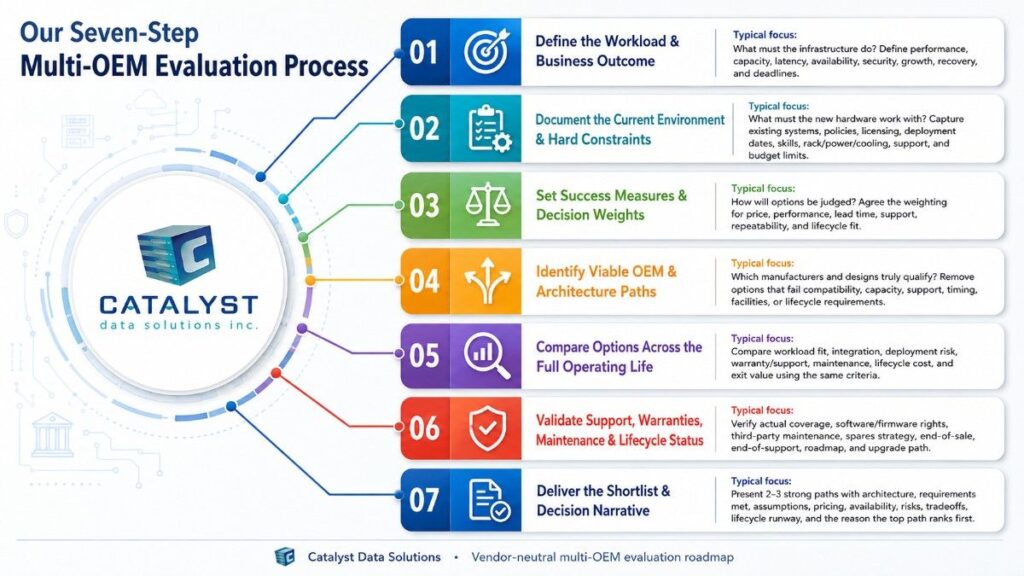
1. Define the workload and business outcome
We begin with what the infrastructure must do. We ask about performance, capacity, latency, availability, security, growth, recovery needs, and the business deadline.
For an AI-readiness project, we also look beyond the accelerator. We review the workload, data path, compute, network fabric, storage, rack density, power, cooling, platform software, security, and operating model. A high-end GPU does not solve a bottleneck in storage, networking, facilities, or data readiness.
This step prevents a common error: choosing a product family before the real requirement is clear.
2. Document the current environment and hard constraints
We map the systems that the new hardware must work with. These may include servers, storage, switches, optics, software versions, hypervisors, operating systems, monitoring tools, racks, cabling, power, cooling, and support contracts.
We also identify limits that cannot be ignored:
- Approved standards and security policies.
- Maintenance windows and deployment dates.
- Internal engineering skills.
- Licensing and subscription rules.
- Site, rack, power, and cooling limits.
- Required warranty or service coverage.
- Budget and financing limits.
- Existing assets that should remain in use.
This work separates a true requirement from a preference. It may also show that part of the installed base can stay while a constrained layer is refreshed.
3. Set success measures and decision weights
Before we name manufacturers, we agree on how the options will be judged. Not every project should give the same weight to price, performance, lead time, or lifecycle.
A business-critical network may place resilience and support above purchase price. A lab may place availability and flexibility above a long OEM lifecycle. A multi-site refresh may give more weight to repeatable deployment, spares, and consistent configurations.
We make these priorities visible so the recommendation can be reviewed. This reduces the risk of changing the criteria after a favored brand appears.
4. Identify viable OEM and architecture paths
We use our multi-OEM technology partner ecosystem and broader sourcing channels to identify realistic options across compute, networking, storage, security, power, cooling, and related platforms.
At this stage, we remove options that cannot meet a hard requirement. A path may be excluded because of compatibility, capacity, licensing, facilities, support, timing, or product-lifecycle limits.
The goal is not to put every manufacturer into the matrix. It is to carry forward only the paths that deserve a full comparison.
5. Compare options across the full operating life
We compare the remaining paths with the same criteria and known assumptions.
| Decision area | Questions we test | Why it matters |
| Workload and performance | Does it meet capacity, latency, throughput, resilience, and growth needs? | Confirms the platform can do the job |
| Integration and operations | Will it work with current systems, tools, skills, firmware, licensing, and processes? | Reduces deployment friction |
| Availability and deployment risk | Can it arrive, stage, and deploy on schedule? | Protects the project timeline |
| Warranty, support, and spares | Who supports it, for how long, and through which replacement path? | Limits downtime and unclear ownership |
| Lifecycle and exit value | What is the roadmap, useful life, upgrade path, maintenance cost, recovery value, and retirement plan? | Shows cost and risk beyond purchase |
Through our enterprise IT hardware procurement work, we can review pricing and availability across eligible manufacturers, channels, generations, and equipment conditions. Pricing is dated because discounts, stock, lead times, and program terms can change.
6. Validate support, warranties, maintenance, and lifecycle status
Support terms are not interchangeable. We compare what is covered, who owns the case, how replacement works, and what happens as the product moves through its lifecycle.
| Coverage area | What we compare | Questions to resolve |
| OEM warranty | Term, eligible configuration, replacement process, exclusions | Is the full configuration covered, and when does coverage begin? |
| OEM support | Software access, firmware rights, technical help, response target | Are subscriptions or contracts required? |
| Third-party maintenance | Assets, service region, parts, field support, escalation | Is it suitable for the workload and risk? |
| Spares strategy | On-site spares, advance replacement, depot stock | How quickly can service be restored? |
| Lifecycle status | End-of-sale, end-of-support, roadmap, upgrade path | Will the platform remain supportable for the planned life? |
We verify the terms for the proposed configuration and engagement. We do not treat a general warranty statement, partner badge, or advertised service level as proof that every product and location receives the same coverage. Our review also distinguishes OEM support, third-party maintenance, spare-parts planning, and phased replacement options.
7. Deliver the shortlist and decision narrative
The final output should be small enough to support a real decision. It may include two or three strong paths instead of ten loosely matched products.
For each path, we document:
- The proposed architecture and configuration.
- The requirements it meets.
- Assumptions, pricing, and availability.
- Support, warranty, and maintenance options.
- Implementation and compatibility risks.
- Lifecycle status and expected runway.
- The main tradeoffs.
- Why the recommended path ranked first.
- When another option would be better.
We also record acceptable substitutions and the conditions that would trigger a new review. That matters when availability or manufacturer roadmaps change during procurement. The article brief requires an auditable matrix, real criteria, dated availability inputs, and clear assumptions rather than a fabricated example.
What information do we need to compare OEM solutions?
A complete input package makes the review faster and more accurate. We can begin with partial information, but unknowns must be listed as assumptions or discovery items.
| Information needed | Useful details | What it helps us evaluate |
| Business goal | Refresh reason, deadline, risk, growth plan, success measure | Scope and priorities |
| Workload profile | Users, applications, traffic, data, capacity, latency, availability | Performance and architecture fit |
| Current environment | Models, part numbers, versions, topology, dependencies, contracts | Compatibility and reuse |
| Project constraints | Budget, sites, rack space, power, cooling, staffing, change windows | Feasibility and deployment risk |
| Support needs | Coverage hours, response needs, spares, escalation, regions | Warranty and maintenance fit |
| Commercial needs | Terms, financing, approved vendors, purchasing rules | Quote and contract comparison |
| Lifecycle plan | Service life, refresh timing, reuse, recovery, ITAD needs | Total cost and exit strategy |
Useful material can include an existing bill of materials, network diagram, asset inventory, performance report, support renewal list, rack and power data, software matrix, deployment schedule, and procurement requirements.
Can we provide pricing from multiple enterprise hardware manufacturers?
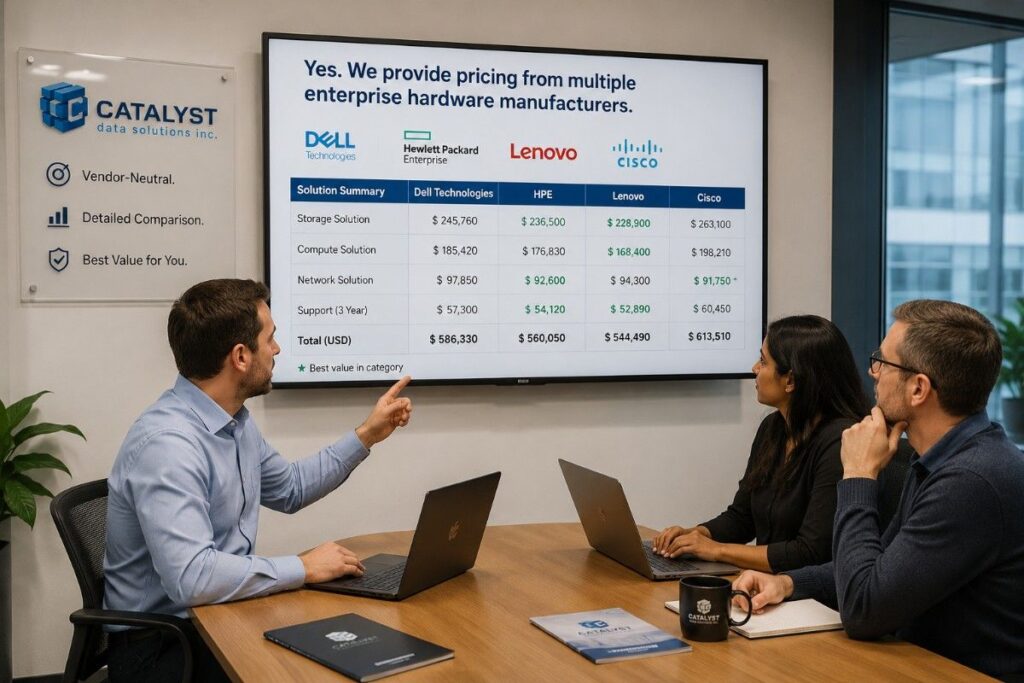
Yes. When the required products and channels are available, we can provide multi-vendor quotes and alternatives rather than limit the discussion to one brand.
We compare more than unit price. We also identify licensing, subscriptions, optics, cables, rails, power supplies, support, freight, staging, spares, and deployment work that may change total project cost.
A lower hardware quote is not always the lower-cost path. One option may need new licenses, staff training, added power, different optics, or a separate maintenance contract. Another may cost more at purchase but offer a longer support runway or lower operating effort.
We date price and availability inputs and state any conditions. Final pricing can change with quantity, configuration, contract status, region, stock, manufacturer programs, and quote validity.
How much does our OEM evaluation process cost?
The cost depends on the scope. A focused comparison of known configurations requires less work than a multi-site refresh that needs discovery, architecture, compatibility review, lifecycle modeling, and deployment planning.
Cost drivers include:
- The number of sites, workloads, and OEM paths.
- The quality of current documentation.
- Engineering or proof-of-value needs.
- Licensing and support analysis.
- New, prior-generation, or refurbished sourcing research.
- Logistics and deployment planning.
- Security or regulated-environment review.
We define the required work before confirming the fee. This keeps the assessment tied to the decision you need to make rather than to a generic package.
How long does it take to create a hardware shortlist?
There is no single timeline. Timing depends on scope, available data, the number of viable paths, engineering review, and how quickly manufacturers or channels confirm configuration, pricing, and availability.
A focused review moves faster when the workload, bill of materials, quantities, locations, and support needs are clear. A complex review takes longer when we must discover the current state, validate compatibility, compare architectures, or wait for formal OEM input.
We organize the work into discovery, criteria approval, option screening, commercial and lifecycle validation, technical review, and final decision. At the start, we identify missing information and confirm the project schedule.
How do product roadmaps and lifecycle status affect our recommendation?
Lifecycle status can change a recommendation even when two products meet the same current performance need.
We review:
- End-of-sale and end-of-support dates.
- Firmware and security-update availability.
- Replacement-part outlook.
- Upgrade and migration paths.
- Compatibility with the installed base.
- Expected service life.
- Support and maintenance choices.
- Reuse, resale, and recovery options.
A newer platform may offer the longest roadmap but require larger changes in software, power, cooling, or operations. A prior-generation platform may offer better compatibility and faster deployment but less OEM support runway. We make that tradeoff visible.
When do new, prior-generation, or refurbished options belong in one comparison?
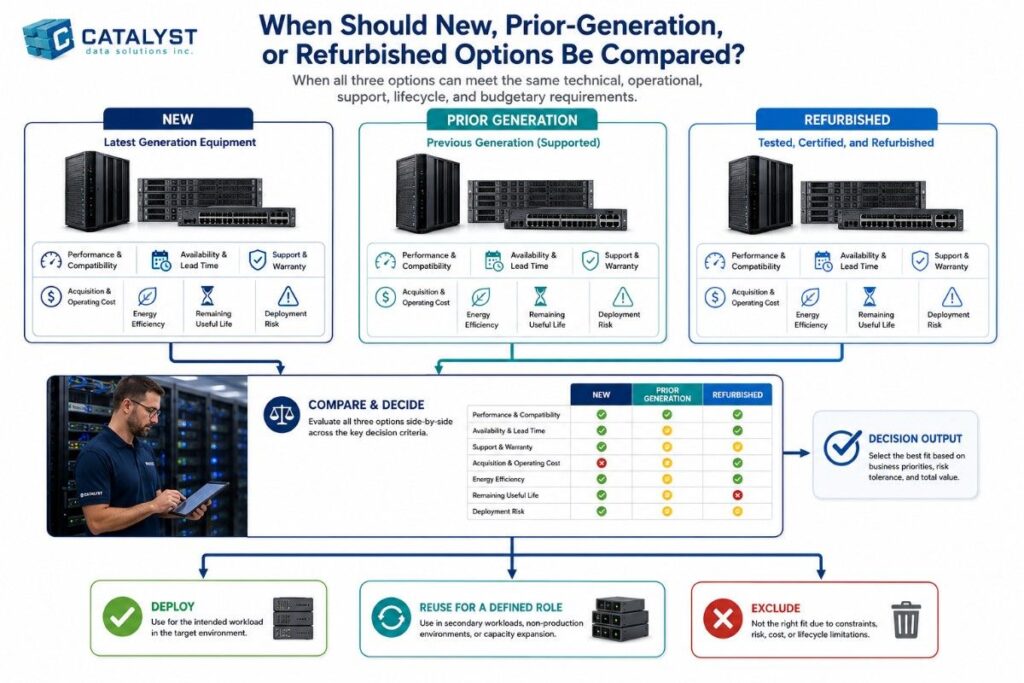
They belong in the same comparison when each option can meet the workload, support, security, and risk requirements.
Our guidance on new and refurbished enterprise hardware options helps buyers judge condition, testing, warranty, compatibility, support, and remaining life rather than purchase price alone.
We may include:
- New current-generation hardware for demanding or long-life deployments.
- Prior-generation hardware for compatibility or faster availability.
- Refurbished hardware for stable workloads, expansion, labs, backup, edge, or budget control.
- Hard-to-find components that support a planned migration or prevent an early full refresh.
We do not present refurbished hardware as equal to new in every case. We match equipment condition and support to the workload’s risk.
What value does the final shortlist create?
A strong shortlist gives IT, procurement, finance, and operations one decision record. It can:
- Reduce time spent reviewing unqualified products.
- Compare OEM quotes on the same basis.
- Expose hidden licensing and support costs.
- Identify compatibility and deployment risks earlier.
- Protect the refresh timeline with alternatives.
- Plan support, spares, and escalation before purchase.
- Include useful life, recovery value, and retirement in the decision.
- Explain why the selected path won.
The shortlist can also guide configuration control, substitutions, deployment, support renewals, and the next lifecycle review.
Build the shortlist before the quote becomes the decision
A multi-OEM review works best before a preferred product or quote becomes fixed. At Catalyst Data Solutions, we start with the workload and operating environment, compare viable manufacturer paths, and make the technical, commercial, support, and lifecycle tradeoffs clear.
To begin a shortlist workshop, request a multi-OEM hardware assessment with your bill of materials, refresh goal, timeline, quantities, and known constraints. We will use that information to define the review scope, required inputs, and next decision step.
FAQs
1. Why should we use Catalyst instead of requesting quotes directly from several OEMs?
Separate OEM quotes can show product and price options, but they may not use the same assumptions or decision criteria. We create one comparison structure for every viable path.
We evaluate workload fit, compatibility, lead time, warranties, support, maintenance, lifecycle status, deployment risk, and exit value. This helps the buyer compare complete operating paths rather than unrelated product quotes.
2. Will Catalyst recommend a single OEM when that is the best choice?
Yes. Multi-OEM does not mean that every project must use several manufacturers.
We may recommend one OEM when standardization improves compatibility, staff efficiency, support, security, or long-term operations. Our process is vendor-neutral because the criteria are defined before the manufacturer is selected. The goal is to identify the best-supported path, not to add brands without a clear reason.
3. Can we use Catalyst for the shortlist without replacing our existing infrastructure?
Yes. A shortlist can include reuse, phased replacement, expansion, or targeted modernization.
We assess whether existing systems can continue in production, backup, lab, edge, preprocessing, or other suitable roles. We recommend replacing the layers that create a real performance, support, security, compatibility, or lifecycle limit rather than assuming the entire environment must be refreshed.
4.What happens after Catalyst delivers the multi-OEM shortlist?
The next step depends on the project scope. The shortlist can support budget approval, technical validation, pricing requests, proof-of-concept work, procurement, staging, deployment planning, support selection, and lifecycle planning.
When the project continues with us, we can connect the approved decision to sourcing and the relevant delivery activities. The final scope should clearly state what we own, what the customer owns, and what an OEM or service partner owns.