



E-Rate is a federal funding program that helps eligible schools and libraries lower the cost of internet access, data transmission, and certain network infrastructure.
For K-12 schools, libraries, and SLED buyers, E-Rate can support early planning for network refreshes, Wi-Fi upgrades, broadband projects, and budget-conscious infrastructure purchases.
It is not a full IT budget. E-Rate helps with eligible connectivity and network services, but schools and libraries still need local budgets, grants, procurement planning, and smart hardware sourcing.
What Is E-Rate?
E-Rate is the common name for the Schools and Libraries Program. It helps eligible schools and libraries receive discounts on approved internet, data, and network services.
The program matters because digital learning, public Wi-Fi, cloud tools, testing platforms, and library services all depend on reliable connectivity. A weak network can affect classrooms, library patrons, staff systems, and daily operations.
Many teams start E-Rate planning when they are also reviewing a network refresh plan for switches, wireless access points, routers, cabling, or internal connections.
| E-Rate Question | Simple Answer |
| What is E-Rate? | A federal discount program for eligible school and library connectivity |
| Who uses it? | Eligible K-12 schools, libraries, districts, systems, and consortia |
| What does it support? | Internet access, data transmission, and eligible internal network infrastructure |
| How large is the discount? | Generally 20% to 90% for eligible services |
| What does it not replace? | The full IT budget, device budget, software budget, or staffing budget |
Who Runs the E-Rate Program?
The Federal Communications Commission, or FCC, oversees E-Rate. The FCC sets the program rules and policy direction.
The Universal Service Administrative Company, or USAC, manages the program process. USAC handles program systems, applicant steps, service provider steps, eligible services guidance, and funding workflows.
Schools and libraries should use official FCC and USAC guidance for E-Rate rules, forms, eligibility, bidding, and filing steps. Internal procurement teams should also review local purchasing policies before building a funding or vendor-selection plan.
Who Can Use E-Rate?
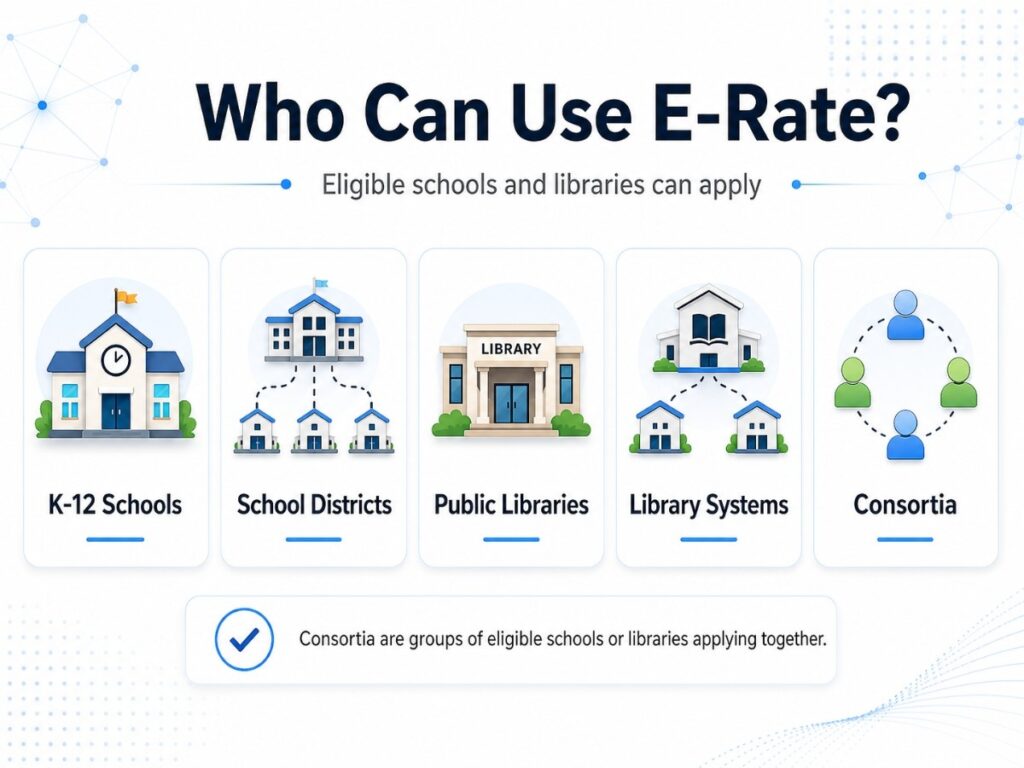
E-Rate is available to eligible schools and libraries. This can include K-12 schools, school districts, public libraries, library systems, and consortia.
Consortia allow groups of eligible schools or libraries to apply together. This can help when several locations share connectivity needs or want to combine demand for better planning.
For SLED buyers, the key point is simple: E-Rate is specific to eligible schools and libraries, but it often overlaps with broader public-sector hardware planning, including K-12 IT needs and procurement strategy.
| Eligible Buyer Type | Common Planning Need |
| Individual school | Wi-Fi refresh, switching, cabling, internet access |
| School district | Multi-campus network modernization |
| Public library | Public Wi-Fi and internet access |
| Library system | Branch-wide network upgrades |
| Consortium | Shared connectivity or regional purchasing plans |
What Does E-Rate Help Pay For?
E-Rate mainly supports eligible connectivity and network infrastructure. It is most relevant when a school or library is planning internet access, data transmission, internal connections, or related network services.
Common E-Rate-related technology areas include:
- Internet access
- Data transmission
- Switches
- Routers
- Wireless access points
- Internal cabling
- Internal connections
- Basic maintenance of internal connections
E-Rate should not be treated as a funding source for every technology purchase. Laptops, classroom devices, many cloud subscriptions, and broad software tools usually belong in the larger IT budget, not the core E-Rate infrastructure plan.
How the E-Rate Program Works
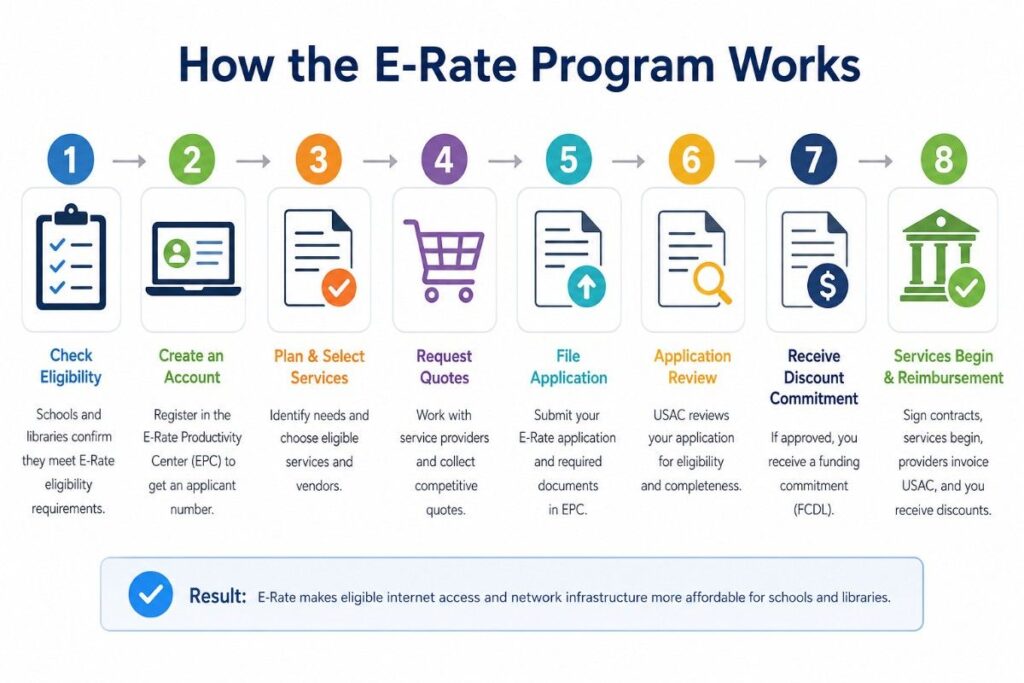
E-Rate helps make broadband and network infrastructure more affordable through two main funding categories. These categories separate the services that bring internet into a school or library from the equipment that distributes access inside the building.
For planning, this split helps IT and procurement teams decide what belongs in the E-Rate scope and what may need other funding. It also helps buyers build cleaner quotes for fiber, broadband, Wi-Fi, switches, access points, and maintenance.
| E-Rate Category | What It Supports | Common Examples |
| Category One | Services that bring internet access to the building | Fiber, broadband, data transmission, satellite connections |
| Category Two | Equipment and services that support internet access inside the building | Wi-Fi routers, access points, switches, cabling, basic maintenance |
Category One is usually tied to external connectivity. Category Two is usually tied to the internal network that students, staff, and library patrons use every day.
What Is the Difference Between Category One and Category Two?
E-Rate uses two main service categories: Category One and Category Two. This split helps buyers understand whether they are planning external connectivity or internal network infrastructure.
Category One focuses on connectivity to the school or library. Category Two focuses on the network inside the school or library.
A buyer planning a wireless upgrade may need Category Two equipment such as access points, switches, cabling, and related internal network components.
| Category | What It Covers | Common Buyer Examples |
| Category One | Internet access and data transmission | Broadband, WAN links, internet service |
| Category Two | Internal connections and related network infrastructure | Switches, routers, access points, cabling |
| Broader IT Budget | Items outside the core E-Rate scope | Laptops, SaaS tools, many security platforms, staff devices |
Category One: Internet and Data Transmission
Category One helps with connectivity that brings internet or data service to the school or library. This often includes internet access and data transmission services.
This is important when bandwidth demand grows. Online testing, video, cloud learning platforms, and public Wi-Fi can all increase traffic.
Category Two: Internal Network Infrastructure
Category Two helps with eligible internal network infrastructure. This is where many network refresh projects begin.
Common Category Two planning areas include:
- Campus switching
- Wireless access points
- Routers
- Internal cabling
- Network controllers
- Basic maintenance
- Some related components when eligible
Why the Category Split Matters
The category split affects planning, budgets, and project scope. A school may have strong internet service but poor classroom Wi-Fi because the internal network is outdated.
In that case, Category Two planning may be more urgent than Category One planning. Buyers should separate external connectivity needs from internal infrastructure needs before requesting quotes.
How Much E-Rate Funding Can Schools and Libraries Get?
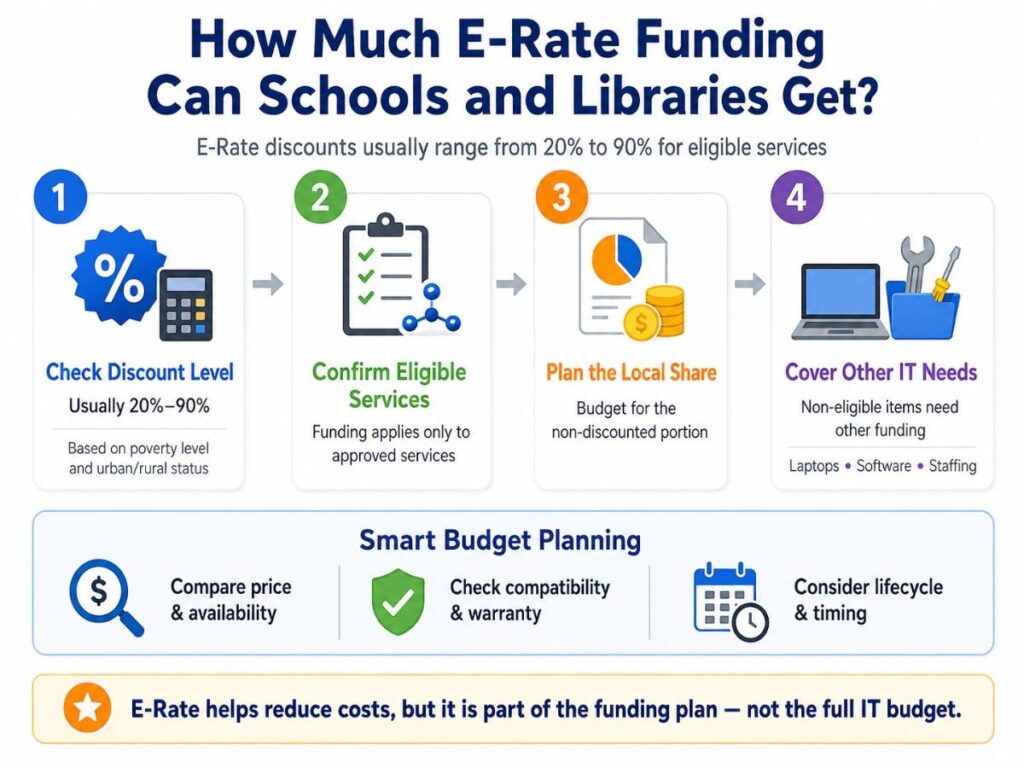
E-Rate discounts generally range from 20% to 90% for eligible services. The discount depends on program rules, including poverty level and urban or rural status.
A high discount can reduce project cost, but it does not remove the need for local funding. Schools and libraries still need to plan for the non-discounted share and for items outside the E-Rate scope.
This is why E-Rate should be part of the funding plan, not the entire plan. Procurement teams should still compare price, availability, compatibility, warranty, lifecycle, and fulfillment timing.
| Budget Planning Point | Why It Matters |
| Discount level | Helps estimate the local share |
| Eligible services | Keeps the project aligned with program scope |
| Non-eligible items | Helps plan laptops, software, staffing, and services |
| Hardware availability | Helps avoid delays during refresh projects |
| Lifecycle timing | Helps prevent short-term buying mistakes |
What Technology Does E-Rate Support in Real Projects?
In real school and library projects, E-Rate often connects to network modernization. Buyers may not only ask, “What is eligible?” They also ask, “What equipment do we need to make the network work?”
A complete project may include access switches, core switches, wireless access points, routers, optics, cabling, power supplies, licenses, and support. The exact scope depends on the building, network design, user count, and performance goals.
OEMs may enter the planning process when teams compare standards, compatibility, support, and availability. Cisco, HPE Aruba, HPE, Dell, Arista, and NVIDIA may be relevant depending on the project type and broader infrastructure plan.
| Project Type | Common Hardware Scope |
| Wi-Fi refresh | Access points, PoE switches, cabling, mounts, licenses |
| Switching upgrade | Access switches, core switches, optics, stacking, power supplies |
| Library public Wi-Fi | APs, switches, cabling, management tools |
| Edge connectivity | Routers, firewalls, WAN equipment, transceivers |
| Broader infrastructure | Servers, storage, GPUs, backup hardware, lifecycle spares |
Why E-Rate Matters for Network Modernization
Modern schools and libraries depend on stable networks. Digital curriculum, testing, video, research databases, cloud platforms, and public Wi-Fi all need reliable connectivity.
Older infrastructure can create slow speeds, weak coverage, downtime, and rising support tickets. A network may have enough internet bandwidth but still perform poorly if switches, cabling, access points, or routing equipment are outdated.
E-Rate can help reduce the cost of eligible infrastructure, while a broader cost control plan can help buyers stretch budgets without weakening performance.
Common modernization goals include:
- Better classroom Wi-Fi
- Faster switching
- Stronger public library access
- Better cabling
- More reliable internal connections
- Cleaner network segmentation
- Improved support lifecycle
- Lower downtime risk
Why E-Rate Is Not the Full IT Budget
E-Rate is valuable, but it does not cover every IT need. Schools and libraries still need budget plans for devices, software, security tools, staffing, training, cloud platforms, and hardware outside the program scope.
This is where many teams run into pressure. A district may receive E-Rate support for eligible switches and wireless access points, but still need funds for laptops, endpoint tools, software renewals, and support contracts.
A library may use E-Rate for public Wi-Fi infrastructure, while using other funds for computers, printing systems, digital services, and staff devices.
Common funding sources include:
- Local capital budgets
- Operating budgets
- Grants
- Bond funding
- Cybersecurity funding
- State contracts
- Cooperative purchasing
- Buyback or trade-in value
- Phased refresh planning
How Schools Should Plan E-Rate With Local Budgets and Grants
A strong E-Rate plan starts with a clear separation between eligible network infrastructure and broader IT needs. This makes budgeting easier and helps procurement teams avoid confusion.
For example, a Wi-Fi project may include eligible access points and PoE switches, but the same year’s IT plan may also include laptops, security tools, and cloud subscriptions. Those needs may require other funds.
A good funding stack helps buyers match the right funding source to the right purchase.
| Need | Possible Funding Path |
| Internet access | E-Rate Category One |
| Switches and APs | E-Rate Category Two, when eligible |
| Student laptops | Local funds, grants, device budgets |
| Cloud tools | Operating budget or software budget |
| Cybersecurity tools | Grants, security budget, local funds |
| Refresh spares | Local funds, refurbished sourcing, buyback value |
Buyers should also consider timing. E-Rate planning, procurement cycles, budget approvals, and hardware lead times do not always line up.
This is why many districts prepare scopes before the buying window gets tight. A clear scope can help the team compare OEM options, confirm availability, and avoid rushed purchasing.
What Buyers Should Define Before Requesting Quotes
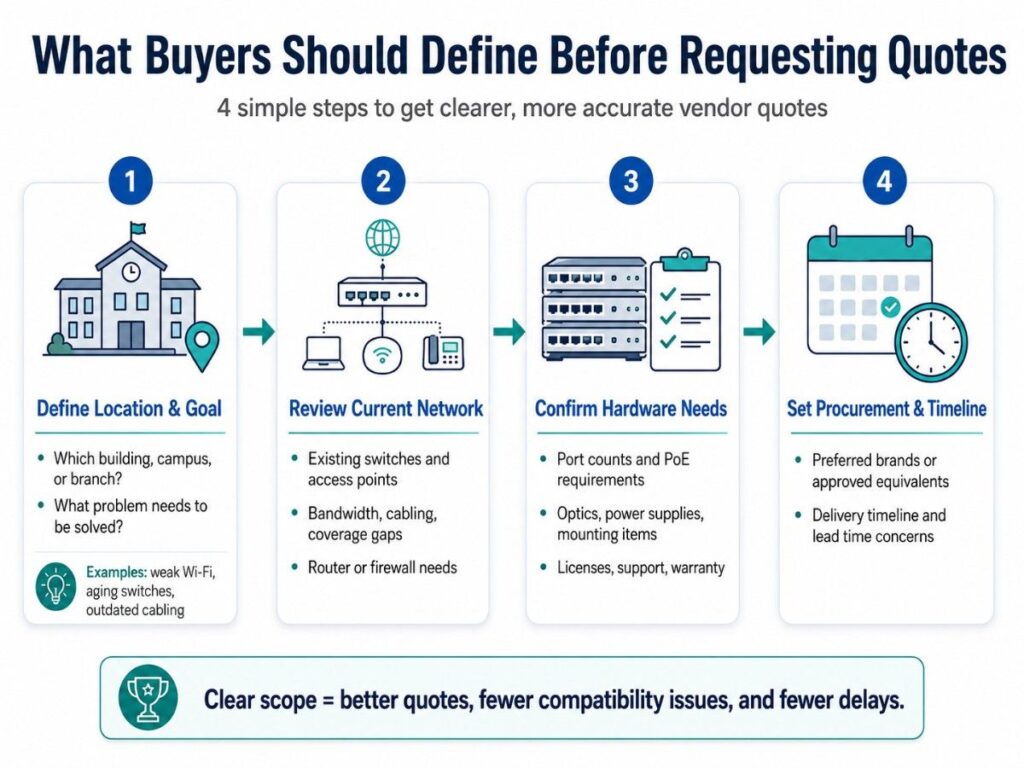
A vague request creates weak quotes. Before asking vendors for pricing, schools and libraries should define the project scope, existing environment, and key hardware needs.
A clear scope helps vendors build better configurations. It also reduces missing parts, compatibility issues, and delays during procurement or fulfillment.
1. Define the Project Location and Goal
Start with the basic project need. Identify which buildings, campuses, or library branches need upgrades and what problem the project should solve.
This may include weak classroom Wi-Fi, aging access switches, poor public Wi-Fi coverage, limited PoE capacity, or outdated cabling.
2. Review the Current Network Environment
Document the equipment already in place. This helps vendors understand what must be replaced, reused, expanded, or matched.
Include details such as:
- Current switches and access points
- Internet and bandwidth needs
- Existing cabling
- Wireless coverage gaps
- Router or firewall requirements
3. Confirm Hardware and Compatibility Needs
Next, define the parts needed to make the project work as a complete system. This prevents quotes that include major equipment but miss required components.
Key items may include port counts, PoE requirements, optics, transceivers, mounting kits, power supplies, stacking cables, licenses, support, and warranty coverage.
4. Set Procurement and Timeline Expectations
Buyers should also define preferred OEMs, approved equivalents, delivery timelines, and any lead time concerns. This helps compare Cisco, HPE Aruba, HPE, Dell, Arista, or other options more fairly.
For broader procurement planning, hardware sourcing support can help buyers compare real options before finalizing a bill of materials.
How OEM and Channel Planning Fits Into E-Rate Projects
E-Rate planning is not only about funding. It also affects how buyers compare products, vendors, availability, and lifecycle fit.
Many schools and libraries already have OEM standards. A district may use Cisco switching, HPE Aruba wireless, Dell servers, HPE infrastructure, or Arista networking in certain environments.
Vendor-neutral planning does not mean every OEM is equal for every project. It means the buyer compares options based on fit, not hype.
Important comparison points include:
- Compatibility with the current network
- Support and warranty needs
- Lead times
- Licensing model
- PoE and performance requirements
- Long-term lifecycle
- Availability through channel or distribution
- Budget fit
- Replacement or spare strategy
In some projects, new hardware is the best choice. In others, refurbished or hard-to-find hardware may support spares, legacy systems, labs, or non-critical expansion outside the E-Rate-funded scope.
Need Help Comparing Network Hardware Options?
E-Rate can reduce eligible network costs, but schools and libraries still need a clear hardware scope before requesting quotes. Catalyst helps translate refresh goals into practical equipment plans across switches, wireless access points, routers, optics, cabling, and related infrastructure.
Catalyst Data Solutions Inc. can compare OEM options, check channel and distribution availability, and build quote-ready bundles through hardware sourcing support for eligible infrastructure projects. Teams can review Cisco, HPE Aruba, HPE, Dell, Arista, new, refurbished, and hard-to-find options based on budget, timeline, and compatibility.
FAQs About E-Rate for Schools and Libraries
Is E-Rate only for schools?
No. E-Rate can support eligible schools, libraries, school districts, library systems, and consortia. Buyers should confirm eligibility through official FCC and USAC guidance.
Does E-Rate pay for laptops?
In general, laptops should not be treated as E-Rate-funded core infrastructure. They usually belong in broader device budgets, local funds, grants, or other procurement plans.
Can E-Rate cover Wi-Fi equipment?
E-Rate may support eligible internal network infrastructure, including wireless access points and related components under Category Two. Buyers should check the current Eligible Services List before planning a purchase.
Can E-Rate help with cybersecurity?
E-Rate mainly focuses on connectivity and eligible network infrastructure. Broader cybersecurity tools often need other funding sources, though network security planning may connect to a larger security roadmap.
Should schools pick the lowest hardware quote?
Price matters, but it should not be the only practical factor. Buyers should also compare compatibility, lead time, support, warranty, lifecycle, and whether the quote includes all required parts.
Can refurbished hardware be part of an E-Rate project?
Do not assume refurbished hardware is E-Rate eligible. Schools and libraries should verify eligibility for the exact product and request. Outside the E-Rate-funded portion, refurbished hardware may help with spares, replacements, labs, or budget-sensitive refreshes.
When should E-Rate planning start?
Planning should start before the project becomes urgent. Schools and libraries need time to assess the network, define scopes, compare OEM options, review budgets, follow procurement steps, and plan fulfillment timelines.