


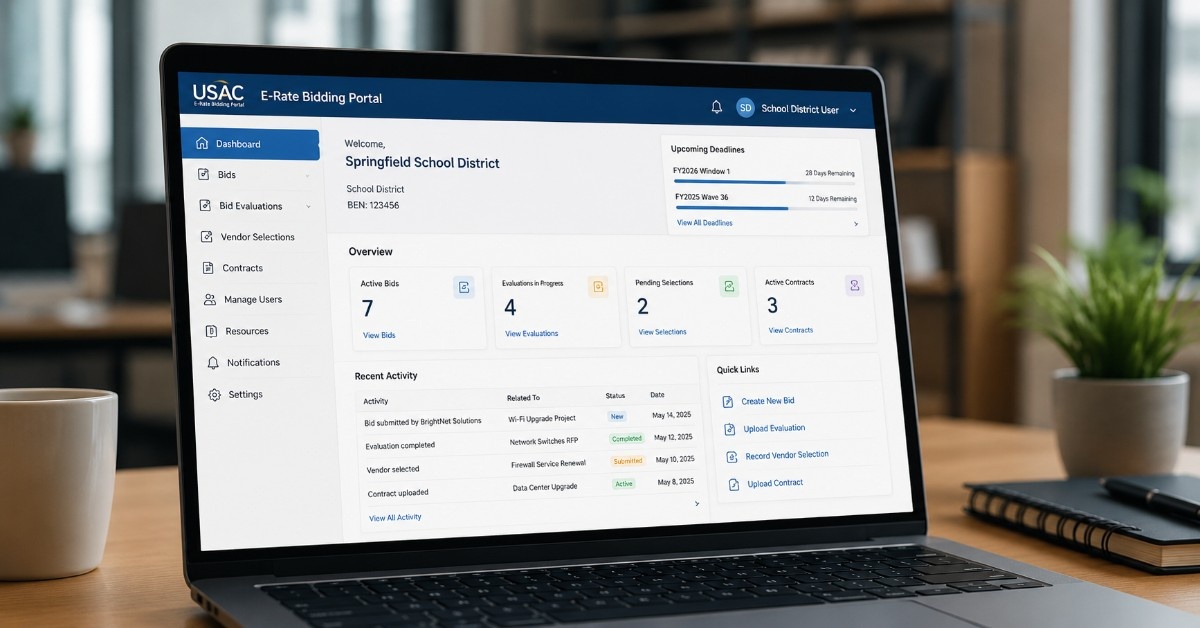
Many schools and libraries already struggle to compare E-Rate bids because vendor responses often follow different formats and levels of detail. One quote may include licenses, support, and accessories, while another excludes critical components. This challenge becomes especially noticeable during E-Rate vendor selection, when procurement teams must evaluate competing proposals fairly.
The 2028 E-Rate Bidding Portal may make these differences easier to identify, but it will not eliminate them. Beginning in FY2028, service providers will submit bids through a USAC-managed portal, while applicants upload evaluation records and contracts. Clear documentation helps, but strong project planning remains essential.
This article explains what the E-Rate Bidding Portal means for schools, libraries, procurement leaders, and SLED technology buyers. It covers practical preparation steps, stronger hardware scopes, cleaner vendor responses, and documentation best practices so applicants can compare bids more effectively and make informed purchasing decisions.
What Is the E-Rate Bidding Portal?
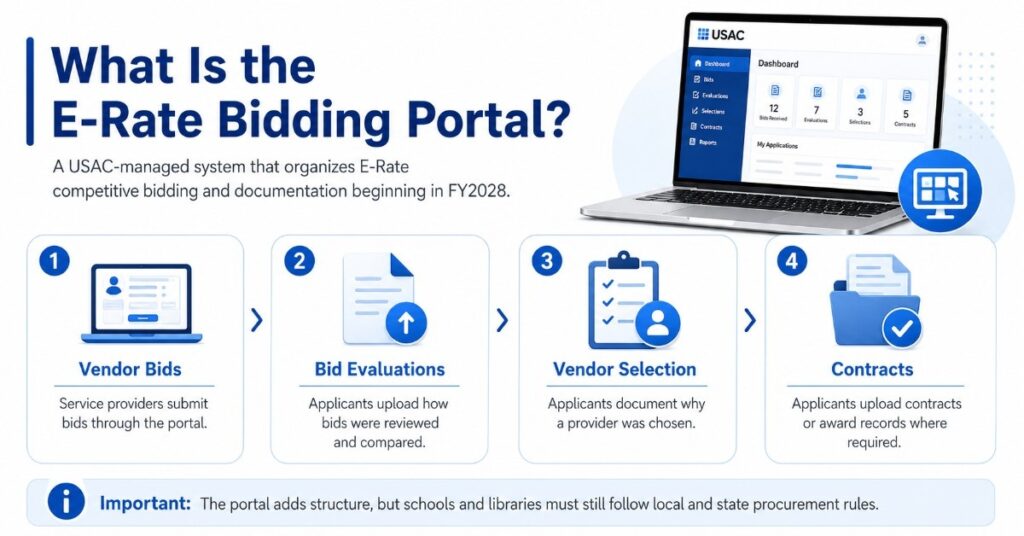
The E-Rate Bidding Portal is a USAC-managed system for competitive bidding activity under the E-Rate program. Beginning in FY2028, service providers will submit bids through the portal instead of relying only on direct emails or separate local processes.
Applicants will also upload bid evaluation records, vendor selection records, and contract documentation after selecting service providers. This makes the bidding process more structured and places more pressure on schools and libraries to keep clean, organized records.
| Portal Area | What It Means for Schools and Libraries |
| Service provider bids | Vendors submit bid responses through the USAC-managed portal |
| Bid evaluation records | Applicants upload how bids were reviewed and compared |
| Vendor selection records | Applicants document why a provider was selected |
| Contract documents | Applicants upload contracts or award records where required |
| Project scopes | Clear requests help vendors submit cleaner bids |
The portal does not replace local procurement rules. Schools and libraries still need to follow E-Rate guidance, state and local purchasing rules, and internal approval steps before making award decisions.
Why the 2028 Portal Matters for IT Hardware Planning
The portal matters because E-Rate projects often involve more than one product or service. A Wi-Fi refresh may include access points, PoE switches, cabling, licenses, support, delivery timing, and installation services.
If the request only says “upgrade Wi-Fi,” vendors may quote different solutions. One bid may include access points only. Another may include switches and licenses. Another may include cabling, support, and installation.
That makes the bids harder to compare. It also creates more work for IT directors, procurement teams, and library technology managers who need clean records before selecting a vendor.
Before FY2028, teams should review:
- How they describe network refresh needs
- How they collect vendor questions
- How they compare hardware bids
- How they document vendor selection
- How they store contracts and award records
- How IT and procurement teams work together
Teams planning E-Rate vendor selection should prepare the evaluation process before bids arrive, not after vendors have already submitted different quote formats.
What Will Change for Service Providers?
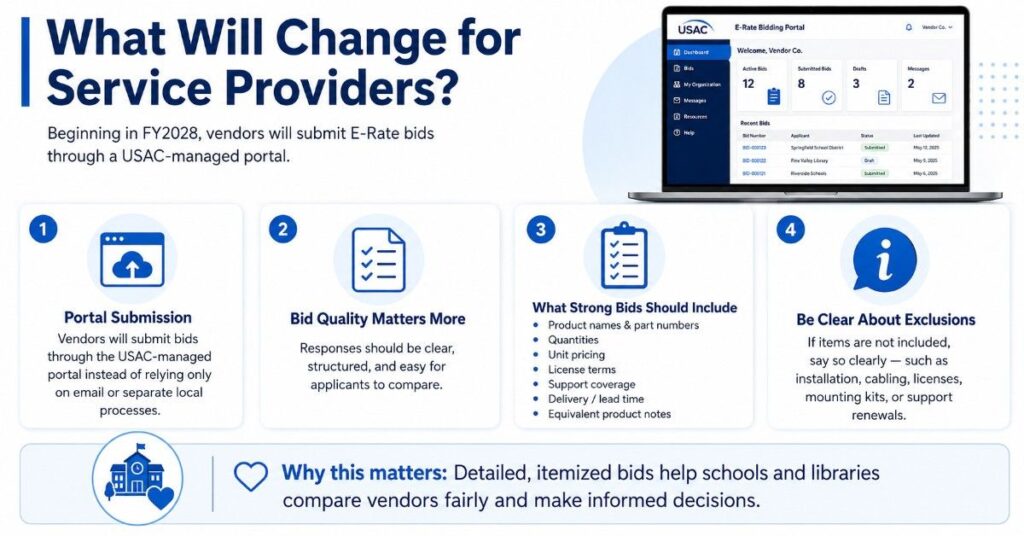
Service providers should prepare for a more structured bid submission process. In FY2028, vendors responding to E-Rate requests will need to submit bids through the USAC-managed portal.
This means bid quality will matter more. Vendors should provide itemized product details, clear assumptions, accurate pricing, support terms, and delivery estimates so applicants can compare responses without guessing.
A weak vendor response may list a “network upgrade bundle” without showing what is included. A better response names the switch model, access point model, license term, support coverage, optics, quantities, and estimated lead time.
| Vendor Response Detail | Why It Matters |
| Product names and part numbers | Helps buyers compare exact products |
| Quantities | Reduces missing equipment risk |
| Unit pricing | Supports cleaner bid evaluation |
| License terms | Shows the real project cost |
| Support coverage | Clarifies lifecycle and service expectations |
| Lead time | Helps plan refresh windows |
| Equivalent notes | Explains why alternate products fit the request |
Good bid responses should also explain what is excluded. If installation, cabling, licenses, mounting kits, or support renewals are not included, the applicant should be able to see that clearly.
What Will Change for E-Rate Applicants?
Applicants should prepare to upload more complete procurement records. These records may include bid evaluation documents, vendor selection notes, contracts, and related award documentation.
The key issue is traceability. A reviewer should be able to see what the applicant requested, what vendors offered, how bids were reviewed, and why the selected provider was chosen.
Applicants should organize:
- FCC Form 470 or RFP language
- Scope attachments
- Vendor bid responses
- Vendor questions and answers
- Bid evaluation matrix
- Vendor selection notes
- Final contract or award record
- Board or internal approval documents, if used
USAC guidance states that price of eligible products and services must receive the most weight during bid evaluation. Schools and libraries may consider other factors, but price must remain the primary factor.
Why Clearer Hardware Scopes Will Matter More
A clear scope helps vendors submit bids that match the same project need. A vague scope forces vendors to make assumptions, which can lead to incomplete or mismatched quotes.
For example, a school may ask for a “switch upgrade.” One vendor may quote access switches only, while another includes optics, stacking cables, support, and power supplies. The lower bid may not be the better bid if key parts are missing.
A strong scope should answer:
- What problem is the project solving?
- Which buildings or campuses are included?
- What equipment is already in place?
- What hardware is needed?
- What licensing or support is required?
- Are equivalent products allowed?
- Is installation included?
- What timeline should vendors follow?
Clearer scopes also help teams connect E-Rate planning with broader network refresh work across switching, wireless, routing, firewalls, optics, and cabling.
What Should a Strong E-Rate Hardware Scope Include?
A strong E-Rate hardware scope should be simple, specific, and complete. It should give vendors enough information to build realistic bids without forcing the applicant to write a full engineering design.
The goal is to reduce guessing. Procurement teams should make it easy for vendors to understand the environment, match compatible hardware, and explain any acceptable alternate options.
| Scope Detail | Why It Helps |
| OEM preference, if allowed | Helps match district standards |
| Equivalent products, if allowed | Supports fair alternative bids |
| Switch port counts | Prevents under-sized switch quotes |
| PoE requirements | Supports APs, phones, cameras, and other powered devices |
| Wireless coverage needs | Helps size AP count and placement |
| Firewall throughput | Matches hardware to real traffic demand |
| Cabling requirements | Avoids missing cable or labor scope |
| Optics/transceiver needs | Ensures switches connect correctly |
| Licensing/support terms | Shows lifecycle cost |
| Installation/services | Clarifies labor expectations |
For a switching project, the scope may include port count, uplink speed, PoE needs, stacking, optics, power supplies, and support term. For a wireless project, it may include AP count, coverage zones, user density, cabling limits, and cloud management needs.
Schools planning wireless infrastructure upgrades should also define whether the project includes classrooms, libraries, outdoor areas, guest networks, staff networks, or high-density spaces.
Why OEM Specifications Matter in Bid Quality
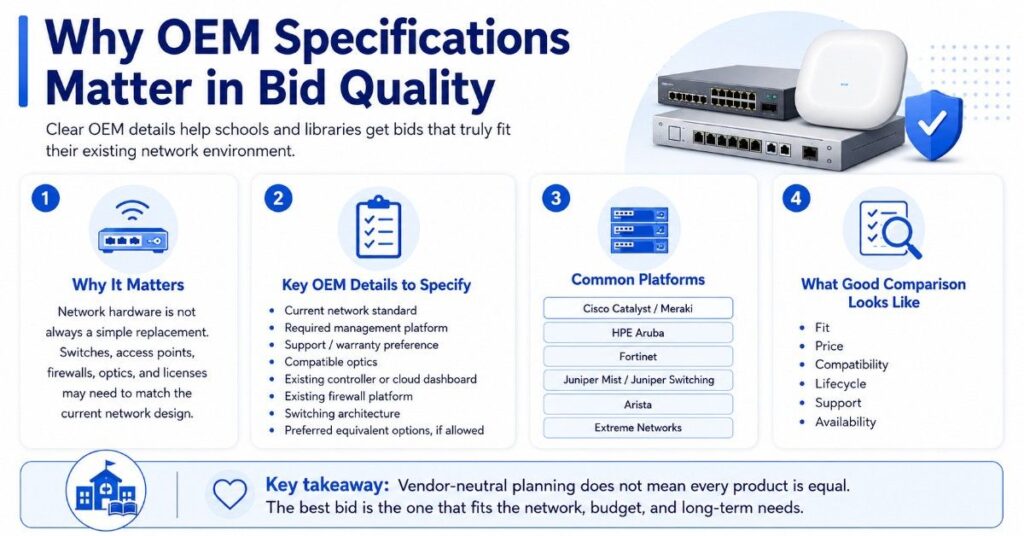
OEM specifications matter because network hardware does not always work as a simple replacement. A switch, access point, firewall, optic, or license may need to match the current network design.
Schools and libraries may already use Cisco Catalyst, Cisco Meraki, HPE Aruba, Fortinet, Juniper Mist, Juniper switching, Arista, or Extreme Networks. A new quote should fit the existing environment unless the project is meant to replace the platform.
Useful OEM details include:
- Current network standard
- Required management platform
- Support or warranty preference
- Compatible optics
- Existing wireless controller or cloud dashboard
- Existing firewall platform
- Switching architecture
- Preferred equivalent options, if allowed
| OEM / Platform | Common Planning Context |
| Cisco Catalyst / Meraki | Switching, wireless, and cloud-managed networks |
| HPE Aruba | Campus wireless and switching |
| Fortinet | Firewalls and edge security |
| Juniper Mist / Juniper switching | AI-driven wireless and switching |
| Arista | Data center or high-performance switching |
| Extreme Networks | K-12 and campus networking |
Vendor-neutral planning does not mean every product is equal. It means the buyer compares options based on fit, price, compatibility, lifecycle, support, and availability.
How Vague Requests Create Bad Bids
Vague requests often create bids that look cheaper but miss important parts. Missing optics, licenses, mounting kits, support, power supplies, cabling, or installation can change the real project cost.
A vague request also slows down bid review. Procurement teams may need to ask follow-up questions, correct assumptions, or decide whether bids are even comparable.
Common vague requests include:
- “Upgrade our Wi-Fi”
- “Replace old switches”
- “Quote a firewall”
- “Improve internet performance”
- “Modernize the network”
- “Add access points where needed”
Better requests include:
- Number of buildings
- Current equipment
- User count
- Coverage goals
- Port count
- PoE needs
- Internet speed
- Support term
- Required accessories
- Delivery timeline
This helps vendors quote the right solution the first time. It also helps IT and procurement teams compare bids without rebuilding every proposal from scratch.
How Schools Can Prepare Bid Records Before FY2028
Schools should create a simple documentation system before the portal becomes required. This helps teams avoid rushed record collection after vendor selection.
A good bid record should show the full path from request to award. It should connect the project scope, vendor responses, bid evaluation factors, final selection, and contract documents.
USAC’s FY2026 guidance still requires applicants to wait at least 28 days after certifying FCC Form 470 before closing competitive bidding, selecting a provider, signing a contract, or submitting FCC Form 471, so bid records should be organized before the review window starts.
Useful records include:
- Original Form 470 or RFP
- Scope attachments
- Vendor questions and answers
- All bids received
- No-bid notes, if applicable
- Bid evaluation matrix
- Vendor selection notes
- Final contract or award document
Applicants should also review the Eligible Services List before opening competitive bidding. This helps separate eligible network infrastructure from broader IT needs such as laptops, endpoint tools, SaaS platforms, or general software.
How Libraries and Small Applicants Can Stay Organized
Small libraries, rural schools, and lean IT teams may not have large procurement departments. They can still prepare well by using simple templates and repeatable checklists.
The best approach is to keep the request short but complete. Vendors need enough information to understand the building, users, current equipment, support needs, and timeline.
A simple library Wi-Fi scope may include:
- Number of branches
- Public Wi-Fi coverage areas
- Current internet speed
- Access point needs
- PoE switch needs
- Firewall or router needs
- Guest network requirements
- Cabling gaps
- Installation expectations
Small teams should save vendor communications in one place. If vendors ask clarifying questions, answers should be consistent and easy to include in the bid record.
How SLED Buyers Should Connect E-Rate With Broader Procurement
SLED buyers often manage several funding sources at once. E-Rate may support eligible connectivity and internal network infrastructure, while other funds cover laptops, software, cloud tools, cybersecurity platforms, servers, or storage.
This is why teams should separate the E-Rate scope from the full IT roadmap. A network project may include both eligible and non-eligible needs, and each part may require a different funding path.
For example:
- E-Rate may support eligible access points and switches
- Local funds may cover laptops
- Grants may support cybersecurity tools
- Capital budgets may support servers or storage
- Buyback value may help offset refresh costs
This planning helps schools and public agencies avoid mixing unrelated costs. It also helps teams compare SLED buying options when state contracts, cooperative purchasing, or channel partners are part of the strategy.
Practical Hardware Examples for E-Rate Planning
E-Rate bidding often connects to real hardware purchases. Buyers should define the product category, required components, and support needs before asking vendors for pricing.
This is especially important for network refresh projects because one missing part can delay the full deployment. A switch may require optics. An access point may require PoE. A firewall may require subscription licensing.
A Wi-Fi refresh may include:
- Wireless access points
- PoE switches
- Cabling
- Mounting kits
- Cloud management or controllers
- Licenses
- Support
A switching upgrade may include:
- Access switches
- Core switches
- Optics
- Transceivers
- Stacking cables
- Power supplies
- Support renewals
A firewall or edge project may include:
- Firewall appliance
- Security subscriptions
- Support term
- Throughput requirements
- VPN needs
- Logging or monitoring needs
For broader infrastructure planning, schools may also compare servers, storage, backup hardware, GPUs, or lifecycle spares outside the core E-Rate-funded scope.
What Not to Assume About the Portal
Do not assume the portal will make a weak request strong. The portal may organize bids and records, but it cannot define the project for the applicant.
Do not assume every technology item belongs in E-Rate. Buyers should check the current Eligible Services List and separate eligible network infrastructure from broader IT budget items.
Avoid these assumptions:
- Lowest total quote always means best practical fit
- All APs or switches are interchangeable
- Licenses and support are always included
- Installation is included by default
- Refurbished hardware is automatically E-Rate eligible
- Equivalent products are allowed unless the request says so
- Vendor bids can be compared fairly without itemized details
Refurbished hardware may help with spares, labs, legacy replacements, or non-critical expansion outside the E-Rate-funded scope. Applicants should verify eligibility before including refurbished products in an E-Rate request.
How to Build a Better Bid Package Before FY2028
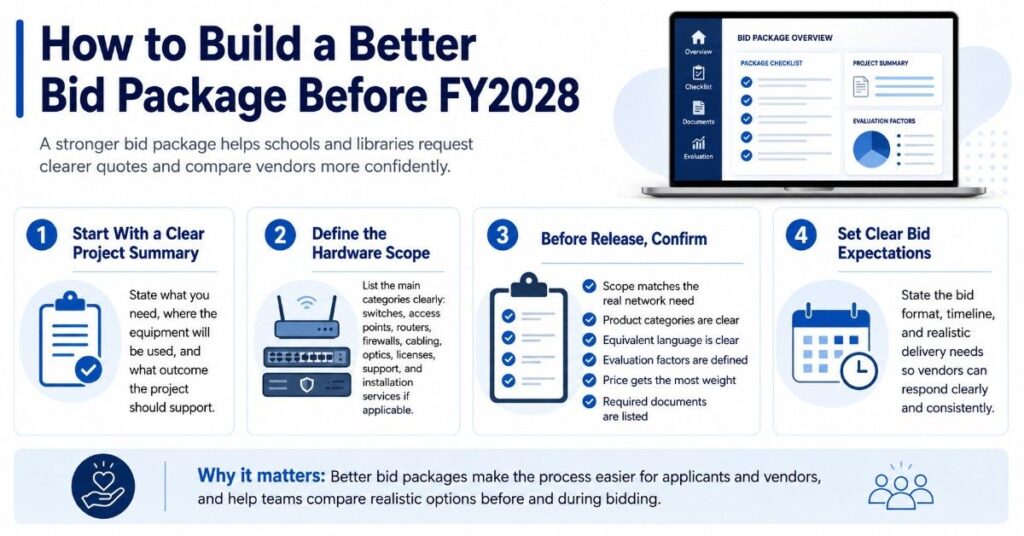
A better bid package starts with a clear project summary. State what the school or library needs, where the equipment will be used, and what outcome the project should support.
Then build the request around specific hardware categories. Include switches, access points, routers, firewalls, cabling, optics, licenses, support, and installation services if applicable.
Before release, confirm:
- The scope matches the actual network need
- Product categories are clear
- Equivalent language is clear
- Evaluation factors are defined
- Price of eligible items receives the most weight
- Bid format expectations are stated
- Required documents are listed
- Timeline and delivery needs are realistic
This makes the process easier for applicants and vendors. It also helps procurement teams compare realistic options before and during bidding.
Need Help Preparing Quote-Ready Hardware Scopes?
Need help making hardware bids easier to compare? Catalyst Data Solution Inc. can help buyers define practical equipment needs, confirm compatible options, and build clearer quote-ready bundles before and during procurement planning.
It supports the hardware sourcing and fulfillment side, not E-Rate legal, filing, or compliance advice. With Catalyst sourcing support, teams can compare OEM availability, refurbished options, hard-to-find parts, budget fit, and delivery timing with more confidence.
FAQs
Will the 2028 E-Rate Bidding Portal replace local procurement rules?
No. The portal is part of the E-Rate bidding process, but schools and libraries still need to follow local, state, and internal procurement rules.
How can Catalyst help schools prepare for the 2028 E-Rate Bidding Portal?
Catalyst can help schools and libraries turn network refresh needs into clearer hardware scopes before bidding begins. That may include switches, wireless access points, firewalls, optics, cabling, licenses, support terms, and quote-ready configurations that make vendor comparisons easier.
Can Catalyst help compare OEM options before an E-Rate bid is submitted?
Yes. Catalyst can help buyers compare options across Cisco Catalyst, Meraki, HPE Aruba, Fortinet, Juniper, Arista,Dell, HPE, and other major brands. The goal is to help procurement teams understand availability, compatibility, lifecycle fit, and budget impact before reviewing bids.
Does Catalyst provide E-Rate compliance or filing advice?
No. Catalyst should not be used as an E-Rate legal, filing, or compliance advisor. Catalyst’s role is hardware sourcing, OEM/channel comparison, quote-ready configuration support, fulfillment planning, and helping buyers understand practical equipment options for infrastructure projects.
Does the portal change what E-Rate covers?
No. The portal changes the bidding and documentation process. It does not change the need to review eligible services before planning purchases.
Should vendors submit more detailed bids in FY2028?
Yes. Vendors should provide itemized product details, quantities, license terms, support terms, delivery estimates, and clear assumptions so applicants can compare bids fairly.
What is the biggest risk for applicants?
The biggest risk is entering the process with a vague scope. Unclear requests can lead to bids that are hard to compare, missing parts, or inaccurate project costs.
Can refurbished hardware be included in an E-Rate bid?
Do not assume refurbished hardware is E-Rate eligible. Applicants should verify eligibility for the exact product and request. Refurbished equipment may still support broader refresh planning outside the funded scope.
How can small schools or libraries prepare with limited staff?
Use a simple checklist. Document the current network, list required hardware, define the goal, ask for itemized bids, and keep all vendor responses and evaluation notes organized.