


Buying a powerful GPU server does not guarantee a successful enterprise AI deployment. Many teams discover this after the purchase, when slow storage, network limits, poor data access, software conflicts, or power and cooling constraints keep expensive accelerators from delivering their expected value.
A complete AI environment must be designed as one connected system. Through our AI infrastructure planning and deployment services, we assess the workload, existing systems, data path, facilities, security needs, and operating model before recommending hardware. This helps organizations invest in the components they actually need instead of building around assumptions.
At Catalyst Data Solutions Inc, we approach planning GPU infrastructure for AI workloads across eight connected layers: data, compute, networking, storage, facilities, software, security, and operations. When these layers work together, teams can move from a limited pilot to a stable, secure, and scalable AI environment with fewer redesigns and clearer investment decisions.
Is a GPU Server Enough for Enterprise AI?
No. A GPU server can support a pilot or a narrow workload, but it does not create a complete production environment by itself.
The server still needs governed data, network paths, storage for datasets and model assets, supported software, identity controls, monitoring, backup, and trained operators.
The more an AI workload scales across GPUs or nodes, the more the surrounding layers affect performance and reliability. NVIDIA’s enterprise reference guidance treats AI infrastructure as a full hardware-and-software stack with compute, cluster networking, control functions, storage, and production software not as an isolated accelerator purchase.
Start With the Workload, Not the GPU Model
Before sizing hardware, define what the AI system must do. “Run AI” is not a usable requirement.
An enterprise AI readiness assessment should document:
- The business process or user outcome
- Training, fine-tuning, RAG, inference, or mixed use
- Model size and memory needs
- Dataset size, format, location, and growth
- Expected users, requests, batch sizes, and response times
- Availability, recovery, and maintenance requirements
- Data sensitivity and access rules
- On-premises, colocation, cloud, edge, or hybrid placement
- Current infrastructure that may be reused
- Budget, power, cooling, support, and staff limits
These inputs shape every later decision. Inference differs from multi-node training, while RAG can place heavy demand on data ingestion, vector search, storage, and network access even with a modest GPU count. Training, inference, and HPC also differ in memory, communication, scheduling, and storage behavior.
The Eight Layers of a Complete Enterprise AI Infrastructure Stack
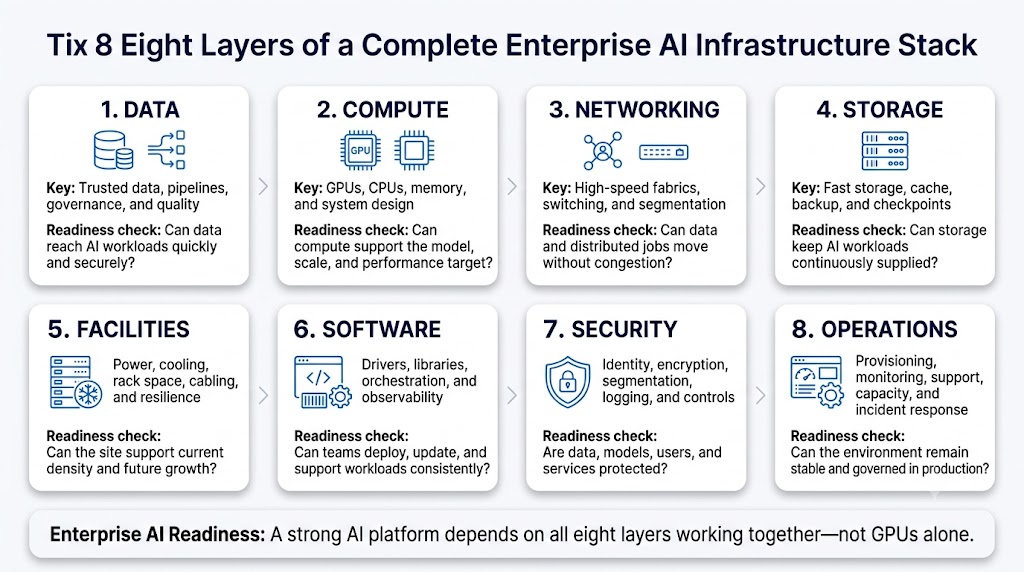
| Layer | What it includes | Main readiness question |
| 1. Data | Sources, pipelines, quality, governance, movement, retention | Can trusted data reach the workload at the required speed and under the right controls? |
| 2. Compute | GPUs or other accelerators, CPUs, system memory, local disks, node design | Does the compute platform fit the model, workload, scale, and service target? |
| 3. Networking | GPU interconnects, Ethernet or InfiniBand fabrics, switching, segmentation | Can data and distributed jobs move without avoidable delay or congestion? |
| 4. Storage | Object, file, block, NVMe, cache, backup, checkpoint, and artifact tiers | Can storage feed compute and protect data across the AI lifecycle? |
| 5. Facilities | Rack space, power, cooling, cabling, UPS, resilience, service access | Can the site safely support the density and growth plan? |
| 6. Software | Drivers, firmware, libraries, containers, schedulers, orchestration, observability | Can teams deploy, update, share, and support workloads consistently? |
| 7. Security | Identity, encryption, segmentation, secrets, logging, model and data controls | Are data, models, users, services, and administrative paths protected? |
| 8. Operations | Provisioning, monitoring, support, capacity, incident response, lifecycle | Can the environment remain stable, visible, governed, and useful in production? |
Layer 1: Data Sources, Governance, Movement, and Readiness
AI infrastructure begins with data. Teams need to know where the data lives, who owns it, how it is prepared, how often it changes, and whether it can move into the AI environment without breaking policy or performance targets.
The data layer may include ingestion pipelines, databases, object or file stores, catalogs, vector databases, quality checks, and retention rules. It should define how training data, prompts, outputs, logs, and generated content are handled.
A fast GPU cannot compensate for missing, low-quality, inaccessible, or poorly governed data. We map data paths and dependencies early because they affect workload placement, storage design, network demand, security, and recovery.
Layer 2: Compute and Accelerator Choice
The compute layer includes more than the GPU. It includes host CPUs, system memory, PCIe capacity, GPU-to-GPU interconnects, local NVMe, network adapters, firmware, and the physical server design.
When planning GPU infrastructure for AI workloads, we match the platform to the workload’s model memory, precision, communication pattern, concurrency, latency target, and expansion plan. Some inference or development workloads fit within one server. Distributed training and tightly coupled jobs may require multiple nodes, faster east-west networking, and shared high-throughput storage.
Not every enterprise needs the highest-density platform. Oversizing can waste budget; undersizing can create memory limits, long queues, or early redesign. Start with a benchmark using a representative model, dataset, and traffic pattern.
How Many GPUs Do We Need for Enterprise AI?

There is no reliable universal number. GPU count depends on the work being performed and the service level required.
| Sizing input | Why it changes GPU demand |
| Model and precision | Model weights, activations, cache, and training states must fit available memory |
| Training or inference | Training may need parallel processing; inference sizing often depends on latency and request volume |
| Batch size and context | Larger batches or context windows can increase memory and compute demand |
| Concurrency | More simultaneous users or jobs may require more capacity or resource partitioning |
| Availability target | Maintenance, failures, and service continuity may require spare capacity |
| Utilization goal | Scheduling, sharing, and queue design affect how much useful work each GPU completes |
| Growth plan | Expected models, users, and data volumes affect expansion and network design |
We size the environment in stages. First, we profile or estimate a representative workload. Next, we test the model on a candidate platform. Then we measure memory use, throughput, latency, data movement, power behavior, and utilization.
We use those results to set an initial production size and a clear scale-out trigger. NVIDIA’s sizing guidance also ties infrastructure decisions to workload type, GPU memory, networking, and cluster configuration rather than to one fixed server count.
Layer 3: High-Performance Network Fabric
The network is part of the AI compute path. Inside a multi-node environment, GPUs and CPUs may exchange large volumes of data during training, synchronization, retrieval, checkpointing, and distributed processing. The network also connects compute to storage, management platforms, users, and external services.
Our article on AI data center networking challenges explains why synchronized east-west traffic can place different pressure on links, switches, and buffers than common enterprise application traffic.
Network design should address bandwidth, latency, oversubscription, loss behavior, segmentation, switch capacity, cable paths, and future node growth. It should also separate compute, storage, management, and user traffic when the architecture calls for it.
NVIDIA’s reference architecture distinguishes east-west compute traffic from north-south customer and storage traffic because each path serves a different role.
Network Modernization in Practice: Building Capacity Across Four Locations
A regional telecommunications provider needed to replace aging network equipment across its primary data center, disaster-recovery facility, and two regional locations. We assessed traffic growth, port requirements, optics, routing, redundancy, power, cooling, and maintenance limits before coordinating the final architecture and deployment plan.
The phased refresh replaced 12 switches, introduced 100GbE core connectivity, added 25GbE capacity where needed, and created a path toward future 400GbE growth. The project shows how careful network planning can remove infrastructure limits before they affect larger data, cloud, or AI initiatives.
Download the Four-Site Arista Network Refresh Case Study
Layer 4: Storage and the AI Data Path
Storage must keep data moving before, during, and after model execution. AI environments may need several storage tiers rather than one large repository.
Local NVMe or cache can support active data, while shared file or object storage can hold training sets and artifacts. Other tiers may handle checkpoints, backups, archives, logs, and recovery. Plan for throughput, concurrency, growth, resilience, and data movement.
We align enterprise storage for AI data pipelines with the workload’s access pattern instead of choosing storage from capacity alone. Slow reads can leave accelerators waiting, while checkpoint bursts and concurrent jobs can create sudden pressure.
Storage also supports continuity, governance, and recovery, so performance and protection must be planned together.
Layer 5: Facility Power, Cooling, and Physical Readiness
A design is not deployable until the facility can support it. Dense accelerator systems can change rack power, cooling, cabling, floor layout, service access, UPS planning, and redundancy requirements.
The readiness review should confirm:
- Available rack power
- PDU and circuit design
- Cooling method and heat rejection
- Rack depth, weight, and spacing
- Network and power cable paths
- Loading and installation access
- Equipment maintenance clearance
- Power and cooling expansion options
Liquid cooling may be appropriate for some high-density designs, while other environments can remain air-cooled. The answer depends on the selected equipment, density, site design, and growth plan.
Workload location is also an architecture choice. Our approach to hybrid infrastructure design and workload placement evaluates on-premises, colocation, cloud, edge, and hybrid options against data location, performance, facility capacity, operational control, timeline, and cost.
We do not assume every workload belongs in one location.
Layer 6: Platform Software, Orchestration, and Observability
Hardware becomes usable through software. A production stack may include:
- The operating system
- Server and accelerator firmware
- GPU drivers and libraries
- Container images and registries
- Kubernetes or another scheduler
- Model-serving platforms
- Data and pipeline services
- Secrets management
- Logging and monitoring tools
- Configuration and update systems
Drivers, firmware, libraries, container images, and orchestration tools must be tested together. Shared environments also need policies for job placement, quotas, priorities, isolation, updates, and resource allocation.
Observability should cover more than GPU utilization. Teams may need visibility into memory pressure, temperature, power, network performance, storage throughput, queue times, job failures, application latency, and capacity trends.
NVIDIA’s current AI Enterprise documentation includes drivers, Kubernetes operators, GPU sharing, and workload management as parts of the infrastructure layer.
Layer 7: Security, Identity, Segmentation, and Protection
Enterprise AI expands the assets that must be protected, including data, prompts, embeddings, model weights, APIs, notebooks, credentials, outputs, and administrative interfaces.
A secure design should define:
- Identity and role-based access
- Network and workload segmentation
- Encryption for stored and moving data
- Secrets and credential handling
- Patch and vulnerability management
- Security logging and alerting
- Backup and recovery requirements
- Model and dataset access
- Data retention and deletion
- Third-party and partner responsibilities
Multi-user systems also need clear tenant or project boundaries.
Our security and compliance controls for hybrid AI infrastructure can support control mapping, but no checklist makes a system automatically compliant. The required controls depend on the use case, data, contracts, sector, deployment model, and shared-responsibility boundaries.
NIST’s AI Risk Management Framework emphasizes documented roles, continuous governance, production monitoring, security and resilience evaluation, and lifecycle risk management. Security should therefore be built into architecture and operations, not added after the pilot.
Layer 8: Operations, Support, Lifecycle, and Scaling
The final layer determines whether the system can stay in production. Operations include provisioning, monitoring, scheduling, incident handling, backup, recovery, capacity planning, patching, firmware updates, change control, vendor support, documentation, and decommissioning.
Teams should define:
- Who owns each infrastructure layer
- Who approves changes and maintenance
- How incidents move across internal and external teams
- Which metrics trigger expansion
- How capacity is allocated among projects
- How models, software, and hardware are updated
- How failed jobs, nodes, or data paths recover
- How hardware will be supported, redeployed, or retired
At Catalyst Data Solutions, we connect architecture, sourcing, deployment planning, and lifecycle decisions so the operating model is considered before equipment arrives.
We also document direct and partner responsibilities when those boundaries affect support, security, or service continuity. Our public services model includes assessment, reference architecture, pilot work, deployment, change control, documentation, monitoring, and lifecycle support.
What Hardware Is Required to Run AI Workloads?
The exact bill of materials varies, but a complete enterprise environment may include:
- GPU or accelerator servers
- Host CPUs and system memory
- High-speed network adapters and switches
- Management and control-plane nodes
- Shared storage, object storage, cache, and local NVMe
- Backup and recovery systems
- Racks, PDUs, UPS capacity, and cooling equipment
- Firewalls, identity systems, and security tools
- Monitoring, logging, and administration platforms
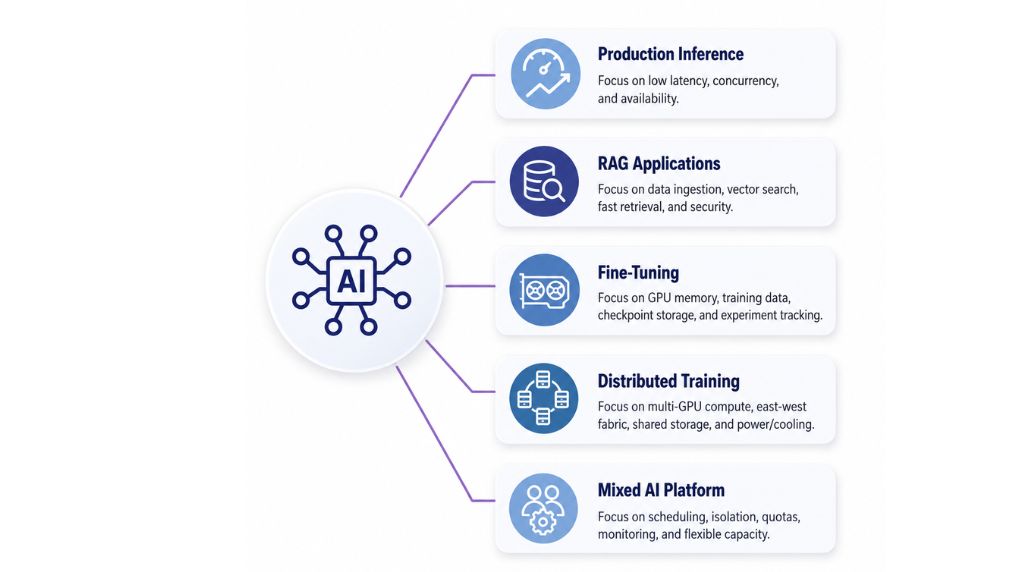
| Workload pattern | Common infrastructure focus | Questions to answer |
| Production inference | Model memory, request latency, concurrency, service availability | How many requests must the system handle, and how quickly? |
| RAG applications | Data ingestion, vector search, storage, retrieval speed, security | How fresh is the data, and where will retrieval run? |
| Fine-tuning | GPU memory, training data, checkpoint storage, experiment tracking | How large is the model, and how often will tuning jobs run? |
| Distributed training | Multi-GPU compute, east-west fabric, shared storage, power and cooling | How much parallel work is required, and can every layer sustain it? |
| Mixed AI platform | Scheduling, isolation, quotas, monitoring, flexible capacity | How will teams share infrastructure without blocking priority work? |
Cloud or colocation services may supply some physical layers, but the organization still needs architecture, governance, connectivity, security, software, and operational ownership. The location changes who manages each component; it does not remove the need.
What Systems Must Work Together for Enterprise AI?
A complete AI environment links several paths:
- Data moves from source systems into governed preparation and storage layers.
- Network and storage services deliver that data to compute nodes.
- CPUs, memory, and accelerators process the workload together.
- Platform software schedules jobs and makes resources available to users.
- Security controls protect access, data, models, and management systems.
- Monitoring tools measure performance, failures, capacity, and health.
- Operations teams manage updates, incidents, support, growth, and retirement.
A bottleneck in one path can limit the value of the rest. Adding GPUs will not correct a slow data pipeline, weak network, storage delay, unsupported software stack, or power limit.
A Practical Enterprise AI Readiness Assessment
We use the assessment to turn a broad AI goal into a testable infrastructure plan. A useful assessment should produce:
- A defined workload and success criteria
- A current-state inventory and reuse decision
- Data-flow and dependency maps
- Compute, network, storage, and facility requirements
- Security and responsibility boundaries
- A deployment-location decision
- A pilot architecture and benchmark plan
- An initial bill of materials or cloud capacity model
- Operating, support, and scaling requirements
- Assumptions, risks, alternatives, and an exit path
This process answers the main question: How do you build a complete AI environment instead of just buying GPUs?
You design the eight layers around a workload, validate them with a bounded pilot, and scale only after measurements show where more capacity is needed.
Build the System Around the Outcome

Enterprise AI infrastructure is a coordinated system. Data must be ready. Compute must fit the model. Networks and storage must keep accelerators supplied. Facilities must support the physical design. Software must make resources usable.
Security must protect the data and platform. Operations must keep the environment stable and accountable.
At Catalyst Data Solutions, we assess these layers together, compare viable deployment paths, and build a phased plan based on workload requirements and existing constraints.
The result is not a generic “AI-ready” claim. It is a documented architecture with assumptions, responsibilities, validation steps, and a practical growth path.
Organizations preparing a pilot, production inference service, RAG platform, fine-tuning environment, or training cluster can request an enterprise AI infrastructure assessment to define the workload, identify the limiting layer, and plan the next investment around evidence rather than guesswork.