


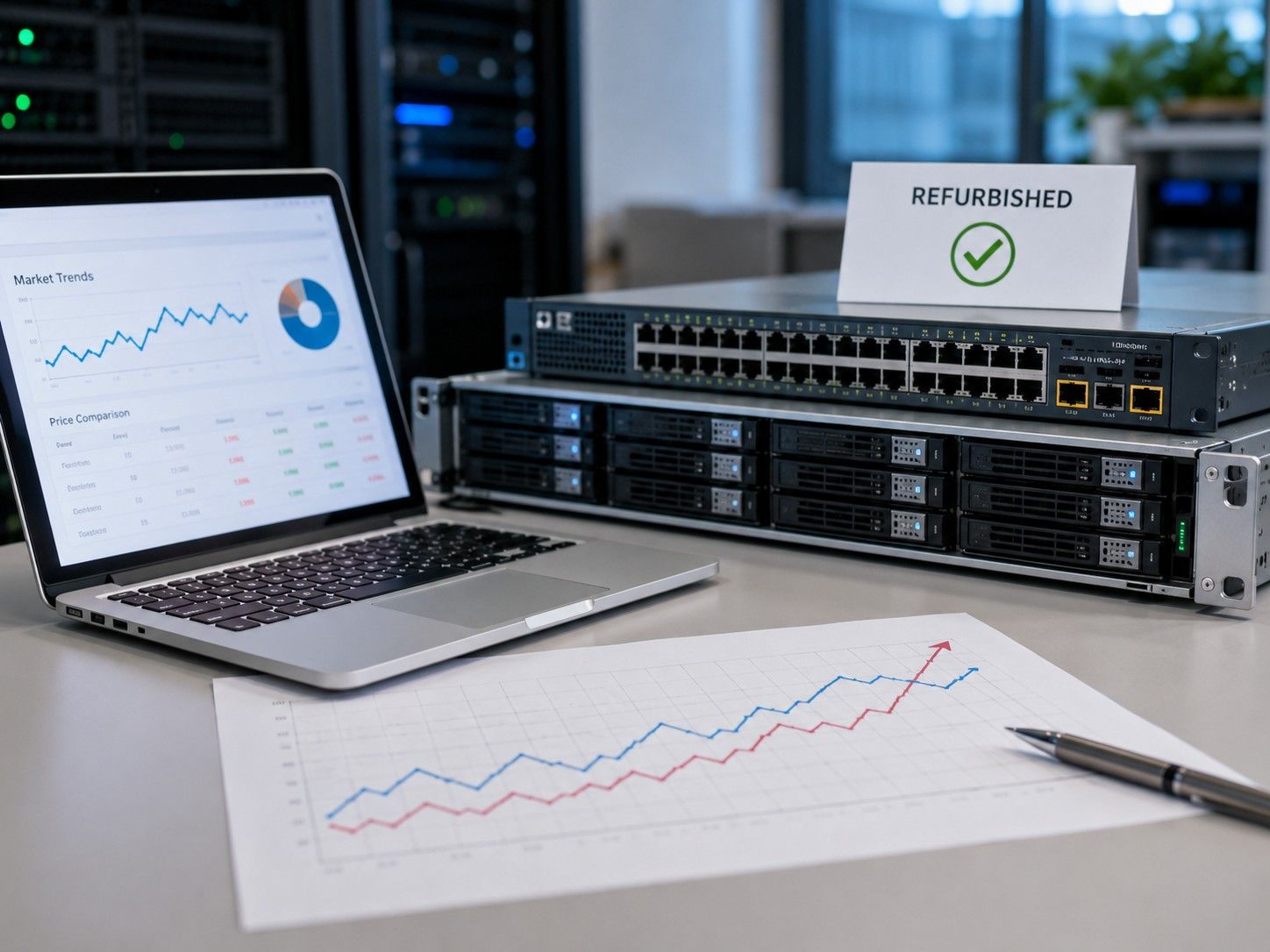
Refurbished IT hardware prices can change faster than many buyers expect. A Dell PowerEdge server, HPE ProLiant system, Cisco switch, storage array, or GPU that looked affordable last month may cost more today if supply tightens or demand rises.
That creates a real problem for IT, procurement, and data center teams. They need reliable equipment, but they also need cost control, faster delivery, and confidence that the hardware will support the workload. The solution is to understand what drives pricing before making a purchase decision.
Why Refurbished IT Hardware Pricing Is Not Fixed
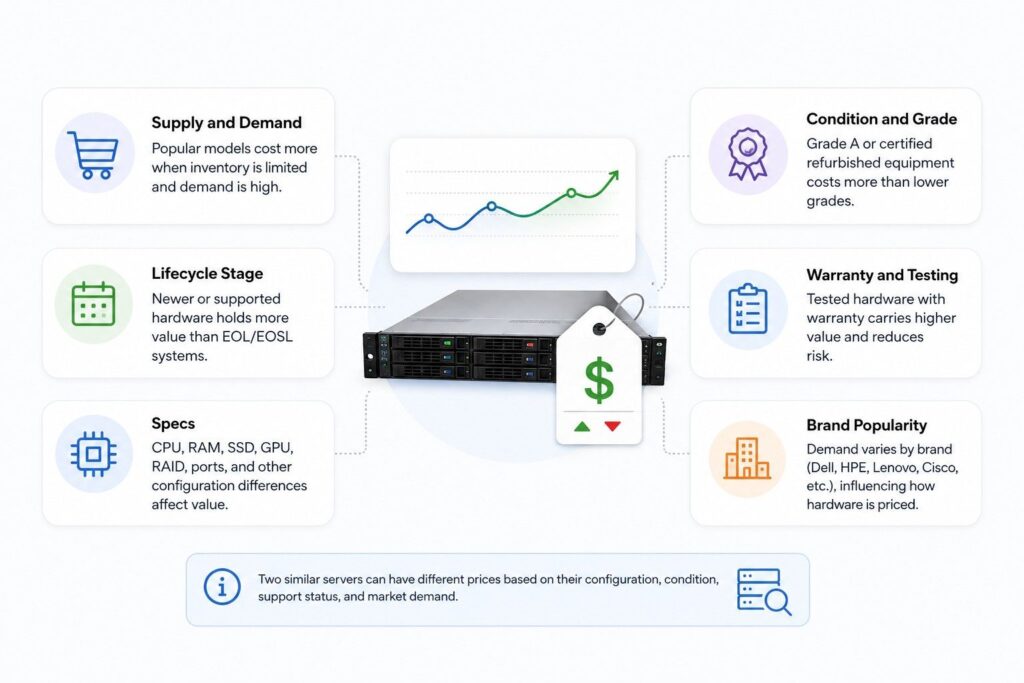
Refurbished IT hardware is priced differently from new hardware. New equipment often follows OEM list pricing and discount tiers, while refurbished pricing depends more on market supply and buyer demand.
Prices can change based on available inventory, server condition, CPU, RAM, storage type, RAID cards, GPU support, network ports, and warranty. Two similar servers may cost different amounts if one has a more desirable configuration or is harder to find.
When companies refresh data centers or move equipment through ITAD programs, more used hardware enters the market. A clear view of the refurbished supply chain helps buyers understand why stock and pricing can shift quickly.
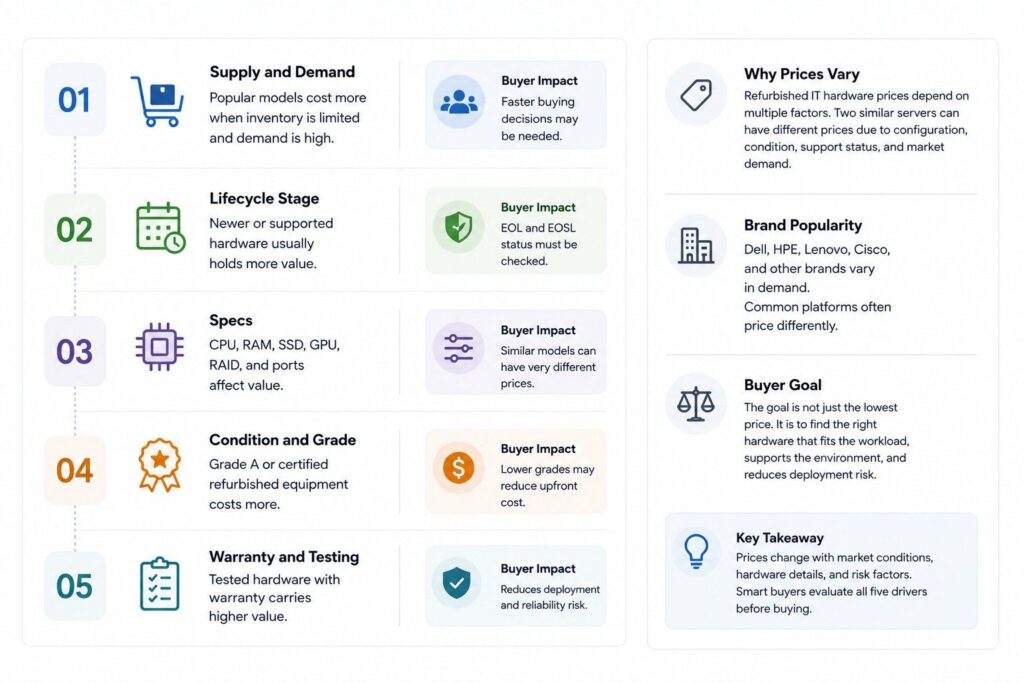
For buyers, the goal is not just the lowest price. It is to find hardware that fits the workload, supports the environment, and reduces deployment risk.
| Pricing Driver | Why It Changes Price | Buyer Impact |
| Supply and demand | Popular models cost more when inventory is limited | Faster buying decisions may be needed |
| Lifecycle stage | Newer or supported hardware usually holds more value | EOL and EOSL status must be checked |
| Specs | CPU, RAM, SSD, GPU, RAID, and ports affect value | Similar models can have very different prices |
| Condition and grade | Grade A or certified refurbished equipment costs more | Lower grades may reduce upfront cost |
| Warranty and testing | Tested hardware with warranty carries higher value | Reduces deployment and reliability risk |
| Brand popularity | Dell, HPE, Lenovo, Cisco, and other brands vary in demand | Common platforms often price differently |
Supply and Demand: Popular Models Move First
Supply and demand are major reasons refurbished IT hardware prices fluctuate. When many buyers need the same Dell PowerEdge servers, HPE ProLiant systems, Cisco switches, storage platforms, or GPUs, available inventory can move fast. Broader IT demand also adds pressure: Gartner forecasted worldwide IT spending to reach $6.15 trillion in 2026, up 10.8% from 2025.
Prices may also shift when refresh cycles release more used IT equipment into the market. Gartner reported that worldwide PC shipments grew 9.1% in 2025, reaching more than 270 million units, partly driven by Windows 10 end-of-support refresh cycles. These large refresh events can increase secondary-market supply, which may improve pricing for buyers who understand refurbished supply routes.
| Market Condition | Price Impact | What It Means for Buyers |
| High demand + limited supply | Prices rise | Act early if the model is business-critical |
| More retired assets entering market | Prices may fall | Compare options before committing |
| Long OEM lead times | Refurbished demand increases | Refurbished may help reduce deployment delays |
Key pricing signals to watch:
- Popular models with limited availability often increase in price, especially if they are still widely used in enterprise environments.
- Large refresh cycles can increase supply, creating better pricing opportunities for servers, networking equipment, storage, and parts.
Hardware Age and Lifecycle: Support Status Matters
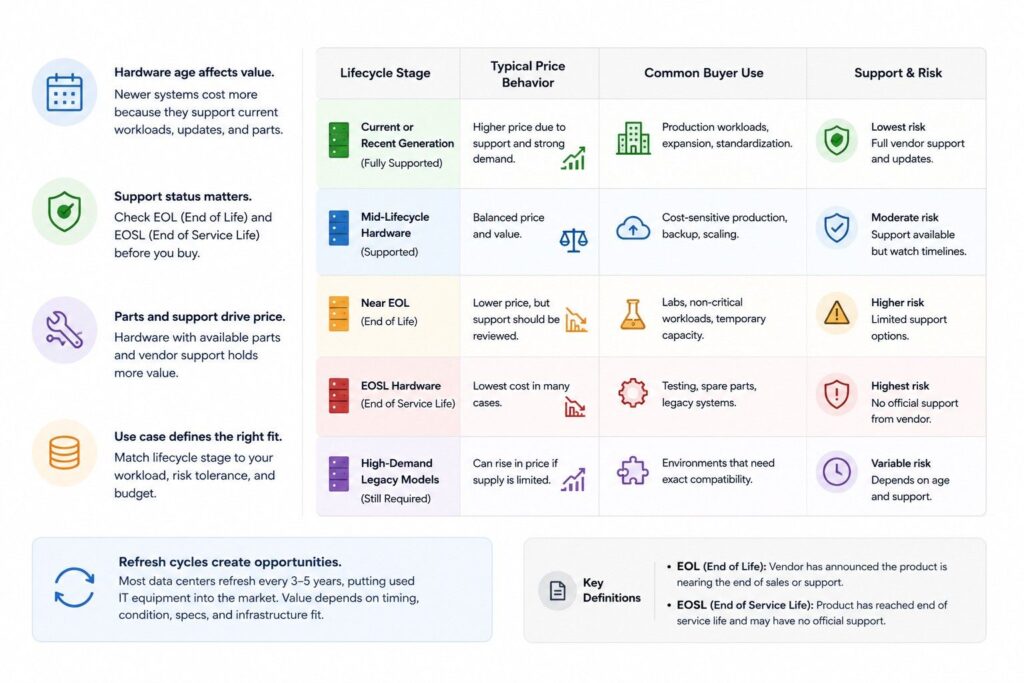
Lifecycle stage changes value
Hardware age has a direct effect on price. A newer refurbished server usually costs more than an older system because it may still support current workloads, firmware updates, operating systems, and replacement parts.
The same is true for networking equipment and storage. A Cisco switch that is still supported may hold value better than a model near end-of-life. A storage platform with available drives, controllers, and support options can also cost more than a system with limited parts availability.
EOL and EOSL status are important. EOL means the vendor has announced the product is near the end of its sales or support path. EOSL means the product has reached end of service life, which can limit official support and maintenance options.
Some buyers still choose EOL or EOSL hardware. It may be useful for lab environments, backup systems, training, or short-term expansion. But for production workloads, many teams prefer hardware with stronger support options.
| Lifecycle Stage | Typical Price Behavior | Common Buyer Use |
| Current or recent generation | Higher price due to support and stronger demand | Production workloads, expansion, standardization |
| Mid-lifecycle hardware | Balanced price and value | Cost-sensitive production, backup, scaling |
| Near EOL | Lower price, but support should be reviewed | Labs, non-critical workloads, temporary capacity |
| EOSL hardware | Lowest cost in many cases, but higher support risk | Testing, spare parts, legacy systems |
| High-demand legacy models | Can rise in price if supply is limited | Environments that need exact compatibility |
A 3–5 year refresh cycle is common in many data center environments. This cycle often creates a flow of used IT equipment into the market. But value depends on timing, condition, specs, and whether the equipment still fits current infrastructure standards.
Lifecycle planning is not only about buying. It also affects resale and reuse. A stronger circular IT plan can help organizations decide when to refresh, redeploy, resell, or retire hardware.
Specs, Configuration, and Workload Fit
Two refurbished servers with the same model name can have very different prices. The reason is configuration.
CPU generation, RAM size, SSD type, GPU support, RAID card, and network ports all change value. A base system with limited memory and older drives will not price the same as a high-memory server with NVMe SSDs, redundant power, and 25GbE networking.
Enterprise buyers should look beyond the model name. A Dell PowerEdge server, HPE ProLiant server, or Lenovo system may have many configuration options. The price reflects what is inside the chassis, not only the brand label.
This matters most when hardware is tied to specific workloads. AI, virtualization, databases, storage-heavy systems, and network-heavy environments may need different configurations.
| Component | How It Affects Price | What Buyers Should Check |
| CPU | Newer, higher-core CPUs increase value | Core count, generation, socket compatibility |
| RAM | Larger memory configurations cost more | Capacity, speed, type, open slots |
| SSD / storage | Enterprise SSDs and NVMe drives increase price | Drive health, endurance, form factor |
| GPU | NVIDIA GPUs can raise price sharply | Model, memory, power, cooling needs |
| RAID card | Advanced RAID controllers add value | Cache, battery, supported drive types |
| Network ports | 10GbE, 25GbE, 40GbE, and 100GbE ports affect cost | Port speed, module needs, compatibility |
Specs should match the actual workload. Paying for unused performance can waste budget. Buying underpowered hardware can create delays, failed deployments, or early replacement.
This is why cost analysis should include more than purchase price. A well-matched refurbished system may reduce capital expense while still meeting workload needs. In many cases, server cost savings come from choosing the right configuration, not simply buying the cheapest unit available.
Condition, Grade, Testing, and Warranty
Condition is another major price factor. Grade A refurbished hardware usually costs more than Grade B or Grade C equipment because it has better cosmetic condition and often stronger resale value.
Certified refurbished equipment also tends to cost more. The added value comes from testing, inspection, cleaning, validation, and warranty coverage. For enterprise buyers, that process can be worth the added cost because it lowers deployment risk.
A lower-grade system may still work well for some use cases. It may be suitable for labs, internal testing, backup systems, or short-term projects. But production workloads often require stronger confidence in condition and reliability.
Key checks include:
- Cosmetic grade and physical condition
- Component health and replacement history
- Firmware and BIOS status
- Drive health and storage wear
- Memory testing
- Port testing for networking equipment
- Power supply and fan condition
- Warranty length and replacement terms
Warranty can also change the price. A tested server with a 1-year warranty will usually cost more than an untested or as-is unit. That higher price reflects lower risk.
Buyers should be careful with very low prices. A cheap listing may not include drives, rails, power supplies, optics, cables, RAID cards, or warranty. Once those missing parts are added, the real cost may be much higher.
Refurbished hardware supports sustainability when it extends the useful life of equipment. It can also reduce waste when paired with responsible disposition. A clear view of data center reuse helps buyers connect cost control with responsible lifecycle planning.
Brand and Model Popularity
Brand and model popularity has a direct impact on refurbished server pricing. Buyers often look for platforms that are already common in enterprise environments because they are easier to maintain, expand, and support.
1. Popular Brands Often Hold Stronger Value
Some server brands are in higher demand because enterprises already use them at scale. This can make certain refurbished models easier to resell and harder to discount.
Common high-demand brands include:
- HPE
- Dell
- Cisco
- Lenovo
- Supermicro
These brands are often preferred because buyers can find compatible parts, firmware, rails, drives, memory, and support knowledge more easily.
2. Specific Models Can Drive Higher Demand
Not every server from a popular brand has the same resale value. Certain models become more attractive because they match common data center needs.
For example, buyers may prefer models that offer:
- Strong CPU support
- High memory capacity
- Flexible storage bays
- GPU compatibility
- Good virtualization support
- Easy parts availability
A widely used model may sell faster than a less common model, even if both servers are from the same brand.
3. Enterprise Standardization Affects Buying Decisions
Many companies prefer refurbished servers that match their current infrastructure. This reduces setup time and makes maintenance easier.
For example:
- A company running HPE ProLiant systems may look for matching HPE models.
- A Dell-based environment may prefer PowerEdge servers.
- A GPU-focused team may look for servers that support NVIDIA cards.
- A networking-heavy environment may prefer familiar Cisco-based infrastructure.
Standardization helps buyers avoid extra testing, compatibility issues, and operational changes.
4. Parts Availability Impacts Long-Term Value
Popular models usually have better parts availability in the secondary market. This matters because refurbished servers may need future upgrades or replacements.
Buyers often value models with easy access to:
- Memory modules
- Drive trays
- Power supplies
- RAID controllers
- Network cards
- Rails
- Fans
- Replacement drives
When parts are easy to source, the server is more practical to maintain over time.
5. Popularity Can Raise Refurbished Server Prices
High demand can increase prices, especially when supply is limited. A common enterprise model with strong specs may cost more than a less popular model with similar performance.
This is why buyers should compare:
- Brand demand
- Model generation
- Configuration
- Parts availability
- Warranty terms
- Lead time
- Total cost
A popular model may be worth the higher price if it reduces deployment risk and supports the existing
How Buyers Can Plan Around Price Movement
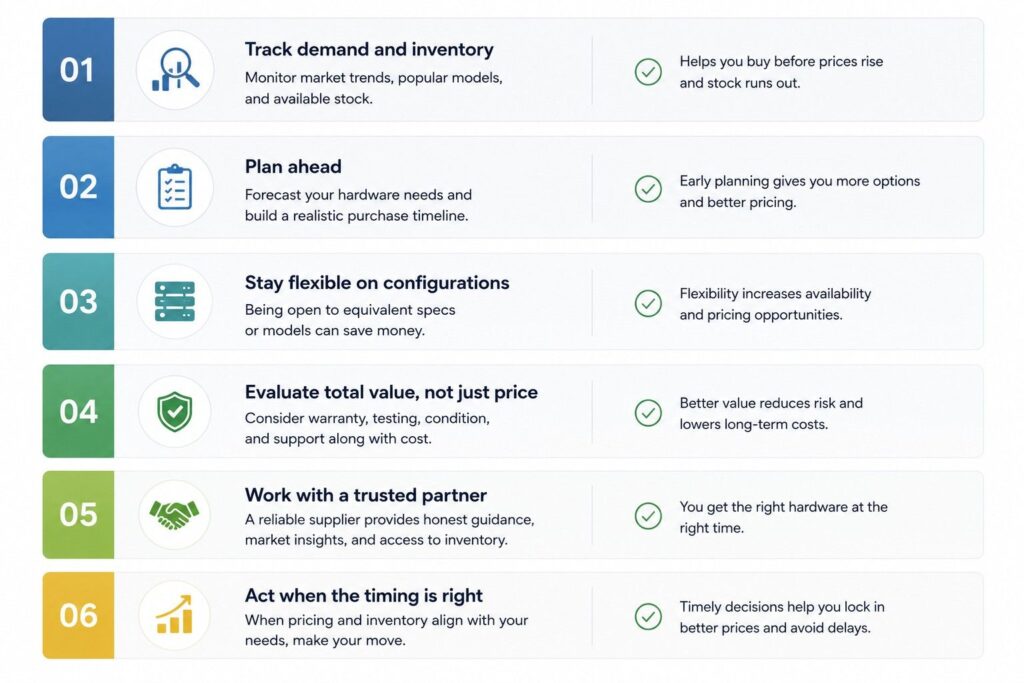
Refurbished server prices can change based on supply, demand, brand popularity, configuration, and hardware availability. Buyers can reduce risk by planning purchases around timing, workload needs, and sourcing flexibility.
1. Track Demand Before Buying
Start by checking whether the server model is in high demand. Popular platforms may increase in price when more buyers compete for the same inventory.
Watch for:
- High demand for specific HPE, Dell, Cisco, or Supermicro models
- Increased need for GPU-ready servers
- Short supply of memory, drives, or power supplies
- Rising demand during refresh or budget cycles
2. Compare Multiple Configurations
Do not focus on one exact configuration too early. Similar models with different RAM, storage, or CPU options may offer better value.
Compare:
- CPU generation
- Memory capacity
- Storage type and drive bays
- Network cards
- RAID controllers
- Warranty and support terms
This helps buyers find a practical option instead of paying more for a single preferred build.
3. Buy Before Urgent Need
Prices often become harder to manage when the purchase is urgent. Buyers should plan ahead for refresh cycles, expansion needs, and replacement hardware.
Good planning helps avoid:
- Rush pricing
- Limited inventory
- Longer lead times
- Higher freight costs
- Fewer configuration choices
4. Use a Flexible Sourcing Strategy
Refurbished hardware availability can change quickly. A flexible sourcing plan gives buyers more options when prices move.
Consider:
- New hardware for critical workloads
- Refurbished servers for expansion or backup
- Alternate brands or models when compatible
- Equivalent configurations from trusted suppliers
5. Lock Pricing When Inventory Matches
When the right model, configuration, warranty, and delivery timeline are available, buyers should move quickly. Refurbished inventory is limited, and pricing can change when stock levels drop.
Before locking pricing, confirm:
- Final server configuration
- Testing and grading status
- Warranty coverage
- Included parts and accessories
- Shipping cost and lead time
6. Work With a Supplier That Understands Market Timing
A supplier with access to OEM channels, distribution networks, and secondary markets can help buyers compare options before prices rise. This is especially useful during shortages, refresh cycles, or high-demand periods.
The goal is to avoid buying too late, overpaying for a constrained model, or choosing hardware that does not match the workload.
Need Better Control Over Refurbished Hardware Pricing?
Catalyst Data Solutions works closely with leading OEMs like Cisco, Arista, HPE, and NVIDIA to help organizations source the right infrastructure for their needs. As a vendor-agnostic partner, Catalyst helps teams compare new, certified refurbished, and hard-to-find hardware based on workload, budget, lead time, and availability.
This approach is useful when refurbished IT hardware prices shift due to supply, demand, lifecycle stage, specs, condition, or warranty coverage. Instead of reacting to price changes late, organizations can plan smarter, compare more sourcing options, reduce cost, and keep infrastructure projects moving with less delay.
Better Pricing Starts With Better Lifecycle Planning
Refurbished IT hardware prices fluctuate because the market is shaped by supply, demand, lifecycle status, specs, condition, warranty, and brand popularity. These factors can change quickly, especially when enterprise buyers need the same models at the same time.
The best approach is not to treat refurbished hardware as a simple low-cost alternative. It should be evaluated as part of a broader infrastructure lifecycle strategy.
When buyers understand why prices move, they can plan better. They can reduce cost, avoid delays, compare new and refurbished options, and make stronger decisions about procurement, deployment, refresh, reuse, and ITAD.
FAQs
Q: Why do refurbished IT hardware prices change so often?
Refurbished IT hardware prices change because supply and demand move quickly. If popular models are limited, prices often rise. Pricing also depends on specs, condition, warranty, lifecycle stage, and availability in the secondary market.
Q: How much can refurbished hardware reduce costs?
Refurbished hardware can often reduce upfront costs by 30–70%, depending on the model, age, configuration, and demand. Savings are usually strongest when buyers can use slightly older enterprise servers, networking equipment, or storage without losing required performance.
Q: Does EOL or EOSL status affect refurbished hardware pricing?
Yes, EOL and EOSL status directly affect price. Supported hardware usually costs more because it carries lower risk and better maintenance options. EOSL hardware may cost less, but buyers should confirm support, parts, firmware, and workload fit.
Q: Why do two similar refurbished servers have different prices?
Two similar servers may have different prices because the specs are different. CPU, RAM, SSD type, GPU, RAID card, network ports, power supplies, and included accessories all affect value. The model name alone does not show the full cost.
Q: Is certified refurbished hardware worth the higher price?
Certified refurbished hardware is often worth the higher price for enterprise use because it is tested, inspected, and usually backed by warranty. This lowers risk during deployment and helps buyers avoid hidden costs from failed parts or missing components.
Q: Do Dell, HPE, Lenovo, and Cisco products hold value differently?
Yes, brand and model popularity can affect resale and refurbished pricing. Dell PowerEdge, HPE ProLiant, Lenovo systems, and Cisco switches often hold value when they remain common in enterprise environments. Demand, support, and compatibility all influence price.
Q: How do supply chain issues affect refurbished hardware pricing?
Supply chain issues can increase refurbished hardware demand when new equipment has long lead times. If OEM lead times reach 6–16 weeks, buyers may look for available refurbished systems to keep projects moving. This can raise prices for popular configurations.
Q: How can companies avoid overpaying for refurbished IT hardware?
Companies can avoid overpaying by defining workload needs, checking specs, comparing equivalent models, reviewing warranty terms, and confirming EOL or EOSL status. A vendor-agnostic sourcing strategy also helps buyers compare new, refurbished, and alternative options before committing.