



Enterprise IT buying is no longer a simple choice between the newest model and the lowest price. Most teams are working through a more practical set of questions: how to meet performance needs, control spending, avoid delays, and make better use of hardware across its full lifecycle.
That is why the decision between new and refurbished equipment has become more important. In some environments, new hardware is the right fit for performance, support, and long-term roadmap planning. In others, refurbished equipment offers a more cost-effective and faster way to expand capacity, support secondary workloads, or manage refresh cycles without unnecessary overspending.
For enterprise buyers, the real value comes from understanding where each option fits. A smart buying strategy looks beyond labels and focuses on workload requirements, reliability, availability, support needs, and total cost over time. When evaluated properly, both new and refurbished hardware can play a useful role in a well-planned infrastructure strategy.
Why this decision matters more now
Enterprise infrastructure buying has become more complex. Buyers are not just comparing specs. They are weighing cost, availability, deployment speed, support coverage, and lifecycle value.
A new server may offer the latest generation performance, but it may also come with a long wait and a higher capital cost. Refurbished hardware may arrive faster and cost far less, but only if it has been tested, validated, and sourced through a trusted process.
This decision also affects sustainability. The world generated 62 million tonnes of e-waste in 2022, and only 22.3% was formally collected and recycled. That makes lifecycle extension more than a cost strategy. It is also part of responsible infrastructure planning.
In practice, enterprise buyers usually look for:
- Faster sourcing when lead times are a problem
- Lower cost without creating reliability issues
- Flexibility across new and refurbished options
- Better use of existing assets
- A lifecycle strategy that supports growth and refresh planning
A strong procurement model should support all of those goals, especially in environments where compute, storage, and networking must stay aligned.
| Decision Factor | New Hardware | Refurbished Hardware |
| Upfront cost | Highest | Usually 30–70% lower |
| Availability | May face OEM lead times | Often faster to source |
| Latest generation | Yes | Usually previous generation |
| Warranty options | Standard OEM warranty | Varies by provider |
| Best fit | Mission-critical, latest workloads | Expansion, backup, lab, cost-sensitive deployments |
How does refurbished differ from new?
New hardware comes directly from the manufacturer or authorized channel in unused condition. It typically includes the latest firmware path, standard OEM warranty, and current-generation features.
Refurbished hardware is previously deployed equipment that has been inspected, tested, cleaned, repaired if needed, and prepared for reuse. Good refurbished equipment is not simply “used.” It should go through a structured process that may include:
- Diagnostic testing
- Component replacement
- Cosmetic grading
- Firmware validation
- Burn-in or performance checks
- Configuration review
That process is what separates enterprise-ready refurbished hardware from equipment with unknown history. A disciplined refurbishment workflow matters because the value of refurbished hardware depends on quality control, not just price.
Refurbished also differs from OEM in another way. OEM hardware refers to equipment sourced through the original manufacturer ecosystem. It may be new, and in some cases it may include manufacturer-certified remanufactured options. But most enterprise buyers use “OEM” to mean factory-new, vendor-direct, or vendor-authorized supply.
So the real comparison is often not just refurbished vs new. It is:
- Current-generation OEM new
- Prior-generation OEM new
- Refurbished enterprise hardware
- Existing hardware that can still be repaired or extended
Repair, refurbish, or replace: key considerations

Before choosing new or refurbished, buyers should first decide whether the existing equipment still has useful life. This is where repair, refurbish, and replace become three separate decisions.
1. When repair makes sense
Repair is usually the right option when the hardware still fits the workload and only a limited component has failed. Common cases include power supplies, fans, memory, drives, and certain field-replaceable units.
Choose repair when:
- The platform is still meeting performance needs
- Downtime can be minimized with parts support
- The system remains compatible with your environment
- Replacement cost is not justified yet
This approach is often strongest when backed by a solid hardware support plan that helps extend service life without forcing an early replacement.
2. When refurbishment makes sense
Refurbishment is a better option when the hardware still has market value and practical business use, but needs testing, validation, or part replacement before redeployment or resale.
Choose refurbish when:
- Existing assets can be reused internally
- Secondary workloads do not need the latest generation
- Budget pressure makes a full new refresh hard to justify
- A previous-generation platform still supports the application
- Faster deployment matters more than latest-model release timing
Refurbished hardware is often used for:
- Lab and development environments
- Backup systems
- Edge locations
- Expansion capacity
- Non-latency-sensitive workloads
- Shorter lifecycle deployments
3. When replacement with new makes sense
New hardware is usually the better fit when performance, compliance, or roadmap alignment outweigh cost savings.
Choose new when:
- The workload depends on latest-generation performance
- Long-term vendor roadmap support is essential
- You need full OEM warranty and certification
- Security, compatibility, or architecture requirements have changed
- The platform is too old to justify repair or redeployment
This is common in major data center refreshes, heavily consolidated environments, and projects where infrastructure design must match future growth. In those cases, broader procurement planning becomes part of the buying decision.
| Option | Best Use Case | Main Advantage | Main Limitation |
| Repair | Minor hardware failure on still-viable systems | Lowest immediate cost | Does not solve aging platform issues |
| Refurbish | Extend or redeploy useful enterprise hardware | Strong value and faster sourcing | Quality depends on testing and source |
| Buy New | Net-new deployments or high-demand workloads | Latest features and full OEM path | Highest cost and possible lead times |
Refurbished vs OEM hardware
For enterprise buyers, this comparison is often misunderstood. OEM hardware is not automatically the only safe choice, and refurbished is not automatically the risky one.
The better question is whether the hardware source matches the technical and operational need.
New OEM hardware is often the right fit when:
- You need the latest generation platform
- OEM certifications are required
- Software or support policies depend on factory-new purchase
- The workload is strategic and long-term
Refurbished enterprise hardware is often the right fit when:
- Prior-generation platforms still meet performance targets
- The business wants lower capital cost
- Availability matters more than newest release timing
- Mixed infrastructure is acceptable
This is why many enterprises use both. A company may deploy new systems for production clusters while using refurbished switches, storage, or servers for disaster recovery, test environments, or regional expansion.
That hybrid model also supports sustainability. Recycling 1 million laptops saves enough energy to power more than 3,500 U.S. homes for a year. Extending hardware life through repair and refurbishment can reduce waste while improving budget efficiency.
Cost vs performance analysis

The price gap between new and refurbished is usually clear. The harder question is whether performance, reliability, and support justify paying more.
In many enterprise environments, the answer depends on workload tier.
Pros and cons of refurbished equipment
Pros
- Lower upfront cost, often 30–70% below new
- Faster availability during shortages
- Useful for expansion, backup, lab, and secondary workloads
- Supports lifecycle extension and sustainability goals
- Helps stretch capital budgets across more infrastructure needs
Cons
- Usually not current generation
- Warranty terms vary by supplier
- Cosmetic condition may differ
- Inventory can be less predictable by model or configuration
- Requires careful sourcing and validation
Pros and cons of new devices
Pros
- Latest architecture and feature set
- Standard OEM warranty and support path
- Longer expected roadmap alignment
- Easier standardization for greenfield deployments
- Better fit for the highest-performance use cases
Cons
- Highest capital cost
- Possible 6–16 week lead times in constrained markets
- Faster depreciation
- May deliver more performance than some workloads actually need
| Buying Scenario | Better Fit | Why |
| High-performance production workload | New | Performance roadmap and OEM support matter most |
| Test lab or non-production cluster | Refurbished | Lower cost with sufficient capability |
| Rapid expansion during supply shortage | Refurbished | Faster access to usable inventory |
| Full platform standardization project | New | Easier consistency across environment |
| Backup, DR, or edge deployment | Refurbished | Practical balance of cost and function |
The right choice comes from workload matching, not from a blanket rule. A previous-generation server may still be more than adequate for many business applications. On the other hand, AI-heavy, analytics-intensive, or consolidation-focused environments may justify new equipment because performance density changes the economics.
When should I choose new?
Choose new when the business case is driven by:
- Current-generation compute needs
- Long-term platform standardization
- Strict OEM support requirements
- Regulatory or certification demands
- Large production deployments with heavy utilization
- Higher energy efficiency that meaningfully changes total cost over time
New hardware is also the better path when the cost of downtime is far higher than the purchase premium.
When should I choose refurbished?
Choose refurbished when the business case is driven by:
- Budget constraints
- Short deployment windows
- Supply chain delays
- Expansion of existing environments
- Workloads that do not need the latest release
- Shorter-term infrastructure planning
- Lifecycle extension and reuse goals
Many organizations use refurbished as part of a largerdeployment strategy or in broader data center planning where performance, cost, and timing all need to be balanced.
Making the right call
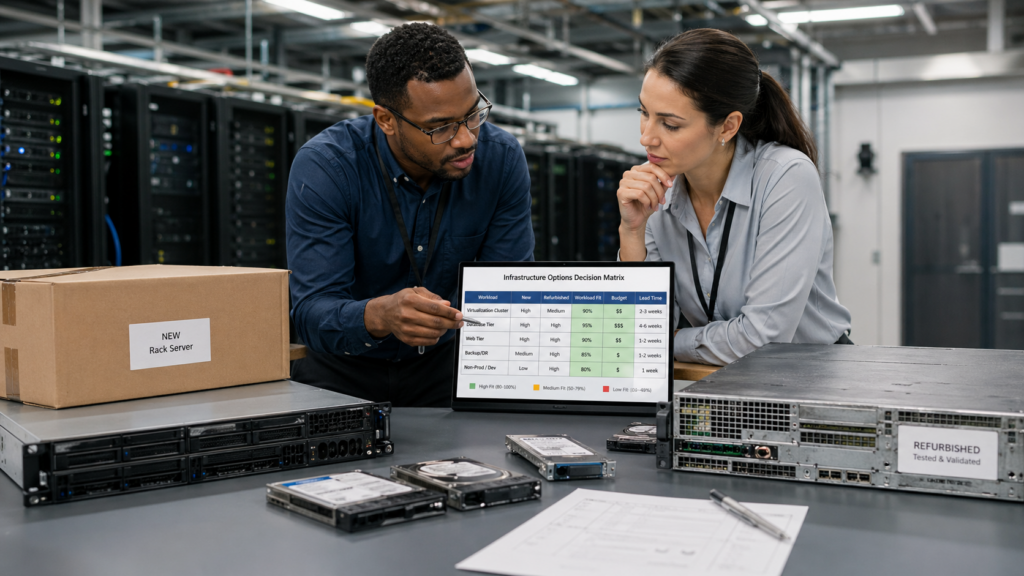
Refurbished vs new is not a simple quality question. It is a business decision shaped by workload needs, support expectations, capital limits, and time.
The strongest enterprise buying strategies usually follow a few principles:
- Use new where performance and roadmap matter most
- Use refurbished where prior-generation hardware still delivers value
- Repair or maintain assets when replacement is premature
- Build flexibility into procurement instead of forcing one model everywhere
- Treat lifecycle planning as part of infrastructure optimization
That approach leads to better outcomes: lower cost where appropriate, faster deployment when supply is tight, and smarter use of existing assets. For enterprise buyers, that is often the difference between simply purchasing hardware and building a stronger infrastructure lifecycle strategy.
Need a practical sourcing strategy, not just a product list?
Catalyst Data Solutions works closely with top OEMs like Cisco, Arista, HPE, Dell, and a lot more to help organizations source the right infrastructure for their needs. As a vendor-agnostic partner, Catalyst Data Solutions focuses on what fits each environment best,whether that means new hardware for current-generation performance or refurbished equipment for better cost control and faster availability.
For enterprise buyers comparing refurbished vs new, that flexibility matters. Catalyst Data Solutions helps teams weigh performance, budget, lead times, and lifecycle goals so the buying decision supports the workload, not just the product list.
FAQs
1.Is refurbished IT hardware reliable for enterprise use?
Refurbished IT hardware is widely used in enterprise environments, especially for cost-sensitive deployments, secondary workloads, and infrastructure expansion. When properly tested and sourced, refurbished servers and networking equipment can deliver performance comparable to new hardware while reducing costs by 30–70%. Reliability depends on quality control, testing standards, and supplier expertise.
2.How much can refurbished hardware reduce costs?
Refurbished hardware typically reduces upfront costs by 30–70%, depending on the product category, generation, and demand. This makes it a practical option for organizations that need to scale infrastructure while managing capital expenditure. The biggest savings usually come in servers, networking equipment, and previous-generation GPU platforms.
3.When should companies choose refurbished hardware over new?
Companies typically choose refurbished hardware when cost optimization, faster availability, or short-term scaling is the priority. It is often used for backup systems, test environments, expansion capacity, or workloads that do not require the latest generation hardware. In many cases, a hybrid approach using both new and refurbished equipment delivers the best balance of performance and budget.
4. How does Catalyst Data Solutions help buyers decide between refurbished and new hardware?
Catalyst Data Solutions helps enterprise buyers evaluate refurbished and new hardware based on workload needs, budget, lead times, and lifecycle goals. Rather than pushing a single option, Catalyst Data Solutions takes a vendor-agnostic approach to determine where new hardware makes sense and where refurbished equipment can deliver better value.
This helps organizations make more practical infrastructure decisions, especially when balancing performance requirements with cost and availability.
5.Can refurbished hardware be used alongside new infrastructure?
Yes, many organizations use refurbished hardware alongside new infrastructure as part of a balanced procurement strategy. New hardware is often reserved for critical or high-performance workloads, while refurbished equipment is used for expansion, backup, lab, or secondary environments. This approach helps control cost without limiting deployment flexibility.