



E-Rate covers eligible internet access, data transmission, and certain internal network infrastructure for schools and libraries. It helps reduce the cost of connectivity and network projects, but it does not cover every IT purchase.
For K-12 schools, libraries, and SLED buyers, the key question is simple: what can E-Rate potentially support before a Wi-Fi refresh, switch upgrade, cabling project, or connectivity purchase begins?
Teams that need a broader program overview can use the E-Rate basics guide to understand how the program fits into school and library technology planning.
What Does E-Rate Cover in Simple Terms?
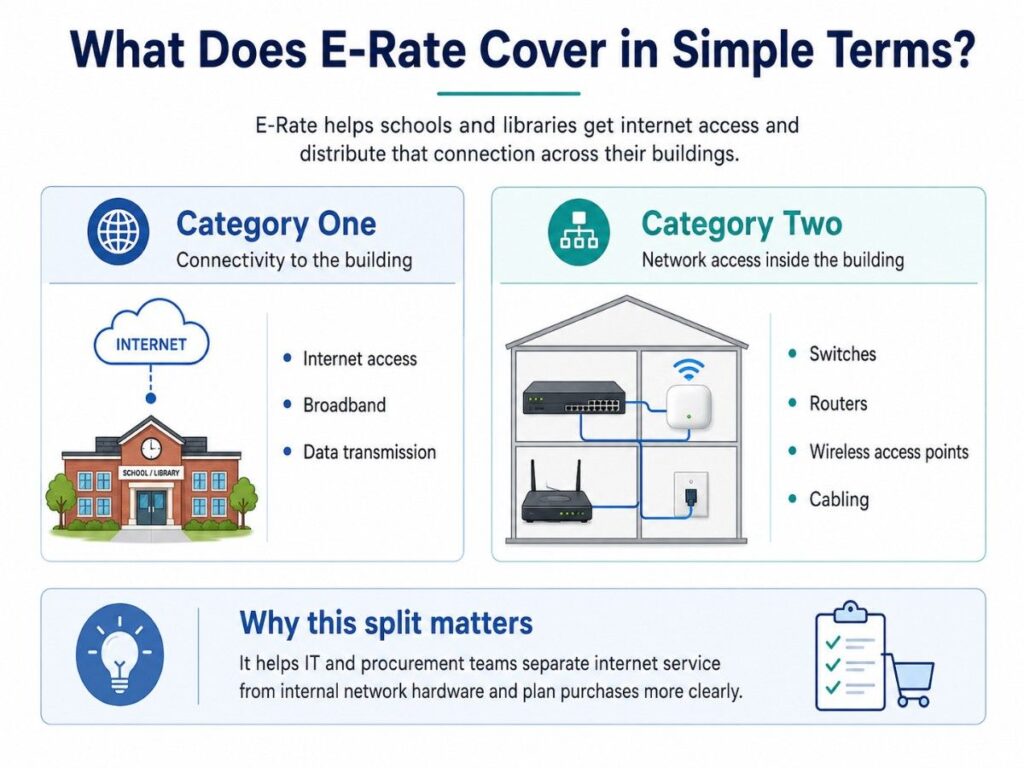
E-Rate mainly supports technology that helps schools and libraries connect to the internet and distribute that connection across buildings. The program separates eligible services into two main categories: Category One and Category Two.
This split helps IT and procurement teams avoid mixing internet service, internal network hardware, devices, software, and broad IT services into one unclear purchase plan.
| E-Rate Area | What It Means | Common Buyer Need |
| Category One | Connectivity to the building | Internet access, broadband, data transmission |
| Category Two | Network access inside the building | Switches, APs, routers, cabling |
| Broader IT Budget | Technology outside core E-Rate scope | Laptops, SaaS, software, staffing |
A strong funding plan should separate E-Rate-related infrastructure from items that need local funds, grants, bond funding, or other procurement paths.
What Is Category One in E-Rate?
Category One covers services that bring internet access or data connectivity to a school or library. It is usually tied to internet service, broadband service, WAN links, or data transmission.
Category One answers this buyer question: how does the school, district, library, or branch connect to the outside network?
Category One Planning Checklist
Common Category One planning areas include:
- Internet access
- Broadband service
- Data transmission
- WAN or transport connections
- Connectivity between eligible sites
- Service provider contracts
- Bandwidth growth planning
Category One helps with external connectivity. It does not automatically fix poor classroom Wi-Fi, weak library coverage, old access switches, or limited internal cabling.
| Category One Need | What Buyers Should Review | Example |
| Internet access | Speed, provider, contract term | Higher bandwidth for students or patrons |
| Data transmission | Site links and transport needs | District or library branch connectivity |
| Broadband growth | Current traffic and future demand | Online testing, video, cloud platforms |
| Service reliability | Uptime, support, service level | Reducing outage risk |
For K-12 teams, Category One planning often connects with wider education IT needs because internet service is only one part of the full technology budget.
What Is Category Two in E-Rate?
Category Two covers eligible internal connections and related network infrastructure. This is the category most buyers review when planning Wi-Fi upgrades, switch refreshes, cabling work, and internal network modernization.
Category Two answers this buyer question: what equipment helps distribute internet access inside the school, library, campus, or branch?
Category Two Hardware Checklist
Common Category Two equipment can include:
- Switches
- Routers
- Wireless access points
- Wireless controllers
- Internal cabling
- Racks, where applicable and eligible
- UPS units, where applicable and eligible
- Basic maintenance of internal connections
Category Two matters because many network problems happen inside the building. A site may have enough internet bandwidth but still suffer from weak access points, old switches, poor cabling, or limited PoE capacity.
| Category Two Item | Buyer Planning Question | Common Use Case |
| Switches | How many ports and how much PoE are needed? | Classroom and access layer refresh |
| Routers | What routing capacity does the site need? | WAN or edge network upgrade |
| Access points | What coverage and density are required? | Wi-Fi 6 or Wi-Fi 6E refresh |
| Controllers | Is local or cloud control needed? | Central wireless management |
| Cabling | Are new runs or upgrades needed? | Classroom, library, or branch expansion |
| Racks / UPS | Are support components applicable? | Network closet reliability |
| Basic maintenance | What keeps eligible equipment working? | Repairs and upkeep for internal connections |
Schools planning network modernization should define the full hardware scope early so quotes do not miss key parts.
What Category Two Equipment Can Schools and Libraries Plan Around?
Category Two often connects to the hardware students, staff, and library patrons depend on every day. It supports the internal network that delivers access across classrooms, offices, media centers, and public spaces.
Buyers should not only ask, “Is this eligible?” They should also ask, “Does this hardware fit our current network, support model, timeline, and lifecycle plan?”
Common project groups include:
- Campus switching
- Wireless access refresh
- Router or edge equipment updates
- Fiber and copper cabling upgrades
- Network closet improvements
- Controller or cloud-managed wireless planning
- Internal connection maintenance
- Optics, transceivers, power supplies, and related parts
For Wi-Fi projects, a campus wireless plan can help buyers avoid weak coverage, missing PoE, and incomplete access point counts.
What Is Generally Not Covered by E-Rate?
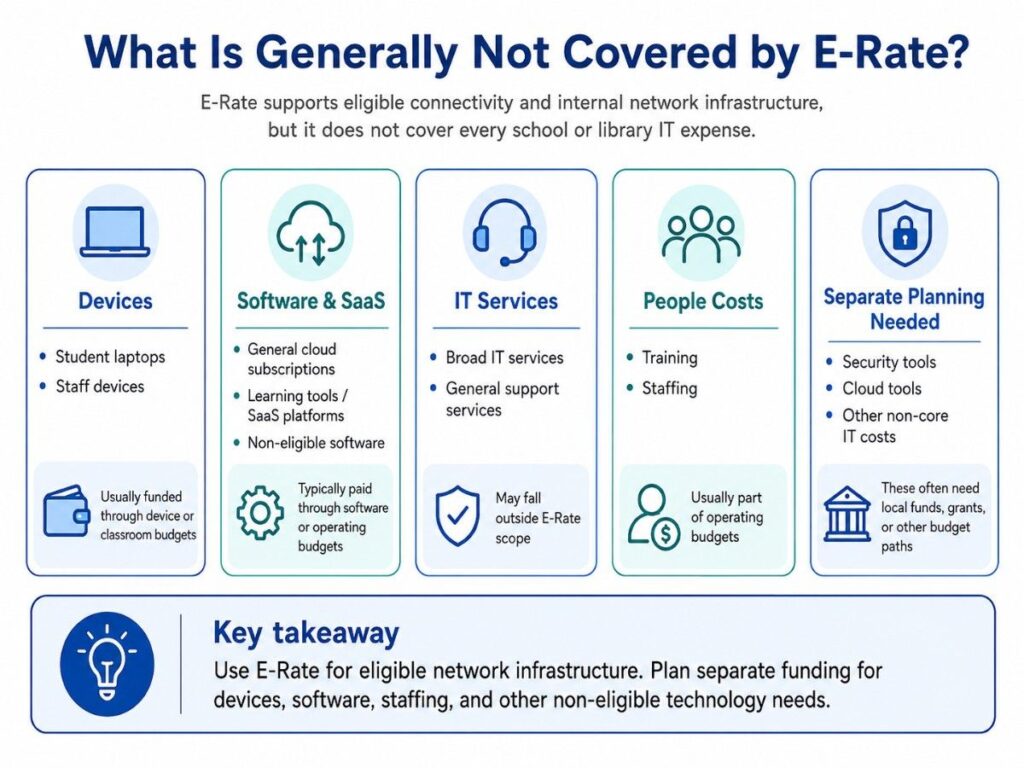
E-Rate is not a full IT budget. It focuses on eligible connectivity and internal network infrastructure, not every technology item a school or library needs.
This matters because many projects combine network, device, software, security, and support needs in the same budget year.
| Generally Not Covered | Why It Needs Separate Planning |
| End-user laptops | Usually part of device or classroom budgets |
| General cloud subscriptions | Often paid through operating or software budgets |
| Non-eligible software | Must be checked before funding assumptions |
| Broad IT services | May fall outside the program scope |
| Staff devices | Usually handled through local IT budgets |
| General SaaS tools | Often funded outside E-Rate |
| Training and staffing | Usually part of operating budgets |
Laptops deserve special caution. Schools may need student devices, staff devices, carts, accessories, and endpoint tools, but those purchases should not be treated as core E-Rate infrastructure.
Cloud tools also need separate planning. Learning platforms, productivity suites, cloud storage, and many SaaS renewals usually belong in broader IT budget categories.
Why Buyers Must Check the Current Eligible Services List
Applicants should always verify planned products and services against the current Eligible Services List. The list can change by funding year, and eligibility may depend on the product, service type, and project use.
This is not only a program issue. It is also a purchasing issue. A wrong assumption can create budget gaps, quote changes, approval delays, or mismatched project scopes.
Before finalizing the E-Rate portion, buyers should confirm:
- Which services fit Category One
- Which products fit Category Two
- Which components are eligible only in certain cases
- Which items need local or grant funding
- Which parts should stay outside the E-Rate request
- Whether the funding year changes the answer
The practical rule is simple: build the network plan early, but verify eligibility before finalizing the funding scope.
How E-Rate Coverage Fits Real Network Refresh Planning
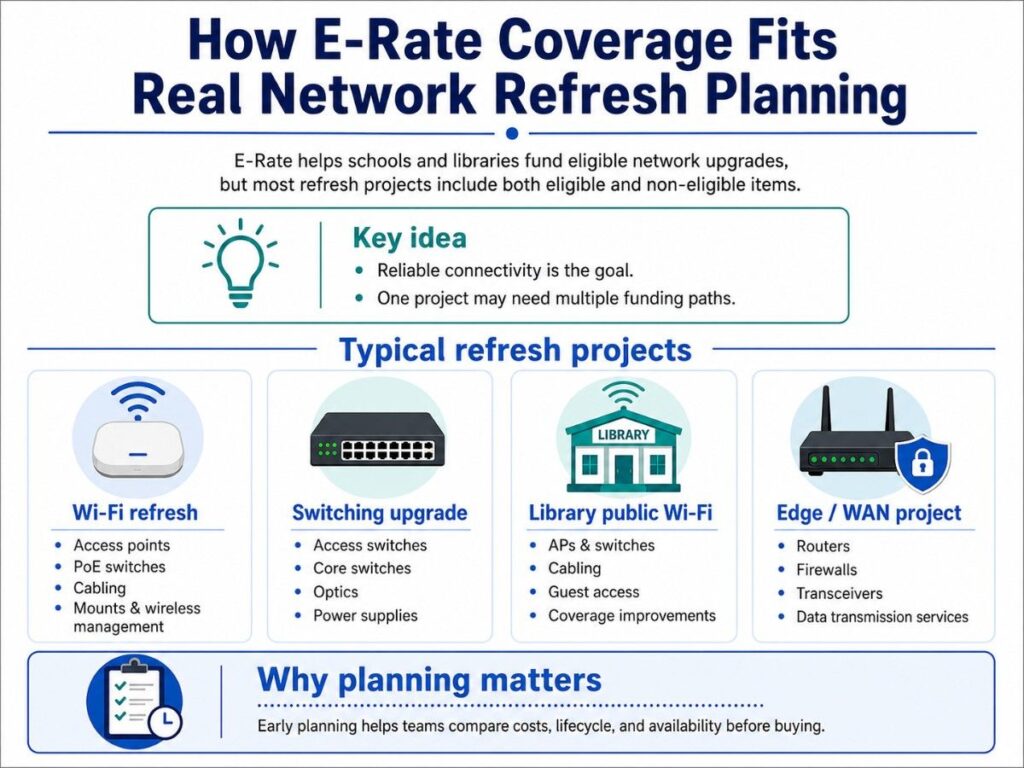
E-Rate often appears during network refresh planning because schools and libraries need reliable connectivity. The challenge is that a real refresh project usually includes more than one funding category.
A Wi-Fi upgrade may include access points, PoE switches, cabling, licenses, mounts, and support. Some pieces may fit the E-Rate scope, while others may need a separate funding path.
Real project examples include:
- Wi-Fi refresh
- Access points
- PoE switches
- Cabling
- Mounting hardware
- Wireless management
- Switching upgrade
- Access switches
- Core switches
- Optics
- Stacking modules
- Power supplies
- Library public Wi-Fi project
- APs
- Switches
- Cabling
- Guest access planning
- Coverage improvements
- Edge or WAN project
- Routers
- Firewalls
- Transceivers
- Data transmission services
A practical cost control strategy can help buyers compare performance, lifecycle, and availability before the purchase window gets tight.
How OEM Options Fit Into Category Two Planning
OEM selection matters because schools and libraries need equipment that works with the current environment. Price matters, but it should not be the only practical factor.
Buyers should compare hardware based on fit, support, lead time, warranty, lifecycle, licensing, and compatibility.
Common OEM planning examples include:
- Cisco Catalyst for switching and campus networks
- Cisco Meraki for cloud-managed wireless and networking
- HPE Aruba for campus switching and wireless
- Fortinet for firewall and edge security planning
- Juniper Mist for AI-driven wireless and switching
- Juniper switching for network refresh projects
- Arista for data center or high-performance networking
- Extreme Networks for K-12 and campus environments
Vendor-neutral planning does not mean every brand is equal for every site. It means the buyer compares the right options for the network, budget, timeline, and support model.
For security-heavy environments, an enterprise security plan can help teams separate network hardware needs from broader security tools and services.
How E-Rate Fits the Larger IT Budget
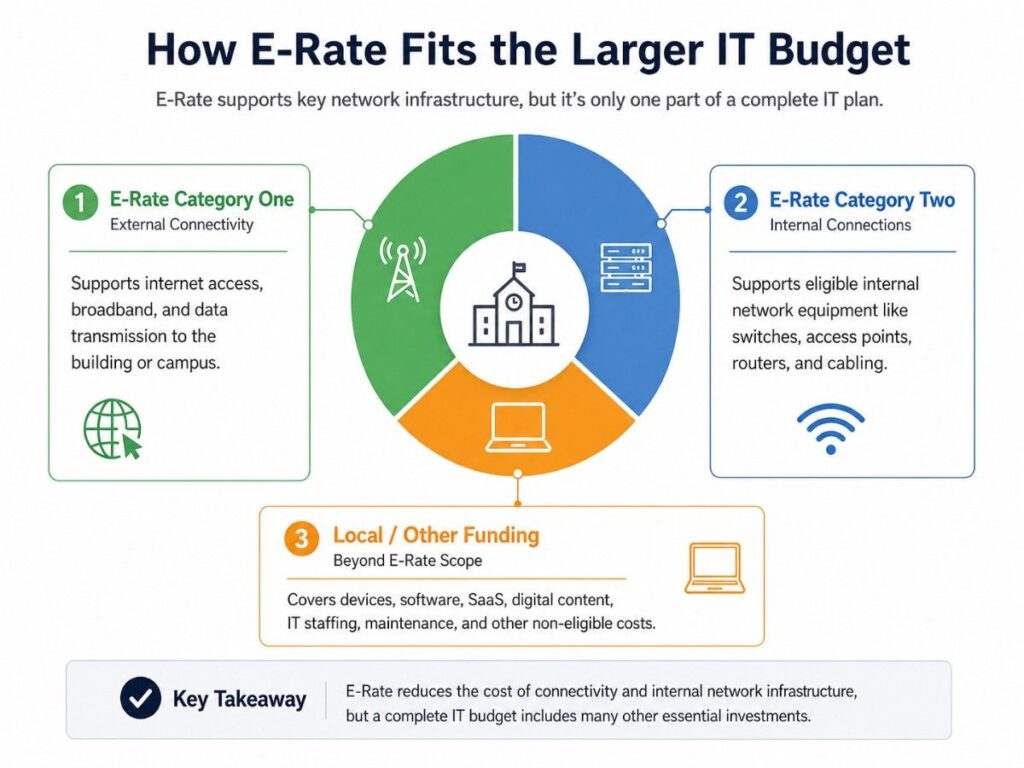
E-Rate can reduce eligible connectivity and network infrastructure costs, but it should not carry the full IT plan. Schools and libraries still need separate funding for devices, software, cloud tools, cybersecurity, storage, support, and staffing.
A practical budget plan should match each need to the right funding path before buyers request quotes.
| Step | Budget Planning Area | What to Include | Likely Funding Path |
| 1 | Eligible connectivity | Internet access, broadband, data transmission | E-Rate Category One |
| 2 | Internal network infrastructure | Switches, APs, routers, cabling, basic maintenance | E-Rate Category Two, when eligible |
| 3 | End-user technology | Student laptops, staff devices, accessories | Local funds, grants, device budgets |
| 4 | Software and cloud tools | SaaS platforms, cloud storage, learning tools | Operating budget or software budget |
| 5 | Security and resilience | Firewalls, monitoring, backup, security tools | Grants, security budget, local funds |
| 6 | Lifecycle and refresh support | Spares, replacements, buyback, refurbished options | Local funds, trade-in value, phased purchasing |
For example, a district may use E-Rate for eligible switches and access points, local funds for laptops, and grants for security tools. A library may use E-Rate for public Wi-Fi infrastructure while using other funds for computers, software, and digital services.
A broader hardware procurement plan can help buyers compare new, refurbished, and hard-to-find options across different funding sources.
What Buyers Should Define Before Requesting Quotes
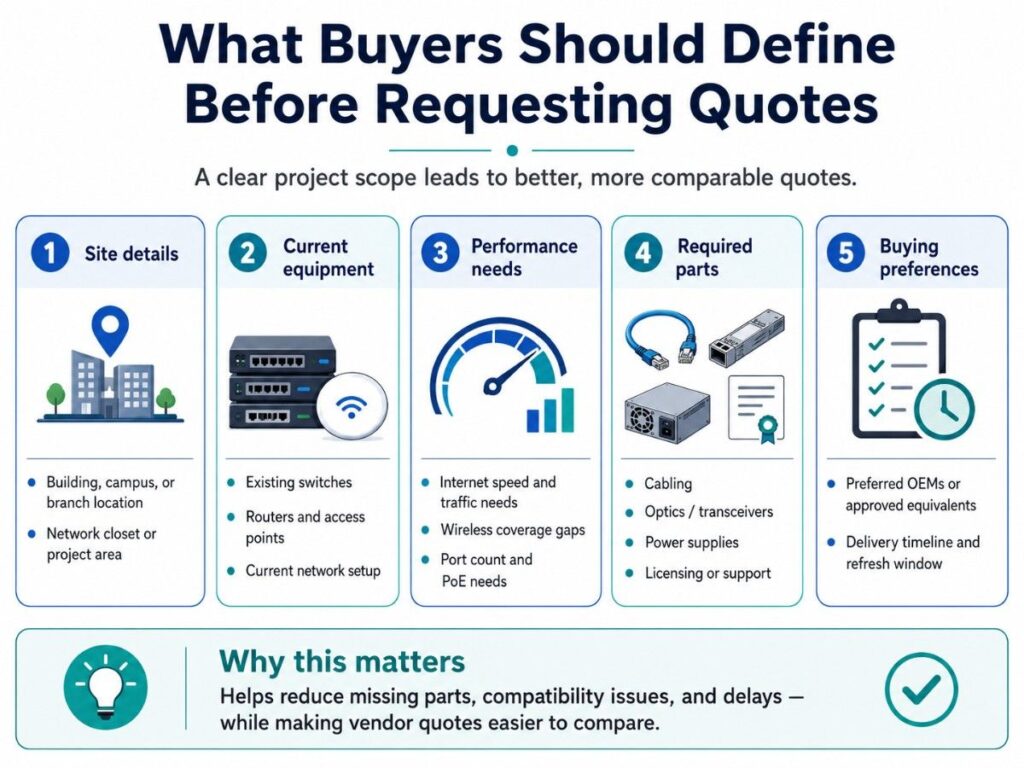
A vague request creates weak quotes. Before asking vendors for pricing, buyers should define the project location, current network, required hardware, preferred standards, and timeline.
This makes vendor responses easier to compare. It also reduces missing parts, compatibility problems, and delays during procurement or fulfillment.
Quote-Ready Scope Checklist
Before requesting quotes, define:
- Building, campus, or branch location
- Current switch, router, and access point models
- Internet speed and traffic needs
- Wireless coverage gaps
- Required port counts
- PoE needs
- Cabling requirements
- Optics and transceivers
- Power supplies and stacking parts
- Licensing or support needs
- Preferred OEMs or approved equivalents
- Delivery timeline and refresh window
| Scope Item | What to Define | Why It Helps |
| Site details | Campus, branch, network closet | Avoids missing locations |
| Current equipment | Existing switches, APs, routers | Helps check compatibility |
| Performance need | Speed, density, PoE, coverage | Matches hardware to use case |
| Required parts | Optics, mounts, power, licenses | Prevents incomplete quotes |
| OEM preference | Standard brand or equivalent | Supports fair comparison |
| Timeline | Delivery and installation window | Reduces fulfillment risk |
A clear scope helps procurement teams compare Cisco, Meraki, HPE Aruba, Fortinet, Juniper, Arista, Extreme Networks, and other options without relying on guesswork.
Need Help Comparing Network Hardware Options?
E-Rate can reduce eligible connectivity and infrastructure costs, but buyers still need a clear hardware scope before requesting pricing. Catalyst Data Solutions Inc. helps schools and libraries organize switch, wireless, router, cabling, optics, and related infrastructure needs into practical equipment plans.
Catalyst Data Solutions Inc can help compare OEM options, check channel and distribution availability, and build quote-ready solutions for eligible infrastructure projects.
Teams can review Cisco Catalyst,HPE Aruba, Fortinet, Juniper, Arista, Extreme Networks new, refurbished, and hard-to-find options based on budget, timeline, and compatibility.
FAQs About What E-Rate Covers
Does E-Rate cover every school IT purchase?
No. E-Rate focuses on eligible connectivity and internal network infrastructure. Schools still need other funds for laptops, software, cloud tools, security platforms, staffing, and broad IT services.
Can E-Rate cover wireless access points?
E-Rate may support eligible wireless access points under Category Two. Buyers should verify the current Eligible Services List before finalizing the project scope or quote request.
Are switches and routers covered by E-Rate?
Switches and routers may be part of eligible Category Two internal connections when they support broadband access inside the school or library. Eligibility should be checked for the exact project.
Does E-Rate pay for laptops?
Laptops should not be treated as core E-Rate infrastructure. They usually belong in local device budgets, grants, refresh budgets, or broader education technology funding plans.
Can E-Rate cover cabling?
Internal cabling may be eligible when it supports approved internal connections. Buyers should define the cabling scope clearly and verify current eligibility before requesting final pricing.
Can schools use refurbished hardware with E-Rate?
Do not assume refurbished hardware is E-Rate eligible. Buyers should verify eligibility for the exact product and request. Outside the E-Rate-funded portion, refurbished hardware may help with spares, replacements, labs, or legacy systems.
Should buyers choose the lowest quote?
Price is important, but it should not be the only practical factor. Buyers should also compare compatibility, lead time, warranty, lifecycle, licensing, support, and whether the quote includes all required parts.