


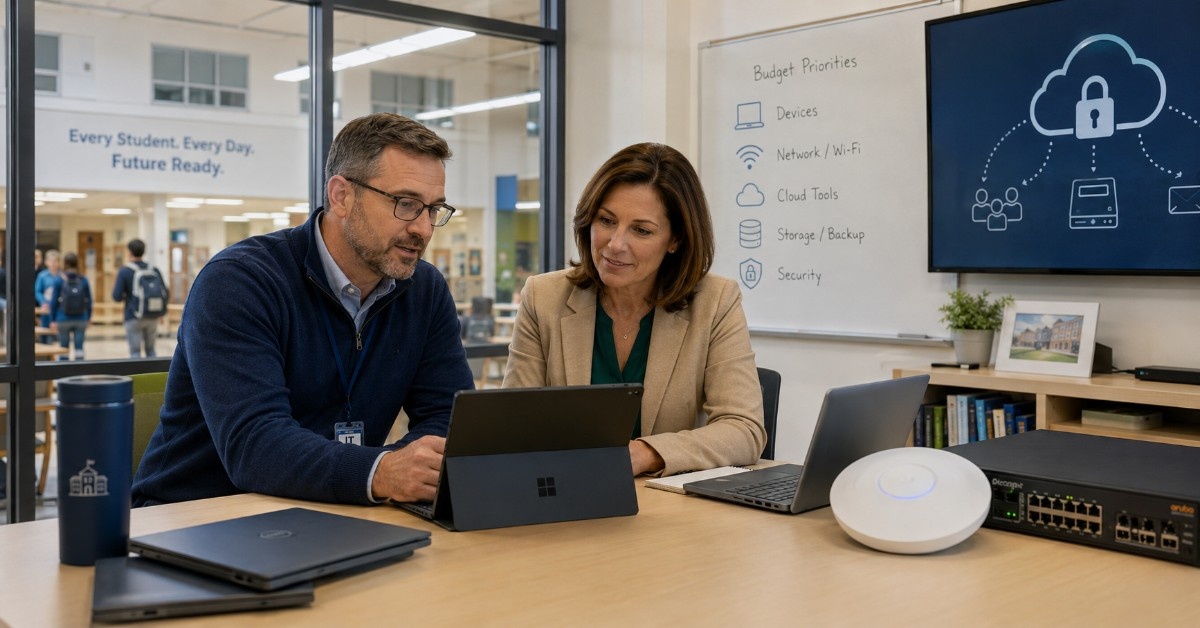
Education IT budget allocation is no longer a simple device plan. Schools, libraries, and SLED buyers now fund laptops, Wi-Fi, switching, internet, cloud tools, cybersecurity, storage, licensing, support, and hardware refresh cycles at the same time.
That creates pressure for IT leaders and procurement teams. A district may need new student devices, but the network may also need PoE switches, access points, cabling, firewall upgrades, and backup storage before those devices can perform well.
For K-12 schools and public libraries, the best budget plan connects technology goals with real infrastructure needs. Buyers need to understand what each category supports, which purchases affect daily operations, and where funding gaps may appear.
A practical plan also helps teams compare new, refurbished, and hard-to-find hardware options. When budgets feel tight, the goal is not only to spend less. The goal is to buy the right equipment, at the right time, through the right sourcing path.
What Is Education IT Budget Allocation?
Education IT budget allocation is the process of dividing technology funds across devices, infrastructure, software, security, services, and support. It helps schools and public agencies decide which purchases are urgent, which can wait, and which need outside funding.
Good allocation starts with business and learning needs. A school may need better classroom Wi-Fi. A library may need more reliable public access. A district may need endpoint refresh, cloud renewals, and a firewall upgrade in the same fiscal year.
Budget planning works best when IT, procurement, finance, and operations teams share one view of priorities. That is why many teams connect their school IT pressure with hardware lifecycle planning before quotes are requested.
| Budget Area | Common Purchases | Planning Question |
| Endpoints | Laptops, desktops, tablets, accessories | Which devices are aging out? |
| Network | Switches, APs, routers, cabling | Can the network support current demand? |
| Cloud and SaaS | Productivity, LMS, storage, management | Which renewals are rising? |
| Security | Firewalls, endpoint tools, monitoring | What risks need funding first? |
| Support | Maintenance, warranties, services | What keeps systems running? |
Where Do Education IT Budgets Usually Go?
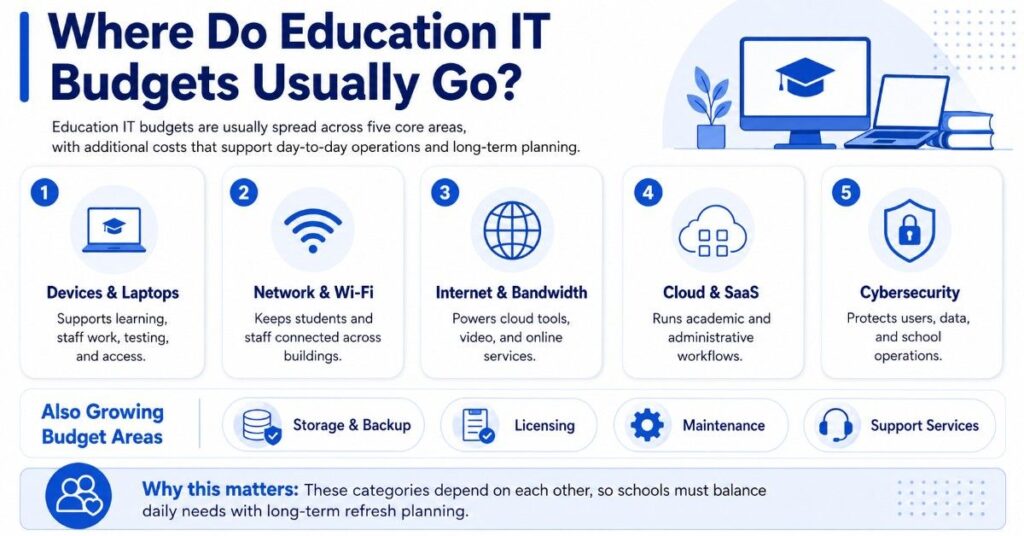
Education IT budgets usually go into five major areas: endpoints, network infrastructure, internet and bandwidth, cloud or SaaS subscriptions, and security. Storage, backup, licensing, maintenance, and support services also take a growing share of the budget.
The challenge is that these categories depend on each other. New laptops need strong wireless. Cloud tools need stable bandwidth. Cybersecurity tools need licensing and staff time. Storage plans need backup hardware, retention rules, and recovery planning.
For many districts and libraries, budget planning is a balancing act between daily operations and long-term refresh. A smart plan looks beyond the purchase price and includes lifecycle, compatibility, lead time, support, and total cost.
| Spend Category | Why It Matters | Common Budget Risk |
| Laptops and devices | Supports learning, staff work, testing, access | Refresh cycles can arrive all at once |
| Switching and wireless | Keeps users connected across buildings | Old gear limits device performance |
| Internet and bandwidth | Supports cloud tools and online services | Usage can grow faster than contracts |
| Cloud and SaaS | Runs daily academic and admin workflows | Renewals may rise each year |
| Cybersecurity | Protects users, data, and operations | Tools need funding, staffing, and support |
How Should Schools Budget for Laptops and Endpoint Refresh?
Laptops and endpoints often take a large share of education IT budgets because they are visible, user-facing, and tied to instruction. Devices may include student laptops, staff laptops, desktops, tablets, carts, monitors, docks, and accessories.
Step 1: Identify Device Needs
- Student laptops for classroom use
- Staff laptops and desktops for administration
- Tablets and shared devices for flexible learning
- Accessories such as docks, monitors, and carts
Step 2: Plan Refresh Cycles
- Avoid large one-time purchases that create future budget spikes
- Spread device purchases across multiple years
- Plan for a 3–5 year lifecycle depending on usage
- Include libraries and public access devices in refresh planning
Step 3: Evaluate Device Lifecycle Factors
- Warranty coverage and support terms
- Repair rates and spare inventory needs
- Battery health and replacement timelines
- Operating system compatibility and updates
Dell, HP, Lenovo, and Apple may all be relevant, depending on standardization, user needs, application support, and procurement rules.
Step 4: Align Devices with Infrastructure
- Assess wireless capacity before adding new devices
- Review DHCP load and identity traffic impact
- Plan for increased cloud usage and support demand
- Ensure switching, cabling, and security can handle growth
Endpoint refresh should not be planned apart from infrastructure. A device project may require a parallel education hardware plan for switches, APs, cabling, and security.
Why Do Network Switching and Wireless Take So Much Budget?
Network switching and wireless often control whether every other IT investment works well. A school can buy strong laptops and cloud tools, but users will still complain if access points are old, switches lack PoE capacity, or cabling limits speed.
Common network refresh purchases include access switches, core switches, wireless access points, controllers, optics, transceivers, stacking cables, power supplies, racks, UPS systems, and patch cabling. These parts must work together as one complete system.
Cisco Catalyst, HPE Aruba, Juniper Mist, Juniper switching, Arista, Extreme, and Meraki may all appear in education network planning. The right choice depends on current standards, building layout, user density, support model, licensing, and lead times.
Network Refresh Planning Checklist
Before requesting quotes, teams should define the current environment and the project goal. A vague request can create missing parts, poor comparisons, and delayed fulfillment.
Key details to collect include:
- Current switch models and port counts
- PoE needs for access points, phones, and cameras
- Wireless coverage gaps
- Cabling condition
- Fiber and uplink needs
- Optics and transceiver requirements
- Licensing and support terms
- Preferred OEMs or approved equivalents
A strong refresh plan connects the bill of materials to real building needs. Districts and libraries often use network upgrade planning to compare performance, budget, compatibility, and sourcing options before purchase.
How Do Internet and Bandwidth Costs Fit Into the Budget?
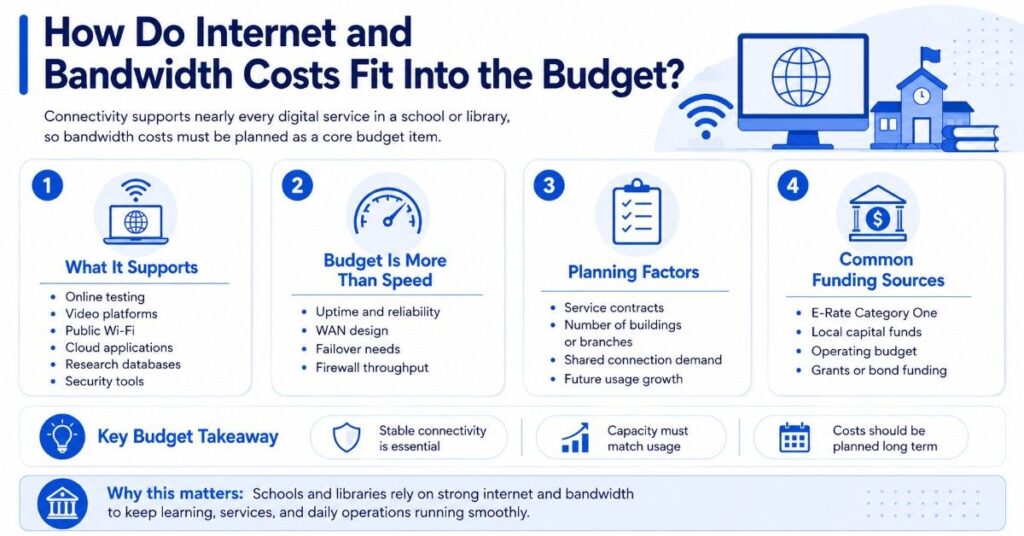
Internet and bandwidth costs support nearly every digital service in a school or library. Online testing, video platforms, public Wi-Fi, cloud applications, research databases, and security tools all depend on stable connectivity.
Bandwidth planning is not only about speed. Teams also need to review uptime needs, WAN design, failover, firewall throughput, service contracts, and how many buildings or branches share the connection.
E-Rate may help with eligible connectivity and some internal network infrastructure. However, E-Rate does not replace the full IT budget. Schools and libraries still need local funds, grants, bond funding, cooperative purchasing, and other procurement vehicles for many technology needs.
| Funding or Budget Source | Common Use | Budget Planning Note |
| E-Rate Category One | Internet access and data transmission | Helps with eligible connectivity |
| E-Rate Category Two | Eligible internal network infrastructure | May support switches, APs, cabling, and related items |
| Local capital funds | Hardware refresh and larger projects | Often used for planned infrastructure cycles |
| Operating budget | Renewals, services, support | May carry cloud, SaaS, and maintenance costs |
| Grants or bond funding | Targeted projects | Useful for gaps outside E-Rate scope |
| Cooperative purchasing | Approved procurement paths | Can simplify buying when rules allow |
Teams should always check current program guidance and local purchasing rules. Catalyst can support hardware sourcing and quote-ready planning, but it should not be treated as an E-Rate legal, filing, or compliance advisor.
How Much Budget Should Go to Cloud and SaaS Tools?
Cloud and SaaS tools often grow quietly inside education IT budgets. Productivity suites, learning management systems, device management, identity tools, security platforms, cloud storage, and digital library services can all become recurring costs.
Here is a simple real-world example to understand the impact:
- A district with 2,000 students and 200 staff may spend:
- $6 per user/month on productivity tools = $15,840/year
- $4 per user/month on LMS = $10,560/year
- $3 per device/month on device management = $7,200/year
- $2 per user/month on security tools = $5,280/year
- Total SaaS spend: ~$38,880 per year
- Over 3 years: ~$116,640 without including storage growth or add-ons
These tools are valuable, but renewals can reduce flexibility. A buyer may have less room for hardware refresh if cloud subscriptions, SaaS seats, and support contracts rise every year.
Cloud planning should include:
- Total license count vs active users
- Unused or duplicate tools across departments
- Contract renewal dates and price increases
- Storage growth (for example, 10 TB to 25 TB in 2 years)
- Integration needs with identity and network systems
- Support and admin overhead
It should also include the infrastructure needed to make cloud tools work well.
A cloud-first district still needs switches, access points, firewalls, backup plans, and endpoint support. For this reason, many teams review cloud security basics while planning network and hardware refresh cycles.
Where Do Storage and Backup Fit Into Education IT Spending?
- Storage and backup are easy to overlook until recovery becomes urgent. Schools and public agencies need to protect files, databases, learning platforms, administrative records, security footage, and operational data.
- Storage budgets may include:
- On-prem storage systems
- Cloud storage services
- Backup appliances
- Drives and controllers
- Memory and servers
- Replication tools
- Archival capacity
- HPE, Dell, Lenovo, and NVIDIA may be relevant where compute, AI, HPC, or high-performance workloads are part of the plan.
- Backup planning should focus on recovery needs, not just capacity. Teams should ask:
- How fast systems must return
- How long data must be kept
- Which systems are most important during an outage
- Storage also affects lifecycle planning. Key considerations include:
- Drives aging over time
- Warranty expiration
- Controller availability
- Growing backup requirements
- Refurbished or hard-to-find components may help support non-critical expansion, spares, or legacy environments when procurement rules allow.
Why Is Cybersecurity a Major Education IT Budget Priority?
Cybersecurity now competes directly with devices, networking, cloud, and storage for budget. Schools and libraries must protect users, networks, data, applications, and public access systems with limited staff and limited funding.
In CoSN’s 2026 U.S. State of EdTech report, 65% of K-12 districts said insufficient budgets were their biggest barrier to effective cybersecurity. That shows why security remains a major education IT budget priority alongside infrastructure and endpoint refresh.
Security spending may include endpoint protection, identity tools, email security, logging, backup, monitoring, firewalls, filtering, vulnerability tools, and incident response support. The right mix depends on risk, staffing, network design, and existing systems.
Fortinet, Cisco, and Palo Alto may be relevant for firewall and security planning. Buyers should compare throughput, subscription costs, support terms, interface needs, logging, VPN use, and fit with the current network.
How Do Firewalls and Network Security Affect Budget Planning?
Firewalls are often both a hardware purchase and a recurring cost. A firewall project may include appliances, security subscriptions, support, logging, installation services, and future renewal costs.
A low-cost firewall can become expensive if it lacks throughput, support, or the right subscriptions. A high-end firewall can also waste funds if it is oversized for the environment. The best choice matches risk, bandwidth, users, and lifecycle needs.
Security Hardware Planning Points
When reviewing firewalls and network security, buyers should define the real workload. This helps compare Fortinet, Cisco, Palo Alto, and other options without relying only on brand preference.
Important planning points include:
- Internet speed and expected growth
- Number of users and devices
- VPN and remote access needs
- Security subscription terms
- Logging and reporting needs
- High availability requirements
- Support coverage
- Replacement timeline
Security planning should connect with the broader cybersecurity roadmap so hardware, subscriptions, staffing, and response needs are not budgeted in separate silos.
How Should Buyers Plan for Licensing, Maintenance, and Support?
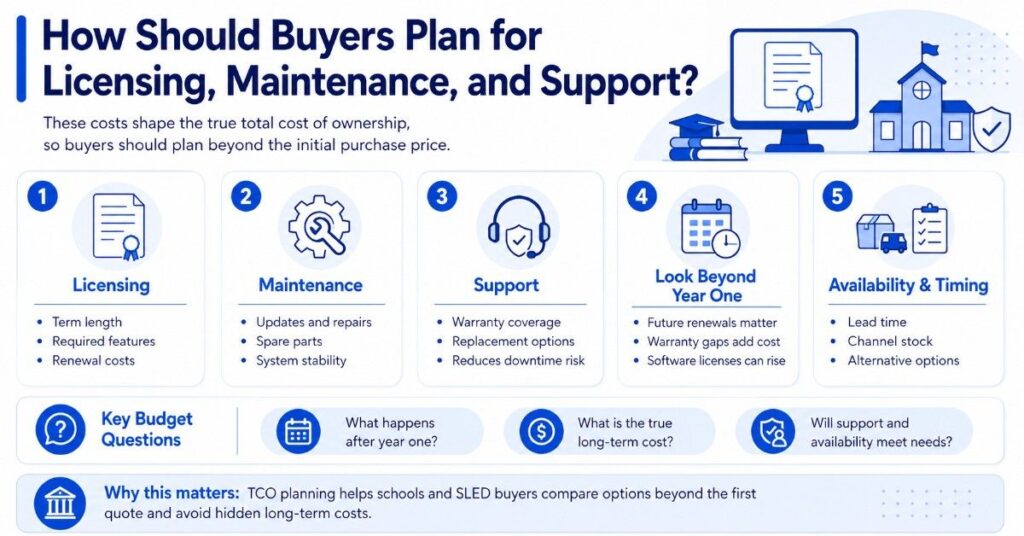
Licensing, maintenance, and support can change the real cost of a purchase. Switches, wireless access points, firewalls, servers, backup systems, and cloud tools may all require renewals or support coverage.
Budget teams should ask what happens after year one. A quote may look affordable at purchase, but future renewals, warranty gaps, support terms, and software licenses can increase total cost over time.
This is where total cost of ownership matters. A procurement team should compare purchase price, licensing, maintenance, support, downtime risk, lead time, and replacement path before choosing hardware or software.
| Cost Type | What to Check | Why It Matters |
| Hardware cost | Unit price, accessories, freight | Shows the starting cost |
| Licensing | Term length, required features, renewals | Affects long-term budget |
| Support | Warranty, TAC, replacement options | Reduces downtime risk |
| Maintenance | Updates, repairs, spare parts | Keeps systems stable |
| Availability | Lead time, channel stock, alternatives | Affects project timing |
Schools and SLED buyers can use TCO planning to avoid choosing equipment based only on the first quote.
How Can E-Rate, Grants, and Local Funds Work Together?
E-Rate can help with eligible connectivity and eligible internal network infrastructure. It may support areas such as internet access, data transmission, switches, wireless access points, routers, cabling, and basic maintenance when program rules allow.
E-Rate does not cover every technology category. Laptops, many SaaS tools, broad cloud subscriptions, staff devices, storage, and many cybersecurity tools often need other funding sources.
A stronger plan layers funds by project type. E-Rate may support parts of a Wi-Fi or network refresh. Local funds may cover laptops. Grants may support security tools. Buyback or trade-in value may help offset future refresh costs.
This distinction is important for procurement. Buyers should separate eligible infrastructure from broader technology needs before building scopes, reviewing quotes, or selecting vendors. A practical E-Rate planning guide can help teams understand the funding role without treating it as the full budget.
What OEMs Should Education and SLED Buyers Compare?
Education and SLED buyers should compare OEMs by fit, support, lifecycle, pricing, availability, and compatibility. The best option depends on the project, not only the brand.
OEM Planning Examples
| Category | Common OEMs | Buyer Considerations |
| Networking and wireless | Cisco, HPE Aruba, Juniper, Arista, Extreme, Meraki | Standards, coverage, PoE, support, lead time |
| Security and firewall | Fortinet, Cisco, Palo Alto | Throughput, subscriptions, logging, support |
| Servers, storage, compute | HPE, Dell, Lenovo, NVIDIA | Workload, warranty, capacity, lifecycle |
| Devices | Dell, HP, Lenovo, Apple | User needs, repair process, OS support |
Cisco Catalyst may fit switching standards in many campus networks. HPE Aruba may fit wireless refresh plans. Juniper Mist may support cloud-managed wireless and network operations. Arista may be relevant for data center or high-performance networking.
Fortinet may be a strong fit for firewall and security projects. Dell, HPE, Lenovo, and NVIDIA may appear in server, storage, compute, AI, or HPC planning where education and public-sector workloads require more capacity.
Vendor-neutral planning does not mean every option is equal. It means the buyer compares each option against the current environment, support needs, lead time, funding source, lifecycle plan, and budget.
How Can Schools Stretch IT Budgets Without Weakening Performance?
Schools, libraries, and SLED teams can stretch budgets by planning refresh cycles earlier, separating must-have from nice-to-have needs, and comparing sourcing paths before the buying window becomes urgent.
New hardware often makes sense for standardization, warranty alignment, long-term lifecycle, and major deployments. Refurbished hardware may help with spares, replacements, labs, non-critical expansion, or hard-to-find legacy parts when rules allow.
Teams should also review buyback or trade-in value for decommissioned hardware. Old switches, access points, servers, storage, optics, and modules may help offset future purchases if they still hold market value.
Budget control should not mean buying underpowered equipment. A better approach is to define the hardware scope, compare OEM and channel options, check availability, and use cost reduction methods that protect performance.
What Should Buyers Define Before Requesting Quotes?
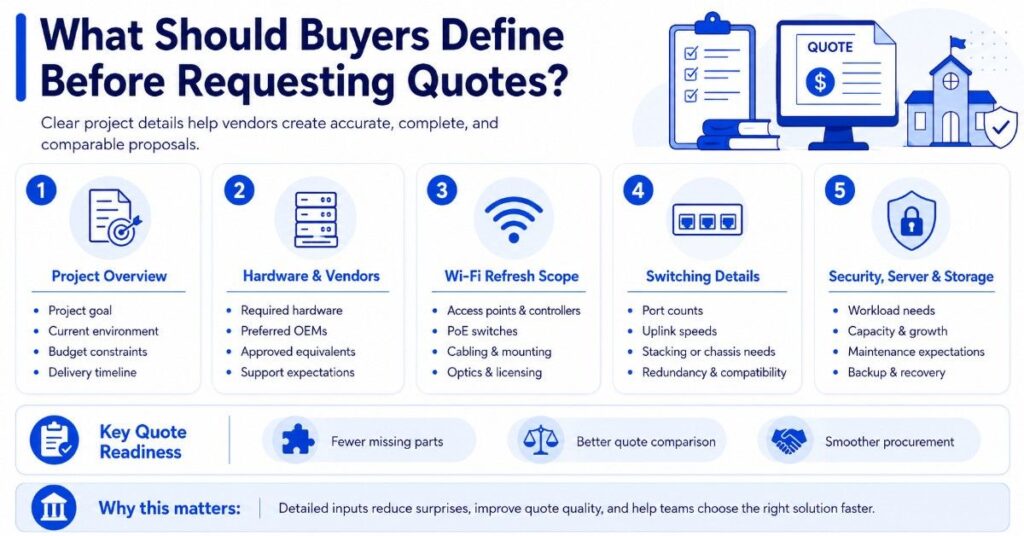
Before requesting quotes, buyers should organize key details into clear categories. This helps vendors build accurate, complete, and comparable proposals.
1. Project Overview
- Define the project goal and expected outcome
- Identify the current environment and limitations
- Confirm funding source and budget constraints
- Set delivery timeline and deployment window
2. Hardware and Vendor Requirements
- List required hardware and components
- Identify preferred OEMs (Cisco, HPE Aruba, Fortinet, etc.)
- Include approved equivalents if applicable
- Define support, warranty, and service expectations
3. Wi-Fi Refresh Scope
A Wi-Fi project should include more than access points. Ensure the scope covers:
- Access points and controllers
- PoE switches to power devices
- Cabling and mounting hardware
- Optics and transceivers
- Licensing and management tools
- Power supplies and support coverage
Missing these components can delay deployment and increase total cost.
4. Switching Project Details
For switching upgrades, document:
- Port counts and user/device density
- Uplink speeds and bandwidth needs
- Stacking or chassis requirements
- Transceivers and optics
- Power supplies and redundancy
- Rack space and physical setup
- Compatibility with existing infrastructure
This level of detail helps vendors deliver accurate and comparable quotes.
5. Security, Server, and Storage Planning
For security, compute, and storage projects, define:
- Workload type and performance needs
- Capacity requirements and future growth
- Support and maintenance expectations
- Subscription and licensing terms
- Backup and recovery requirements
Clear inputs lead to better quotes, smoother procurement, and fewer surprises during fulfillment.
Need Help Comparing New, Refurbished, and Hard-to-Find Hardware?
Education IT budget allocation works best when buyers can turn plans into clear hardware scopes. Catalyst Data Solutions Inc helps schools, libraries, and SLED teams compare OEM options, source products through channel and distribution access, and build quote-ready solutions that align with real infrastructure needs.
Catalyst Data Solutions Inc supports switches, wireless access points, firewalls, optics, servers, storage, devices, spares, and refresh hardware across major OEM ecosystems. Teams can compare new, refurbished, and hard-to-find options based on budget, compatibility, availability, and timeline, while building practical quotes through hardware procurement support.
FAQs About Education IT Budget Allocation
How often should schools refresh laptops?
Many schools plan laptop refresh cycles around three to five years, depending on warranty, battery health, operating system support, repair rates, and instructional needs. The best plan also includes spares, accessories, and support capacity.
Should networking be funded before new devices?
Sometimes, yes. If Wi-Fi, switching, cabling, or firewall capacity is weak, new devices may not perform well. Buyers should check network readiness before funding a large endpoint refresh.
Does E-Rate cover all school technology purchases?
No. E-Rate may help with eligible connectivity and internal network infrastructure, but it does not cover every IT category. Laptops, many cloud tools, storage, and broad cybersecurity platforms often need other funding.
How can libraries plan IT budgets differently from schools?
Libraries often prioritize public Wi-Fi, patron computers, staff workstations, printing systems, internet access, security, and branch connectivity. They may also need flexible plans for public access, privacy, and shared-use devices.
When does refurbished hardware make sense?
Refurbished hardware may make sense for spares, replacements, labs, non-critical expansion, or hard-to-find legacy systems. Buyers should check procurement rules, warranty, testing, support, and funding restrictions before purchase.
What should be included in a network hardware quote?
A strong quote should include the main hardware plus required parts. That may include switches, APs, optics, transceivers, cabling, mounts, licenses, power supplies, support, warranty terms, and delivery timelines.
How can Catalyst Data Solutions help with education IT budget planning?
Catalyst Data Solutions helps schools and SLED buyers translate budget plans into clear hardware scopes. Teams can compare OEM options, check compatibility, and build quote-ready solutions that align with network, device, and infrastructure needs.
Can Catalyst help source hard-to-find or refurbished hardware?
Yes. Catalyst supports sourcing new, refurbished, and hard-to-find hardware across major OEMs. This helps buyers manage budget limits, extend lifecycle planning, and secure replacement parts or expansion equipment without delaying projects.