



Infrastructure decisions can shape performance, cost, support, and flexibility for years. Starting with a preferred vendor may feel efficient, but it can narrow the available options before the workload, technical limits, and long-term risks are fully understood.
Vendor-neutral infrastructure design takes a different approach. It defines business goals, workload needs, security requirements, operational limits, and evaluation criteria before selecting an OEM. Viable server, storage, networking, cloud, and support options are then compared against the same standards.
The goal is not to use as many vendors as possible. A well-designed environment may rely on one OEM or several. What makes the process vendor-neutral is that the final choice is based on documented evidence, clear tradeoffs, lifecycle cost, and the needs of the organization not on a vendor relationship or product preference.
What Vendor-Neutral Infrastructure Design Means
Vendor-neutral design is a documented decision process. It is not a promise to avoid major vendors, and it is not proven by the number of logos on a partner page.
A strong Vendor-agnostic infrastructure service should define requirements before products are shortlisted. It should compare realistic options, disclose commercial relationships, test lifecycle effects, and explain why the selected path fits the buyer’s environment.
The result may still standardize on one OEM. Standardization can reduce support, training, and compatibility work. A multi-OEM design can improve workload fit, sourcing flexibility, or lifecycle options.
The goal is not maximum vendor diversity. The goal is a defensible architecture decision.
Single-Vendor vs. Multi-Vendor Infrastructure: Which Is Better?
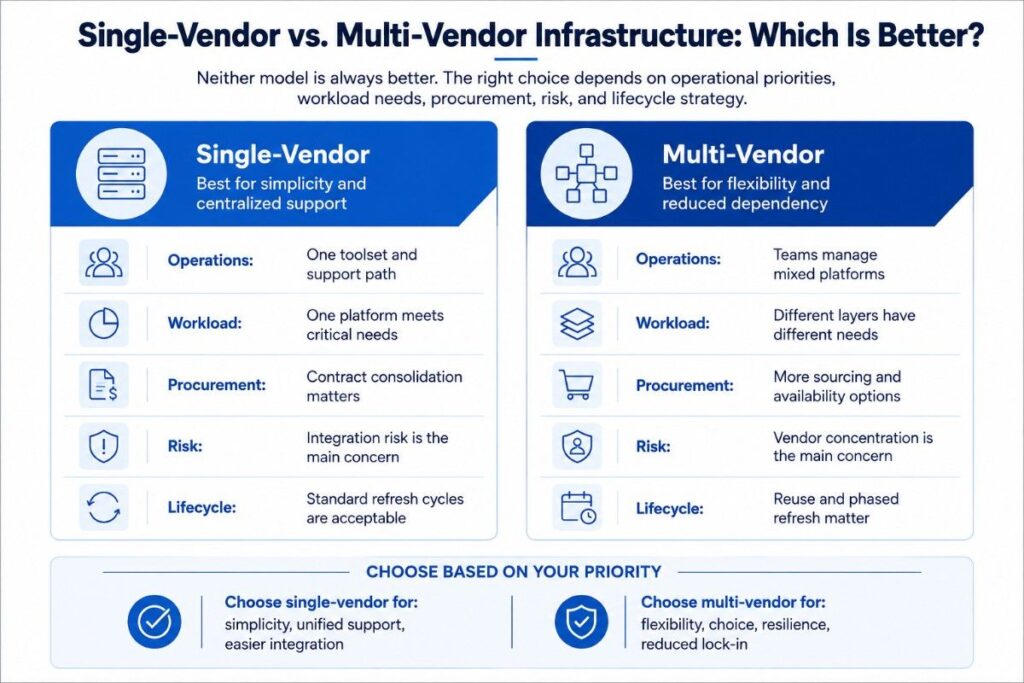
Neither model is always better. The right choice depends on workload, operating skills, service needs, risk, budget, and lifecycle.
A single-vendor environment can reduce integration work and create one support path. A multi-vendor environment can provide more choice and reduce dependence on one product roadmap. Industry and research comparisons frame this as a tradeoff between integrated simplicity and best-of-breed flexibility.
| Decision factor | Single-vendor may fit when | Multi-vendor may fit when |
| Operations | One toolset and support path matter most | Teams already manage mixed platforms |
| Workload | One platform meets all critical needs | Different infrastructure layers have different needs |
| Procurement | Contract consolidation is a priority | Availability or lead time requires more options |
| Risk | Integration risk is the main concern | Vendor concentration is the main concern |
| Lifecycle | Standard refresh cycles are acceptable | Reuse, lifecycle extension, or phased refresh matters |
Multi-vendor IT infrastructure solutions should include another OEM only when it creates a clear technical, operational, commercial, or lifecycle benefit.
7-Step Multi-OEM Evaluation Framework
Step 1: Define Workload and Business Outcomes
Define the applications, users, data, availability, growth, recovery needs, and business impact before discussing products.
For AI infrastructure, clarify whether the workload involves experimentation, inference, fine-tuning, or training.
Ask:
- What must the environment support?
- Which results are mandatory?
- What downtime is acceptable?
- How quickly must the environment scale?
- Which security or data-location rules apply?
- What budget and delivery limits cannot change?
- What skills does the internal team already have?
These answers form the basis for every later comparison.
Step 2: Document the Current Environment and Hard Constraints
Map the existing servers, storage, networks, facilities, software, support status, dependencies, and remaining useful life.
Hard constraints may include:
- Power and cooling capacity
- Rack density
- Data location
- Software licensing
- Maintenance windows
- Procurement rules
- Budget cycles
- Staff capacity
Existing assets should be evaluated by the role they can still perform rather than treated as permanent or disposable.
A system may remain useful for backup, testing, preprocessing, edge work, or a lower-risk workload even when it no longer fits critical production use.
When cloud is a possible destination, an Enterprise cloud migration strategy should compare placement based on workload, latency, data, control, cost, and operating needs.
Step 3: Set Success Metrics and Decision Weights
Set the score before naming vendors. This reduces preference bias and makes the final recommendation easier to review.
Common criteria include:
- Performance and capacity
- Resilience and recovery
- Compatibility
- Lead time
- Deployment risk
- Support coverage
- Security
- Lifecycle cost
- Energy use
- Expansion options
- Exit value
Weights should reflect the project.
A regulated workload may prioritize evidence, security controls, chain of custody, and responsibility boundaries. A rapid capacity project may prioritize product availability and deployment risk.
Architecture, operations, security, procurement, finance, and business owners should approve the weights before the shortlist is built.
Step 4: Identify Viable Architecture Patterns
Compare architecture paths before comparing products.
Possible paths include:
- Extending the current environment
- Replacing only a constrained layer
- Standardizing on a new platform
- Using a mixed-generation design
- Moving selected workloads to cloud or colocation
- Building a hybrid environment
- Phasing the change across several budget cycles
Each path must meet the same mandatory requirements. If an architecture cannot meet a hard requirement, remove it before product scoring begins.
Relationships with Strategic technology partners can expand the available options, but partner status does not prove technical fit.
Every path still needs to pass the workload, integration, security, support, and lifecycle tests.
Step 5: Compare OEM Paths Across Shared Criteria
Build a short list of viable OEM combinations. Remove any option that fails a mandatory requirement before comparing price.
A Vendor-agnostic hardware procurement process may consider new, prior-generation, refurbished, constrained, or hard-to-find equipment when warranty, licensing, testing, support, and compatibility are clear.
For each path, evaluate:
- Workload fit
- Integration with the current environment
- Product availability and lead time
- Warranty and licensing
- Support and spare-parts access
- Required operating skills
- Lifecycle cost
- Expansion and replacement difficulty
A useful shortlist contains a few viable choices with visible tradeoffs. It is not a long product catalog.
Step 6: Validate Compatibility, Operations, Security, and Support
A design is not viable simply because each component works on paper.
Validate:
- Firmware and drivers
- Software support
- Network protocols and optics
- Storage and data paths
- Hypervisor or platform compatibility
- Management and monitoring tools
- Identity, segmentation, and logging
- Backup and recovery
- Patching and updates
- Spares and escalation
Also define ownership.
State what the customer owns, what the integrator owns, what the OEM owns, and where a security, cloud, compliance, or maintenance partner enters.
Step 7: Document the Decision, Alternatives, and Exit Plan
Record the requirements, weights, scores, assumptions, risks, approvals, and reason for the selection.
Explain:
- Why the selected path won
- Why the other paths were not selected
- When another option might become better
- Which assumptions could change the recommendation
- Which risks must be tracked
- Who approved the decision
Add support milestones, expected useful life, spare strategy, upgrade paths, redeployment options, data-handling requirements, residual value, and disposition plans.
Vendor neutrality is proven by the decision record, not by the number of OEMs selected.
Criteria for Evaluating Server, Storage, and Networking Vendors
Specifications are only part of the decision. The evaluation must connect architecture to deployment, operations, support, and retirement.
| Criterion | What to evaluate | Evidence to request |
| Workload fit | Capacity, latency, throughput, scaling | Sizing method and assumptions |
| Compatibility | Software, protocols, optics, and drivers | Compatibility matrix and test plan |
| Deployment risk | Lead time, migration, and change windows | Delivery and rollback plan |
| Support | Warranty, spares, escalation, and coverage | Written terms and ownership map |
| Security | Identity, logging, patching, and recovery | Security design and update policy |
| Lifecycle cost | Purchase, power, support, labor, and retirement | Cost model with ranges |
| Flexibility | Expansion, reuse, and interoperability | Upgrade and replacement path |
For servers, review processing, memory, expansion, firmware, power, and support life.
For storage, review latency, protection, capacity, replication, growth, and migration.
For networking, review topology, speed, optics, telemetry, security, and operating skills.
The strongest individual products do not always create the strongest complete system. Server, storage, and network layers must be tested together.
How to Compare Multiple Infrastructure OEMs
Use a weighted scorecard, but apply pass-or-fail gates first.
A path that fails a mandatory security, compatibility, or support requirement should not remain in the scoring model.
A sample weighting may include:
- Workload and performance: 25%
- Compatibility and integration: 15%
- Availability and deployment risk: 15%
- Support and operations: 15%
- Lifecycle cost: 15%
- Security and governance: 10%
- Exit value and flexibility: 5%
Add evidence beside every rating. Then run a separate risk review so a high average does not hide a serious licensing, service, software, or facility issue.
Weights must change by project. An AI inference platform may prioritize the data path, network fabric, power, cooling, and operations. A public-sector refresh may prioritize documentation, procurement timing, lifecycle extension, and service coverage.
A complete cost model should include more than purchase price. Data center cost optimization strategies should consider support, energy, facilities, operations, downtime, useful life, and retirement.
Questions to Ask a Vendor-Neutral Infrastructure Consultant

Ask questions that expose the decision method:
- How do you define requirements before selecting vendors?
- Which criteria are fixed before OEM discussions begin?
- How do you disclose partner levels and incentives?
- When would you recommend one OEM instead of several?
- How will you validate compatibility with our environment?
- How do you include support, energy, useful life, and recovery?
- Who owns architecture, deployment, security, and escalation?
- What will the scorecard, decision record, and exit plan contain?
Request sample deliverables.
A scorecard, responsibility map, and decision record reveal whether the recommendation follows a repeatable process or rests mainly on opinion.
What the Final Design Package Should Contain
A vendor-neutral engagement should leave the buyer with more than a bill of materials.
The final package should include:
- A current-state inventory and constraint map
- A clear requirements document
- Approved decision criteria and weights
- Two or more viable architecture paths when appropriate
- A comparison scorecard with supporting evidence
- Compatibility, support, and security validation
- A responsibility and escalation map
- A phased implementation plan
- Lifecycle assumptions and an exit strategy
- A record of the selected path and rejected alternatives
These outputs allow architecture, operations, security, finance, procurement, and leadership teams to review the same decision.
Designing Vendor-Agnostic Infrastructure for AI Readiness
AI readiness is a system issue, not a GPU shopping task.
The workload and data shape compute needs. Network and storage affect data flow. Power and cooling determine whether the design can run. Software, security, monitoring, and support determine whether a pilot can move into production.
An AI-readiness assessment should review:
- Workload type, size, latency, and growth
- Data sources, movement, quality, and governance
- Compute and accelerator options
- Network fabric and storage paths
- Power, cooling, rack density, and resilience
- Platform software and observability
- Identity, segmentation, backup, and recovery
- Operations, support, scaling, and lifecycle plans
Existing assets may remain useful when they can perform a defined role safely.
The goal is not to preserve every component. It is to identify the real bottlenecks, replace constrained layers, and reuse the rest where risk and economics support it.
Plan Support and Lifecycle Before Purchase
A platform may fit today but create future cost if spares are limited, firmware access is restricted, support is unclear, or migration is difficult.
A Multi-vendor hardware maintenance plan should define coverage, parts, service hours, update access, escalation, and ownership across each platform.
Lifecycle planning should address:
- Support and end-of-service milestones
- Spare and replacement strategies
- Energy and facility effects
- Upgrade and expansion paths
- Redeployment opportunities
- Data sanitization and chain of custody
- Residual value and disposition
- The next refresh or exit decision
Lifecycle planning does not require a perfect forecast. It requires clear assumptions, owners, and review dates.
Common Mistakes to Avoid
| Common mistake | Why it creates risk | Better approach |
| Choosing a brand before defining needs | The design becomes a defense of a product | Fix outcomes, constraints, and weights first |
| Assuming vendor-neutral means multi-vendor | Extra vendors can add cost and complexity | Add an OEM only when its value is clear |
| Comparing purchase price alone | Support, power, labor, and exit costs stay hidden | Compare lifecycle cost and risk |
| Scoring an option that fails a mandatory requirement | A strong average can hide a critical weakness | Use pass-or-fail gates before scoring |
| Treating compatibility as paperwork | Integration failures may appear during deployment | Test software, firmware, protocols, and support |
| Using “unbiased” without governance | Commercial influence may remain hidden | Disclose relationships and audit the criteria |
| Ignoring the exit plan | Lock-in and retirement costs can increase | Plan migration, recovery, and disposition |
| Leaving ownership unclear | Incidents can stall between providers | Publish a responsibility and escalation map |
Build an Infrastructure Decision You Can Defend
At Catalyst Data Solutions Inc, we begin with the workload, existing environment, technical limits, risk, and lifecycle goals. We set the evaluation criteria before selecting an OEM and compare viable server, storage, networking, cloud, sourcing, and support paths against the same requirements.
We document the tradeoffs, test compatibility, define responsibility boundaries, and explain why the selected design won.
Our process can produce a current-state assessment, weighted scorecard, multi-OEM comparison, phased implementation plan, lifecycle assumptions, and exit strategy.
By connecting architecture, procurement, deployment, maintenance, and asset recovery, we help teams avoid isolated purchases that create future support or integration problems.
Organizations that need a clear, evidence-based comparison can Request a multi-OEM architecture review based on their infrastructure requirements and intended outcomes.
FAQs
1. Open Standards vs. Proprietary Platforms: Which Reduces Lock-In?
Open standards usually make integration and future replacement easier. Proprietary platforms may provide tighter integration and simpler support. Compare data portability, APIs, licensing, supported protocols, and migration costs before deciding.
2. OEM Support vs. Third-Party Maintenance: Which Is Better?
OEM support is often best when official firmware, patches, and engineering escalation are essential. Third-party maintenance may suit stable, post-warranty equipment. Many environments use both models based on workload risk and platform age.
3. Can vendor-neutral infrastructure still use one vendor?
Yes. Vendor-neutral design does not require multiple vendors. It means the requirements and evaluation criteria are set before an OEM is selected. If one vendor provides the best overall fit, a single-vendor design may still be the right choice.
4. How do I know whether a multi-vendor design is worth the added complexity?
Compare the added flexibility against the cost of integration, support, training, and management. A multi-vendor design is most useful when it improves workload fit, availability, lifecycle value, or risk control enough to justify the extra operational effort.
5. New vs. Refurbished Enterprise Hardware: Which Should You Buy?
New equipment may suit performance-sensitive systems that need long OEM support. Refurbished or prior-generation hardware can support labs, spares, lifecycle extension, and lower-risk workloads when testing, warranty, licensing, and condition are verified.