



OEM IT hardware sourcing can help schools, libraries, and SLED buyers make smarter buying decisions when budgets are tight, timelines are short, or equipment is hard to find. Instead of relying on one buying path, teams can compare OEM direct options, channel partners, distributor-backed inventory, and refurbished or hard-to-find hardware.
This matters during network refreshes, Wi-Fi upgrades, firewall replacements, server projects, and other infrastructure plans. A clear sourcing strategy helps buyers improve pricing, check availability, reduce lead-time risk, and choose hardware that fits the current environment and long-term lifecycle.
What Is OEM IT Hardware Sourcing?
OEM IT hardware sourcing means buying manufacturer-backed technology through the most practical and reliable supply paths. These paths can include OEM direct sales, authorized resellers, VARs, distributors, and trusted secondary-market providers.
For schools and SLED buyers, this usually covers switches, wireless access points, routers, firewalls, servers, storage, optics, transceivers, licenses, support, and replacement parts. The goal is not just to choose a brand, but to get the right equipment that fits budget, timing, and long-term use.
How Do OEM Channels Work for Schools and SLED Buyers?
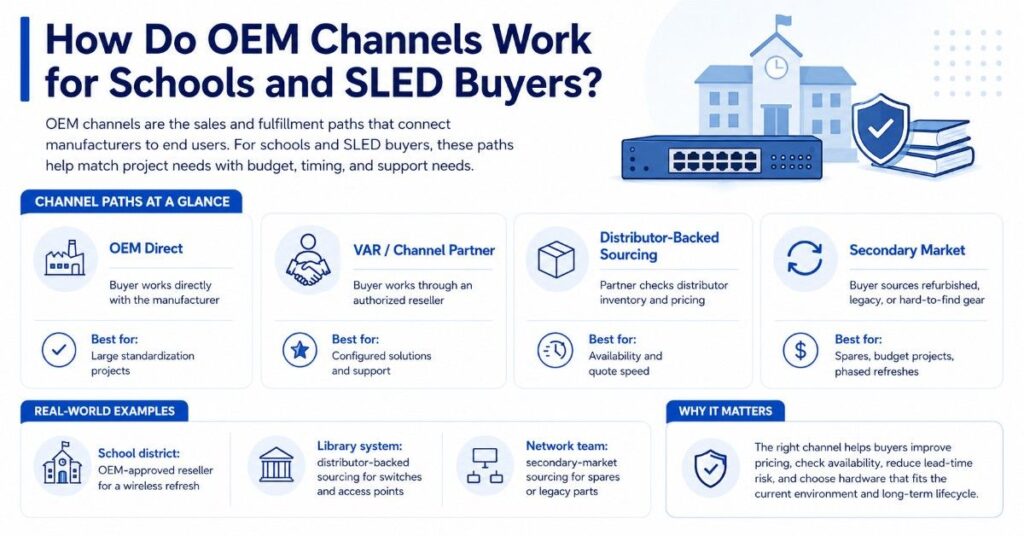
OEM channels are the sales and fulfillment paths that connect manufacturers to end users. In IT hardware, these paths often include direct OEM sales teams, distributors, VARs, system integrators, and sourcing partners.
A school district may buy through an OEM-approved reseller for a large wireless refresh. A library system may use distributor-backed sourcing for switches and access points. A network team may use secondary-market sourcing for spares, legacy parts, or hard-to-find hardware.
Schools with active infrastructure plans often align sourcing with K-12 technology needs before finalizing a bill of materials. This helps buyers avoid quotes that look complete but miss licenses, optics, mounting kits, power supplies, or support coverage.
| OEM Channel Path | How It Works | Best Fit |
| OEM direct | Buyer works directly with the manufacturer | Large standardization projects |
| VAR or channel partner | Buyer works through an authorized reseller | Configured solutions and support |
| Distributor-backed sourcing | Partner checks distributor inventory and pricing | Availability and quote speed |
| Secondary market | Buyer sources refurbished, legacy, or hard-to-find gear | Spares, budget projects, phased refreshes |
What Does Distribution Access Mean in IT Hardware Procurement?
Distribution access means a sourcing partner can check inventory, pricing, and availability through major IT hardware distributors. This can give buyers a broader view of what is actually available.
A distributor may carry hardware from Cisco, HPE Aruba, Fortinet, Juniper, Arista, Dell, and other OEMs. Availability can change quickly based on demand, allocations, lead times, and product lifecycle status.
Distribution access helps buyers avoid planning around products that are delayed, constrained, or near end of sale. It also helps procurement teams compare equivalent options before they commit to one hardware path.
According to Gartner’s April 2026 forecast, global device spending is projected to reach about $856 billion in 2026. That reinforces why schools and SLED buyers should use OEM channels to improve pricing, availability, and lifecycle support before replacement cycles become urgent.
Why Do Channel Partners Matter When Buying IT Hardware?
Channel partners matter because they help buyers connect project needs with real hardware options. They can compare OEM pricing, check distribution inventory, identify compatible parts, and help build quote-ready bundles.
For schools and libraries, this can reduce confusion during refresh planning. A Wi-Fi upgrade may require access points, PoE switches, licenses, cabling, optics, mounts, controllers, and support. Missing one part can delay the whole project.
A strong channel partner can also help buyers think beyond the first purchase. They can support lifecycle planning, refresh timing, warranty alignment, spare strategy, and replacement options for older systems.
Common SLED Hardware Needs
Schools and libraries often need more than one product type for a complete project. A network refresh may include switching, wireless, firewall, routing, cabling, optics, and edge infrastructure.
Buyers planning network modernization should compare the full environment before choosing a source. A lower hardware quote may not save money if it creates compatibility gaps or support issues.
| Project Need | Common Hardware Scope | OEMs Often Compared |
| Wi-Fi refresh | Access points, PoE switches, licenses, mounts | HPE Aruba, Cisco, Juniper Mist |
| Firewall upgrade | Firewall appliances, support, subscriptions | Fortinet, Cisco, Juniper |
| Switching upgrade | Access switches, core switches, optics, stacking | Cisco Catalyst, HPE, Juniper, Dell |
| Data center refresh | Switching, servers, storage, transceivers | Arista, Dell, Cisco, HPE |
| Library public Wi-Fi | APs, switching, cabling, management tools | HPE Aruba, Cisco, Juniper Mist |
Is Buying Direct From the OEM Always the Best Path?
Buying direct from the OEM can be useful, especially for large standardization projects or when a buyer needs manufacturer-led planning. Direct OEM engagement can help with roadmaps, standards, support programs, and product direction.
But direct buying is not always the only or best path. A channel partner may offer better visibility into distributor stock, faster quote building, bundle support, or alternative sourcing options.
Some buyers also need phased purchasing, refurbished spares, or replacement parts for older environments. In those cases, a strict OEM-direct path may not solve the whole problem.
Why Do Availability, Lead Time, and Pricing Vary by Source?
Availability, lead time, and pricing vary because each channel sees a different part of the supply chain. OEM teams, distributors, VARs, and secondary-market suppliers may not have the same inventory or pricing position.
A product may be available from one distributor but delayed through another. A firewall model may have a support bundle available, while a specific switch power supply or optic may be constrained.
Pricing also changes based on volume, contract terms, registration, stock position, product lifecycle, and demand. Gartner has also reported pressure from memory and component costs, which can affect device prices and replacement cycles.
How Should Schools Compare OEM Direct, Channel, Distribution, and Refurbished Sources?
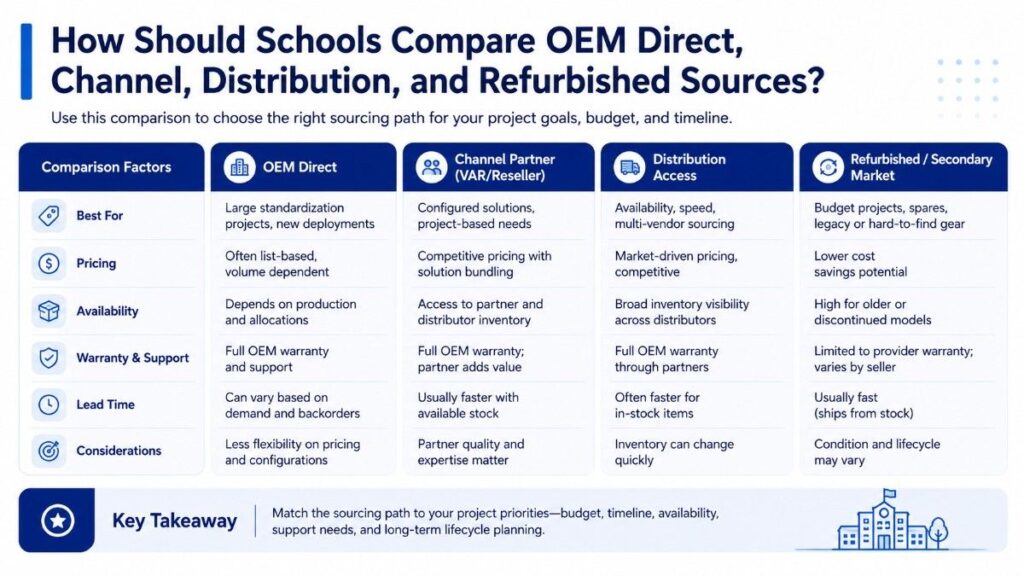
Schools and SLED buyers should compare sourcing options based on fit, not habit. The best path depends on project size, urgency, support needs, lifecycle stage, and budget limits.
A district may use OEM direct input for standards, a VAR for configuration, distributor-backed sourcing for availability, and refurbished hardware for spares or non-critical expansion. These paths can support different parts of the same hardware plan.
Buyers reviewing new vs refurbished hardware should separate mission-critical infrastructure from spare, lab, and lifecycle-extension needs. This keeps sourcing practical and reduces unnecessary risk.
| Sourcing Path | Strengths | Watchouts |
| OEM direct | Strong roadmap input and manufacturer alignment | May not show every fulfillment option |
| VAR/channel partner | Better configuration and project support | Quality depends on partner experience |
| Distributor-backed sourcing | Strong inventory and pricing visibility | Stock can change quickly |
| Refurbished/secondary market | Cost control and hard-to-find options | Must verify condition, warranty, and fit |
| Mixed sourcing | Flexible for phased projects | Requires clear scope control |
How Can Channel Partners Help During Hardware Shortages?
Channel partners help during shortages by checking multiple supply paths instead of relying on one route. They can compare OEM lead times, distributor stock, compatible alternatives, and available replacement models.
This matters when a school has a summer refresh window or a library branch must stay open during upgrades. Hardware delays can affect install schedules, contractor timing, staff training, and service continuity.
A partner with channel and distribution access can also help buyers decide whether to wait, substitute, phase the project, or use spares. This keeps the project moving without guessing.
Why Do Compatible Alternatives Matter in Network Refreshes?
Compatible alternatives matter because the first-choice model may not be available, affordable, or ideal for the full project. A buyer may need another switch, access point, optic, firewall appliance, or server configuration that still meets the technical need.
For example, a district using Cisco Catalyst switching may compare similar port counts, PoE budgets, and stacking needs. A library using HPE Aruba wireless may need APs that match controller, licensing, and coverage requirements.
Compatible does not mean random. It means the option fits the environment, performance goal, support model, and procurement need. Buyers planning campus Wi-Fi upgrades should confirm compatibility before accepting substitutions.
What Is the Difference Between OEM and Third-Party Sourcing?
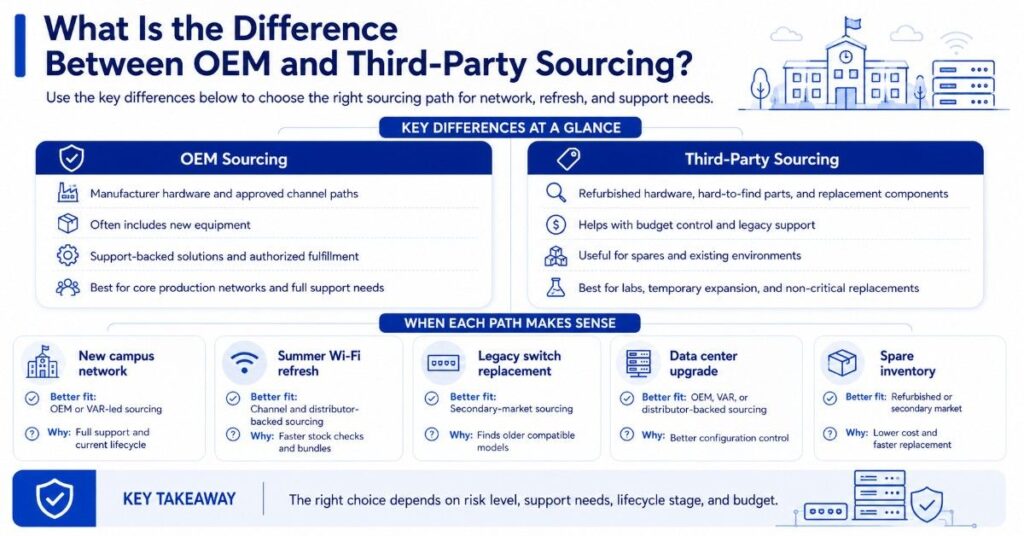
OEM sourcing focuses on manufacturer hardware and approved channel paths. It may include new equipment, support-backed solutions, and authorized fulfillment through partners or distributors.
Third-party sourcing can include refurbished hardware, hard-to-find parts, secondary-market supply, and replacement components. It can help when buyers need budget control, legacy support, or spare equipment for existing systems.
The right choice depends on risk level. Core production networks may need new hardware and full support. Labs, spares, temporary expansion, and non-critical replacements may allow more flexible sourcing.
| Buying Scenario | Better Fit | Why It Works |
| New campus network | OEM or VAR-led sourcing | Full support and current lifecycle |
| Summer Wi-Fi refresh | Channel and distributor-backed sourcing | Faster stock checks and bundles |
| Legacy switch replacement | Secondary-market sourcing | Finds older compatible models |
| Data center upgrade | OEM, VAR, or distributor-backed sourcing | Better configuration control |
| Spare inventory | Refurbished or secondary market | Lower cost and faster replacement |
What Risks Should SLED Buyers Avoid?
SLED buyers should avoid quotes that look low but miss required parts. Switches without optics, APs without licenses, firewalls without support, or servers without correct memory can create hidden cost and delays.
Buyers should also avoid assuming every product is current, supported, or easy to source. End-of-sale, end-of-support, region limits, and stock shortages can affect the final plan.
Teams working through hardware procurement support can reduce these risks by confirming scope, availability, compatibility, and fulfillment timing before purchase approval.
Common risks include:
- Choosing price without checking compatibility
- Missing optics, transceivers, licenses, or power supplies
- Buying hardware near end of support
- Ignoring lead times before install windows
- Assuming direct OEM buying is the only option
- Treating refurbished gear like new gear
- Mixing sources without a clear warranty plan
- Buying too late in the budget cycle
What Action Checklist Should Buyers Use Before Requesting Quotes?
A strong quote starts with a clear scope. Schools and libraries should define the environment, project goal, preferred OEMs, required parts, support needs, and timing before asking for pricing.
This helps vendors and sourcing partners build better quotes. It also helps procurement teams compare options fairly across Cisco, HPE Aruba, Fortinet, Juniper, Arista, Dell, and other OEMs.
Quote-Ready Details to Gather
Before requesting quotes, collect the technical and procurement details that affect pricing and availability. A clear request helps avoid missing parts, wrong models, and poor comparisons.
For budget-sensitive projects, buyers should also look for ways to reduce network costs without weakening performance, support, or lifecycle planning.
| Checklist Item | Why It Matters |
| Current hardware list | Shows what must be replaced, reused, or matched |
| Project goal | Keeps the quote tied to the real need |
| Preferred OEMs | Helps compare Cisco, HPE Aruba, Fortinet, Juniper, Arista, and Dell |
| Port and PoE needs | Prevents underpowered switch choices |
| Wireless coverage needs | Supports better AP planning |
| Optics and cabling | Reduces missing-part delays |
| Support requirements | Aligns warranty and service expectations |
| Install timeline | Helps compare lead time risk |
| Budget range | Supports practical sourcing options |
| Spare strategy | Improves long-term support planning |
How Should Buyers Use OEM Channels in E-Rate-Related Projects?
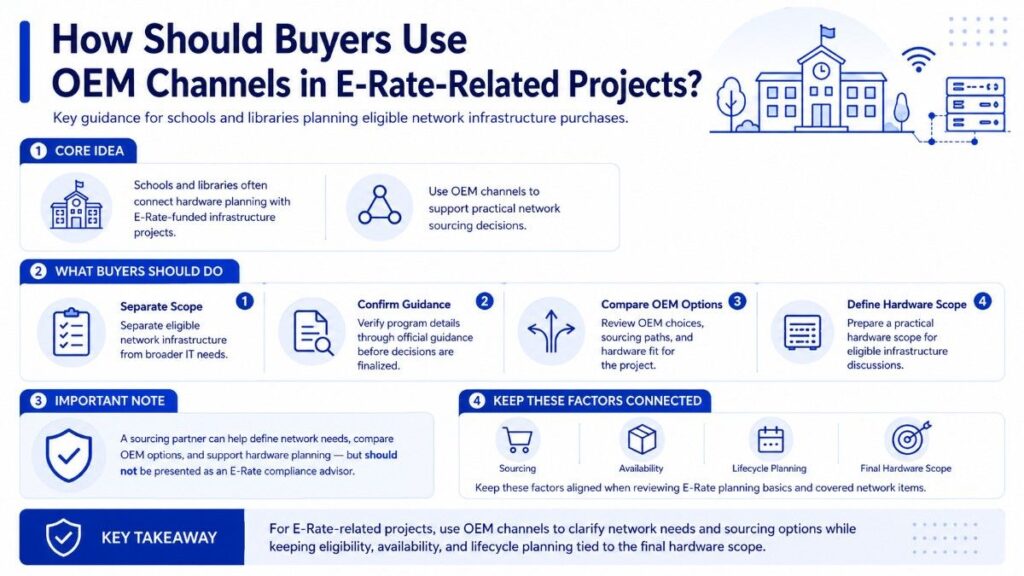
Some schools and libraries connect network hardware planning with E-Rate-funded infrastructure projects. In those cases, buyers should separate eligible network infrastructure from broader IT needs and confirm program details through official guidance.
Catalyst can support in hardware sourcing and help define network needs, compare OEM options, and prepare practical hardware scopes for eligible infrastructure discussions.
Teams reviewing E-Rate planning basics or covered network items should keep sourcing, availability, and lifecycle planning connected to the final hardware scope.
Need Help Comparing New, Refurbished, and Hard-to-Find Hardware?
Catalyst Data Solutions Inc helps schools, libraries, and SLED buyers translate network needs into practical hardware scopes. Teams can compare Cisco Catalyst, HPE Aruba, Fortinet, Juniper Mist, Juniper switching, Arista, Dell, new, refurbished, and hard-to-find options based on budget, timing, and compatibility.
Catalyst can help buyers check channel and distribution availability, build quote-ready bundles, review compatible alternatives, and support fulfillment planning for eligible infrastructure projects. The goal is simple: help public-sector teams source better hardware without guessing.
FAQs
Is OEM IT hardware sourcing only for new equipment?
No. OEM IT hardware sourcing can include new hardware, current models, replacement parts, and approved channel options. It may also connect to refurbished or secondary-market sourcing when buyers need spares, legacy support, or budget-sensitive alternatives.
Can schools buy refurbished hardware for network projects?
Yes, in some cases. Refurbished hardware can work well for spares, labs, non-critical expansion, or legacy replacements. Buyers should confirm condition, compatibility, warranty, support needs, and procurement rules before choosing refurbished equipment.
Why would a school use a channel partner instead of buying direct?
A channel partner can compare OEM options, check distributor inventory, build complete bundles, and identify practical alternatives. This can help schools avoid long lead times, missing parts, and narrow pricing visibility.
What hardware should buyers check most carefully before purchasing?
Buyers should check switches, access points, firewalls, optics, transceivers, licenses, support contracts, power supplies, and mounting hardware. These items often affect compatibility, install timing, and long-term support.
How do SLED buyers avoid overpaying for IT hardware?
SLED buyers can avoid overpaying by comparing multiple sourcing paths, checking distributor-backed availability, validating alternatives, and reviewing lifecycle status. Price should be compared with lead time, support, warranty, and compatibility.
Which OEMs are common in school and library infrastructure projects?
Common OEMs include Cisco, HPE Aruba, Fortinet, Juniper, Arista, and Dell. Cisco Catalyst switches, HPE Aruba wireless, Fortinet firewalls, Juniper Mist access points, Juniper switching, Arista networking, and Dell infrastructure may fit different project needs.
When should schools start hardware sourcing for a refresh?
Schools should start before the buying window gets tight. Early sourcing gives IT and procurement teams more time to define scope, compare OEMs, check availability, review budgets, and avoid rushed purchasing decisions.