



School IT project funding rarely comes from a single source. A network refresh, Wi-Fi upgrade, cybersecurity project, server replacement, or laptop refresh often requires several funding paths working together.
For K–12 schools, libraries, and SLED buyers, the goal is not only to secure funding. The goal is to match each funding source to the right project need, reduce out-of-pocket costs, and avoid gaps in hardware planning, sourcing, and procurement.
A strong funding stack can combine E-Rate, local capital budgets, operating budgets, bond funding, cybersecurity grants, cooperative purchasing, state contracts, equipment buyback value, phased purchasing, and strategic hardware sourcing.
What Is a School IT Project Funding Stack?
A school IT project funding stack is a planned mix of funding sources used to support one technology project or a group of related projects. It helps buyers decide what each funding source should cover before quotes, approvals, and purchases begin.
Many teams start with school E-Rate basics, then add local funds, grants, or sourcing strategies to cover items outside the program scope. This approach gives IT and procurement teams a cleaner plan.
| Funding Source | Best-Fit Use | Common Buyer Need |
| E-Rate | Eligible connectivity and network infrastructure | Internet, Wi-Fi, switches, cabling |
| Local capital budget | Large hardware refreshes | Network, server, storage, security hardware |
| Operating budget | Ongoing services and renewals | Licenses, support, subscriptions |
| Bond funding | Major infrastructure programs | Campus-wide modernization |
| Cybersecurity grants | Security improvement goals | Firewalls, monitoring, logging |
| Cooperative purchasing | Contract-based buying | Faster vendor and pricing access |
| Buyback or trade-in | Cost recovery | Decommissioned switches, APs, servers |
| Phased purchasing | Multi-year planning | Projects with budget timing gaps |
Why Is E-Rate Only One Part of School IT Project Funding?
E-Rate can help reduce the cost of eligible internet access, data transmission, and internal network infrastructure. It is useful for Wi-Fi refreshes, switching upgrades, cabling, and related connectivity projects.
E-Rate does not replace the full IT budget. Teams reviewing eligible network services still need separate plans for laptops, security tools, servers, storage, backup hardware, software, staff devices, and support needs.
This article focuses on funding and hardware planning. Schools and libraries should use official program guidance and local procurement rules for eligibility, bidding, forms, and filing steps.
Which Funding Sources Cover Different School IT Needs?
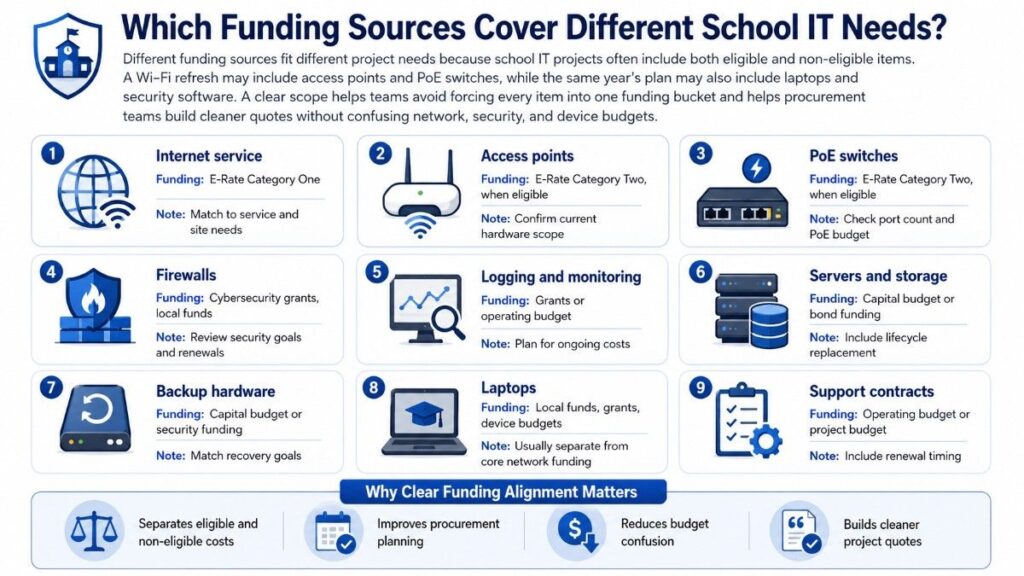
Different funding sources fit different project needs because school IT projects contain both eligible and non-eligible items. A Wi-Fi refresh may include access points and PoE switches, while the same year’s plan may also include laptops and security software.
A clear scope helps teams avoid forcing every item into one funding bucket. It also helps procurement teams build cleaner quotes for K-12 hardware planning without confusing network, security, and device budgets.
| IT Need | Possible Funding Path | Planning Note |
| Internet service | E-Rate Category One | Match to service and site needs |
| Access points | E-Rate Category Two, when eligible | Confirm current hardware scope |
| PoE switches | E-Rate Category Two, when eligible | Check port count and PoE budget |
| Firewalls | Cybersecurity grants, local funds | Review security goals and renewals |
| Logging and monitoring | Grants or operating budget | Plan for ongoing costs |
| Servers and storage | Capital budget or bond funding | Include lifecycle replacement |
| Backup hardware | Capital budget or security funding | Match recovery goals |
| Laptops | Local funds, grants, device budgets | Usually separate from core network funding |
| Support contracts | Operating budget or project budget | Include renewal timing |
How Can Schools Layer Funds Without Overlap?
Layering funds means assigning each funding source to a clear project role. It should not mean charging the same item to more than one source or building unclear quotes that mix eligible and non-eligible equipment.
Start by separating the project into hardware, services, licenses, support, and implementation needs. Then match each line item to the most practical funding source before requesting pricing.
A simple planning process can help:
- Define the project goal and locations.
- Separate network, security, server, storage, and device needs.
- Identify which items may fit E-Rate, grants, local funds, or contracts.
- Build quotes with clean line-item detail.
- Use buyback or phased purchasing to reduce local pressure.
- Keep internal records clear for budget review.
How Should Teams Fund Common IT Hardware Projects?
School IT project funding works best when the project scope is specific. A general request for “network upgrades” can miss parts, create weak quotes, and slow approvals.
Teams planning network modernization plans should define the hardware, compatibility needs, OEM preferences, lifecycle stage, and delivery timeline before choosing the funding mix.
Wi-Fi Refresh
A Wi-Fi refresh may include access points, PoE switches, cabling, mounting kits, controllers or cloud management, licenses, and support. E-Rate may help with eligible internal network infrastructure, while local funds may cover related needs outside the program scope.
Cisco Catalyst wireless, HPE Aruba, Juniper Mist, and related switching options may all fit different school environments. For buyers planning wireless infrastructure work, the best choice depends on coverage goals, density, management model, and budget.
Network and Security Refresh
A switch upgrade may include access switches, core switches, optics, power supplies, stacking accessories, transceivers, and support. E-Rate may support eligible network infrastructure, while capital budgets or bond funds may cover broader modernization needs.
A security refresh may include Fortinet firewalls, subscriptions, logging, monitoring, support, and related network security tools. Cybersecurity grants can support broader security goals, but teams should plan for renewals and long-term operating costs.
Server, Storage, and Laptop Refresh
Server and storage refreshes may include servers, drives, memory, storage arrays, backup hardware, and lifecycle replacement parts. These projects often fit capital budgets, bond funding, local funds, or special grants instead of E-Rate.
Laptop refreshes usually need device budgets, local funds, grants, or phased purchasing. Arista may become relevant in data center or high-performance networking projects, while Cisco, HPE, Dell, and other OEMs may fit server, campus, or infrastructure refresh plans.
| Project Type | Common Hardware Scope | Likely Funding Mix |
| Wi-Fi refresh | APs, PoE switches, cabling, licenses | E-Rate, local funds, phased purchasing |
| Switch upgrade | Access switches, core switches, optics | E-Rate, capital budget, bond funding |
| Security refresh | Firewalls, subscriptions, logging | Cybersecurity grants, operating budget |
| Server refresh | Servers, drives, memory, backup hardware | Capital budget, bond funding |
| Laptop refresh | Student or staff devices | Device budget, grants, local funds |
How Does Hardware Sourcing Reduce Total Project Cost?
Hardware sourcing affects total project cost because price is only one part of a purchase. Availability, lead time, warranty, compatibility, lifecycle stage, support coverage, and replacement planning can change the real cost of a project.
According to Gartner’s April 2026 forecast, global device spending is projected to reach $856.2 billion in 2026, reinforcing why schools and SLED buyers should use OEM channels to secure better pricing, availability, and lifecycle support.
A strong OEM sourcing strategy can help schools compare Cisco Catalyst, HPE Aruba, Fortinet, Juniper Mist, Juniper switching, Dell, HPE, and Arista options based on fit, not brand preference alone.
| Cost Lever | How It Helps | Example |
| Channel pricing | Improves quote strength | Bundle APs, switches, optics |
| Distribution access | Reduces availability risk | Source hard-to-find parts |
| Refurbished options | Lowers non-eligible costs | Spares, labs, legacy expansion |
| Compatibility checks | Prevents wrong purchases | Match optics, power, licenses |
| Lifecycle review | Avoids short-term waste | Replace aging platforms in phases |
| Buyback value | Offsets local share | Sell decommissioned switches |
New hardware may fit core projects with support and warranty needs. Refurbished or hard-to-find equipment may help with spares, legacy systems, labs, or non-critical expansion outside funded project lines.
A balanced review of New vs Refurbished IT Hardware complete guide can help buyers decide where new equipment is needed and where refurbished hardware may reduce pressure on local funds.
How Do Grants Support Broader IT Project Goals?
Grants often support broader goals, not just hardware purchases. A cybersecurity grant may focus on risk reduction, incident response, endpoint protection, monitoring, training, or network visibility.
This matters because a firewall purchase may be only one part of the security plan. Teams working through a security planning checklist should also account for subscriptions, logging, monitoring, support, and staff capacity.
Grants may also support digital access, learning continuity, public library services, or resilience. The key is to connect the project to the grant goal, then use local funds or sourcing strategies for items that do not fit cleanly.
How Can Cooperative Purchasing and State Contracts Improve Buying Power?
Cooperative purchasing and state contracts can help SLED buyers access approved contracts, standard terms, and competitive pricing paths. They can also reduce the time needed to compare vendors when procurement rules allow their use.
These contracts do not remove the need for good scopes. Buyers still need to define quantities, OEM preferences, equivalents, support terms, delivery timelines, and lifecycle requirements before requesting quotes.
State contracts may work well for standard hardware, while cooperative purchasing can help with broader infrastructure bundles. Procurement teams should compare the contract path with direct channel or distribution options when policy allows.
How Can Buyback, Trade-In Value, and Phased Purchasing Stretch Budgets?
Buyback and trade-in value can turn decommissioned hardware into budget relief. Older switches, access points, routers, servers, storage, memory, and optics may still have resale or recovery value, depending on condition and market demand.
That value can help offset the local share of a project or fund non-eligible items. Teams focused on network cost control should identify recoverable assets before disposal.
Phased purchasing also helps when funding windows do not line up. A district may refresh the highest-risk switches first, then replace remaining access switches, APs, backup hardware, or laptops across later budget cycles.
What Common Funding Mistakes Should Schools Avoid?

Many funding mistakes happen before pricing begins. A vague scope, missing accessories, unclear funding roles, or poor timing can create delays and budget gaps.
The best way to avoid these issues is to define the full project, separate funding categories, and confirm hardware details before approvals become urgent.
| Mistake | Why It Creates Problems | Better Approach |
| Treating E-Rate as the full budget | Leaves gaps for devices and software | Build a complete funding stack |
| Mixing eligible and non-eligible items | Creates unclear quotes | Separate line items early |
| Ignoring licenses and support | Understates total cost | Include renewals and terms |
| Missing accessories | Delays deployment | Add optics, power, mounts, stacking |
| Waiting too long to source | Limits availability | Check lead times early |
| Skipping lifecycle review | Buys short-term fixes | Compare age, support, and roadmap |
| Overlooking trade-in value | Loses budget recovery | Review assets before disposal |
What Should Teams Define Before Requesting Hardware Quotes?
A quote-ready scope helps vendors build accurate pricing and helps internal teams compare options. It also reduces missing parts, compatibility issues, and project delays.
Before requesting quotes, schools and libraries should define:
- Project location and site count
- Current hardware environment
- OEM standards or approved equivalents
- Port counts and PoE requirements
- Wireless coverage or density goals
- Core, access, and edge requirements
- Optics, transceivers, stacking, and power needs
- Licenses, subscriptions, support, and warranty terms
- Delivery timing and lead time concerns
- Decommissioned hardware for buyback review
For larger projects, hardware sourcing support can help turn network needs into a cleaner bill of materials, compare real availability, and reduce quote gaps.
Need Help Comparing New, Refurbished, and Hard-to-Find Hardware?
School IT project funding works better when the hardware plan is clear before purchasing begins. Catalyst can help schools and libraries translate network needs into hardware scopes, compare OEM options, source products through channel and distribution access, and build quote-ready solutions for eligible infrastructure projects.
Catalyst data solution inc can also help teams compare new, refurbished, and hard-to-find options across switches, wireless access points, routers, optics, servers, storage, backup hardware, and related infrastructure. Buyers can review compatibility, availability, bundle pricing, and trade-in value before finalizing the project plan.
FAQs
Can schools use grants with E-Rate on the same project?
Yes, but each funding source should have a clear role. Teams should avoid overlap by separating line items and matching each cost to the right funding path.
How early should school IT teams start funding planning?
Planning should start before the project becomes urgent. Early scopes give teams time to review budgets, funding windows, OEM options, availability, and phased purchasing needs.
What if the approved budget does not match current hardware prices?
Teams can compare OEM alternatives, check refurbished or hard-to-find availability, review trade-in value, and phase the project. The goal is to protect performance without forcing a weak purchase.
Should schools standardize on one OEM?
A standard can simplify support, training, and compatibility. Still, buyers should compare Cisco Catalyst, HPE Aruba, Fortinet, Juniper, Dell, HPE, or Arista options based on the project environment.
Can libraries use the same funding stack approach?
Yes. Public libraries and library systems can use a similar planning model for public Wi-Fi, switching, internet access, security, servers, backup hardware, and staff or patron technology needs.
Are refurbished products a good fit for school IT projects?
They can be useful for spares, labs, legacy expansion, and budget-sensitive needs. Buyers should confirm compatibility, condition, warranty, support expectations, and whether the item fits the intended funding source.
How can phased purchasing help a district refresh aging infrastructure?
Phasing lets teams replace the most urgent equipment first. A district may start with core switches or high-risk APs, then refresh access switches, security hardware, servers, storage, or laptops over time.