



A server refresh cycle is not simply a countdown to replacing old hardware. It is a structured process for deciding whether each server should be upgraded, replaced, redeployed, sold, or securely retired.
Age matters, but it should not control the decision alone.
IT leaders must also evaluate workload performance, failure risk, energy use, security exposure, support status, upgrade costs, and resale value.
The right decision can reduce downtime and infrastructure costs. It can also extend asset life through planned upgrades, secondary server uses, and timely resale.
What Is a Server Refresh Cycle?
A server refresh cycle is the planned review and renewal of physical server infrastructure.
During each cycle, an organization determines whether existing equipment still meets its technical, operational, financial, and security requirements.
A complete server lifecycle usually includes:
- Initial procurement and deployment
- Production operation
- Component upgrades
- Workload consolidation
- Redeployment to a secondary role
- Resale, IT asset disposition, or recycling
The refresh cycle gives infrastructure teams a consistent way to manage these stages.
It also prevents servers from remaining in production simply because they have not failed yet.
Organizations may also use tested refurbished equipment during a refresh. Comparing hardware sourcing options can help procurement teams balance cost, warranty coverage, and workload requirements.
Why Server Refresh Planning Matters
An aging server may continue running while creating hidden costs.
These costs can include higher power consumption, frequent repairs, limited capacity, unsupported firmware, expensive maintenance agreements, and longer recovery times.
A formal refresh process helps organizations:
- Reduce unplanned downtime
- Maintain predictable performance
- Control maintenance costs
- Address security vulnerabilities
- Improve energy efficiency
- Recover value from unused assets
- Plan capital spending in advance
The goal is not to replace every server at a fixed age.
The goal is to make the most suitable decision before the equipment becomes a business risk.
Planning should also cover equipment condition after removal. Consistent server refurbishment checks help determine whether a system is suitable for redeployment, resale, parts recovery, or retirement.
How Long Does an Enterprise Server Normally Last?
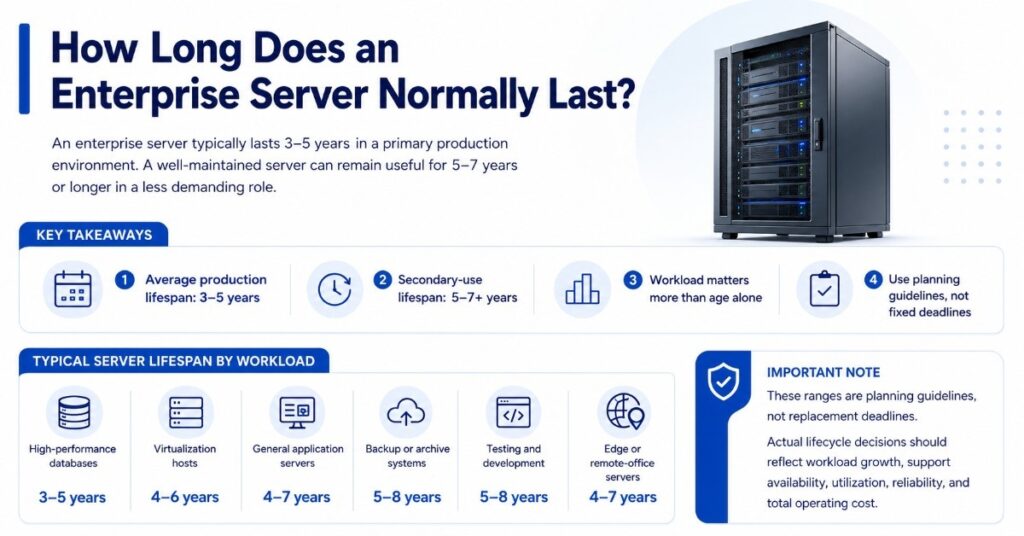
The average lifespan of a server is commonly three to five years in a primary production environment.
However, a well-maintained enterprise server may remain useful for five to seven years or longer in a less demanding role.
Useful life depends on more than the manufacturing date.
A five-year-old server running a stable file service may remain dependable. A three-year-old virtualization host operating near maximum capacity may already require replacement.
Typical Server Lifespan by Workload
Organizations can use these ranges as planning guidelines:
- High-performance databases: Three to five years
- Virtualization hosts: Four to six years
- General application servers: Four to seven years
- Backup or archive systems: Five to eight years
- Testing and development servers: Five to eight years
- Edge or remote-office servers: Four to seven years
These ranges are not replacement deadlines.
Actual lifecycle decisions should reflect workload growth, support availability, utilization, reliability, and total operating cost.
Production Life and Useful Life Are Different
Production life describes how long a server should support important workloads.
Useful life describes how long the equipment can provide value in any suitable role.
A server may no longer be appropriate for customer-facing applications but remain useful for:
- Development environments
- Backup repositories
- Disaster recovery
- Lab testing
- Training systems
- Internal tools
- Low-priority file storage
This distinction prevents organizations from discarding functional equipment too early.
Economic Life May Be Shorter Than Technical Life
A server may still function while becoming financially inefficient.
The technical life ends when the equipment can no longer operate reliably.
The economic life ends when the cost of maintaining the server exceeds the value it provides.
Economic warning signs include:
- Rising maintenance contracts
- Expensive replacement parts
- High power consumption
- Frequent technician involvement
- Low workload density
- Limited virtualization capacity
- Repeated downtime
- Poor performance per watt
CFOs and procurement teams should evaluate economic life alongside physical condition.
How Do Software and Support Lifecycles Affect Server Replacement?
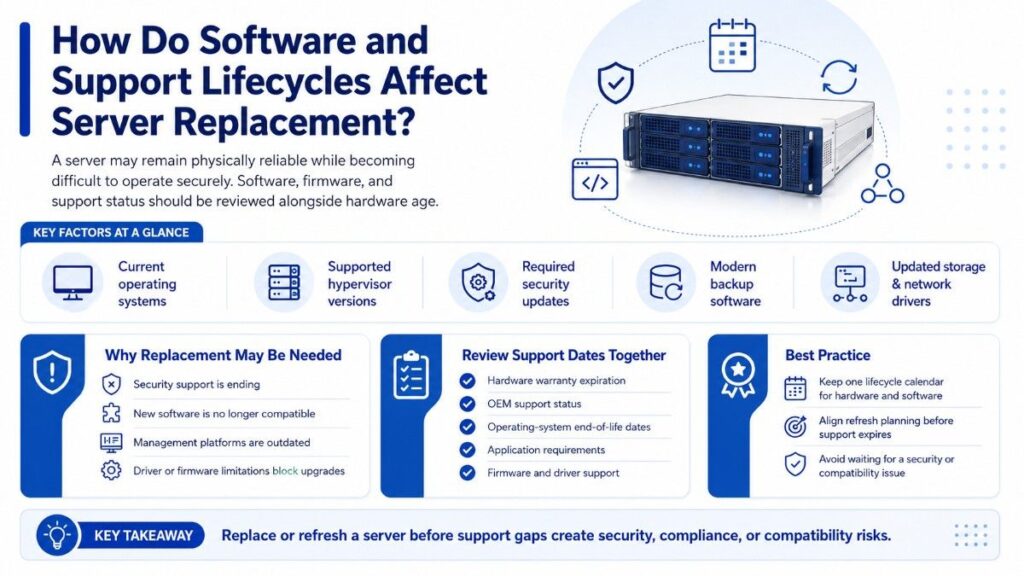
A server may remain physically reliable while becoming difficult to operate securely.
Operating-system, hypervisor, firmware, driver, and application support should be reviewed alongside hardware age.
Replacement may be necessary when the server cannot support:
- Current operating systems
- Supported hypervisor versions
- Required security updates
- Modern backup software
- Updated storage or network drivers
- Current management platforms
Review Support Dates Together
IT teams should track hardware warranty expiration, OEM support, operating-system end-of-life dates, and application requirements in one lifecycle calendar.
This prevents situations where recently upgraded hardware cannot support the next software release.
A refresh should ideally occur before support expires, not after a security or compatibility problem appears.
Should Servers Be Replaced Every Five Years?
Servers should not automatically be replaced every five years.
A five-year schedule is a useful planning baseline, but it should trigger an assessment rather than an automatic purchase.
Some servers need replacement earlier because of capacity, reliability, or support problems.
Others can remain productive after five years with reasonable upgrades and proper maintenance.
When the Five-Year Rule Makes Sense
A five-year replacement target may be appropriate when:
- The server supports a critical application
- Downtime has a high financial impact
- OEM warranty coverage is ending
- Parts availability is becoming uncertain
- New systems offer significant efficiency gains
- The workload requires newer processors or accelerators
- Security or compliance rules limit unsupported hardware
Organizations with strict service-level agreements often benefit from predictable refresh schedules.
Predictability makes budgeting, migration planning, and procurement easier.
When a Longer Cycle May Be Reasonable
Extending the server refresh cycle may be practical when:
- Performance remains within the required range
- Failure rates remain low
- Firmware and security support are available
- Replacement parts are accessible
- The workload is stable
- Energy costs remain acceptable
- The server is not supporting a critical service
An extended lifecycle should still include active monitoring.
Keeping old hardware without performance, support, and cost data is not a refresh strategy.
When Is Upgrading a Server Better Than Replacing It?
Upgrading is usually better when one or two replaceable components are limiting an otherwise reliable server.
Memory, storage, RAID, and networking upgrades can provide meaningful improvements without the cost and disruption of a complete replacement.
An upgrade is often appropriate when:
- CPU utilization remains acceptable
- Memory pressure is causing slowdowns
- Storage latency is the main bottleneck
- More drive capacity is required
- Network throughput is insufficient
- The server remains under support
- Firmware updates remain available
- The chassis supports expansion
- Reliability remains consistent
Organizations using ProLiant systems can evaluate practical HPE upgrade paths before authorizing a complete hardware replacement.
Memory Upgrades
Memory upgrades can extend server life when applications or virtual machines are constrained by RAM rather than processor performance.
Common indicators include:
- High paging activity
- Frequent memory ballooning
- Virtual-machine consolidation limits
- Application cache pressure
- Database memory shortages
- Slow response during peak demand
Before adding memory, confirm the server’s supported capacity, module type, population rules, and operating-system limits.
Storage Upgrades
Storage upgrades may be appropriate when the server has adequate processor and memory capacity but suffers from slow drives or limited space.
Possible improvements include:
- Enterprise SSD installation
- Higher-capacity drives
- RAID controller replacement
- Cache expansion
- Additional drive enclosures
- Faster storage interfaces
- New host bus adapters
The team should also evaluate rebuild times, endurance ratings, redundancy, and backup performance.
Network Upgrades
A server may remain useful when networking is the only major limitation.
Upgrading network adapters can support:
- Higher virtualization density
- Faster backup windows
- Storage traffic
- Replication
- Cluster communication
- Large data transfers
Confirm that the motherboard, PCIe generation, operating system, switches, and cabling can support the proposed speed.
When an Upgrade Is a False Economy
An upgrade may be technically possible without being financially sensible.
Avoid investing heavily in a platform with several declining attributes.
Warning signs include:
- Unsupported processors or chipsets
- Expiring firmware support
- Repeated hardware failures
- High maintenance costs
- Limited operating-system compatibility
- Poor energy efficiency
- No remaining expansion capacity
- Low expected resale value
- Imminent application migration
Calculate the upgrade cost against the server’s realistic remaining life.
A major upgrade is difficult to justify when replacement will still be required within another year.
Set an Upgrade Investment Limit
Organizations should define how much they are willing to spend on an aging server.
The limit may be based on:
- Percentage of replacement cost
- Expected life extension
- Workload criticality
- Maintenance savings
- Migration timing
- Residual asset value
For example, a modest upgrade may be reasonable if it extends service for two years.
A costly upgrade that delays replacement for only six months is rarely attractive.
Server Upgrade vs. Replacement Decision Table
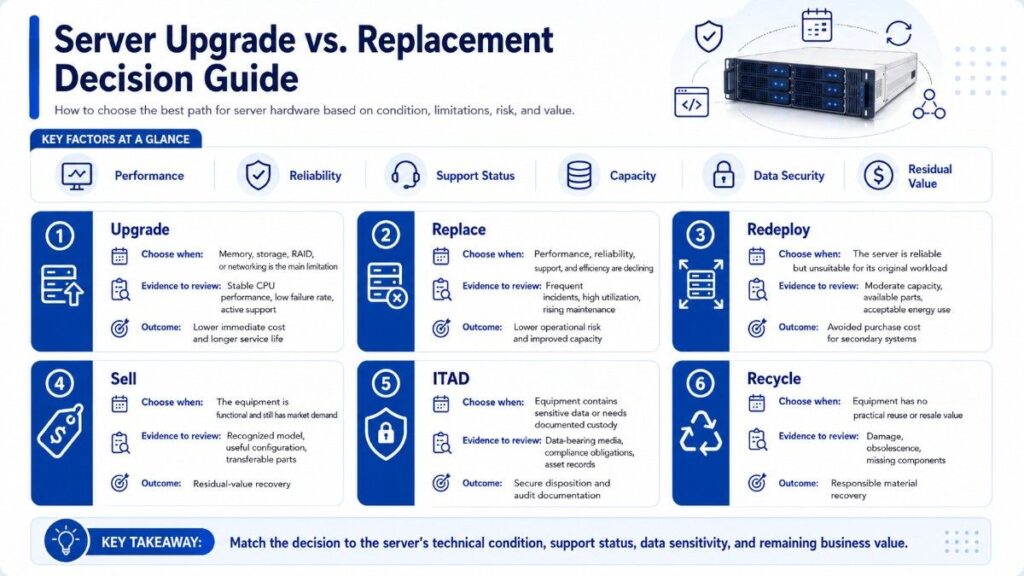
| Decision | Choose This Option When | Evidence to Review | Main Outcome |
| Upgrade | Memory, storage, RAID, or networking is the main limitation | Stable CPU performance, low failure rate, active support | Lower immediate cost and longer service life |
| Replace | Performance, reliability, support, and efficiency are declining | Frequent incidents, high utilization, rising maintenance | Lower operational risk and improved capacity |
| Redeploy | The server is reliable but unsuitable for its original workload | Moderate capacity, available parts, acceptable energy use | Avoided purchase cost for secondary systems |
| Sell | The equipment is functional and still has market demand | Recognized model, useful configuration, transferable parts | Residual-value recovery |
| ITAD | Equipment contains sensitive data or needs documented custody | Data-bearing media, compliance obligations, asset records | Secure disposition and audit documentation |
| Recycle | Equipment has no practical reuse or resale value | Damage, obsolescence, missing components | Responsible material recovery |
A Simple Decision Sequence
Ask these questions in order:
- Does the server still meet workload requirements?
- Can a targeted upgrade solve the main limitation?
- Is the platform still secure and supportable?
- Is maintenance cost still reasonable?
- Can it serve a lower-risk workload?
- Does it have secondary-market value?
- Does it require secure ITAD or recycling?
This sequence helps organizations avoid premature replacement and delayed retirement.
Need Help Turning Server Refreshes Into a Lifecycle Strategy?
Catalyst Data Solutions Inc works with OEMs such as Cisco, Arista, HPE, and NVIDIA to help organizations source, upgrade, redeploy, resell, and retire server infrastructure. As a vendor-agnostic partner, Catalyst recommends options based on workload needs, budget, availability, and long-term lifecycle value.
This approach supports teams dealing with tight budgets, long lead times, mixed-vendor environments, and supply constraints. Catalyst can help compare new and refurbished hardware, locate hard-to-find equipment, plan redeployment, and coordinate secure ITAD services during a server refresh cycle.
Frequently Asked Questions
How should a company prioritize servers during a large refresh?
Start with systems that support critical workloads, have expired support, experience frequent failures, or create high downtime risk. Less-critical and stable servers can be reviewed later.
Should server refresh planning match software renewal dates?
Yes, when possible. Aligning hardware refreshes with operating-system, hypervisor, and application renewals can reduce duplicate work, migration costs, and licensing complications.
How can companies reduce risk during a server migration?
Create backups, test workloads in advance, document rollback procedures, and schedule the migration during a low-usage period. Critical applications should also have a verified recovery plan.
What records should be kept after a server is retired?
Keep the asset serial number, final disposition method, data-destruction record, resale details, chain-of-custody documentation, and any recycling or destruction certificates.
Can leased servers be included in a refresh strategy?
Yes. Leased servers can support temporary capacity, short-term projects, and predictable replacement schedules. Teams should review return conditions, upgrade limits, contract costs, and data-removal requirements before signing.