



K-12 and SLED IT budgets can grow on paper and still feel tight in practice. The reason is simple: technology needs are growing faster than many public-sector budgets can absorb.
Schools, libraries, and public agencies now support more devices, more cloud tools, more cybersecurity needs, more bandwidth demand, and more aging infrastructure. A larger budget does not always mean more room to spend.
For many teams, the real question is not only how much money is available. It is how to make better choices across hardware, software, support, refresh cycles, and funding sources.
A practical K-12 technology plan should connect classroom needs, network capacity, procurement rules, and lifecycle timing before the budget year becomes urgent.
Why Do K-12 and SLED IT Budgets Still Feel Tight?
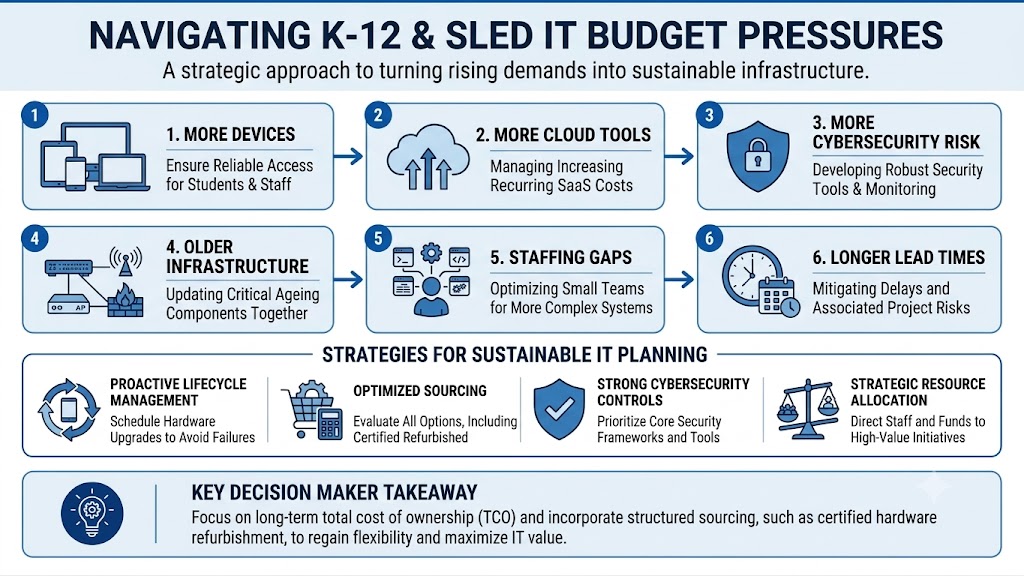
K-12 and SLED IT budgets still feel tight because demand is rising across many categories at the same time. Devices, Wi-Fi, switching, cybersecurity, storage, software renewals, bandwidth, support, and staffing all compete for the same limited funds.
A district may receive more IT funding than last year but still face higher costs in every major area. A library system may upgrade public Wi-Fi while also paying more for cloud tools, staff devices, and security services.
The result is a budget that looks larger but buys less flexibility. This is why many schools and public agencies need stronger planning around hardware lifecycle, sourcing options, and total cost.
| Budget Pressure | Why It Feels Tight |
| More devices | Students, staff, and public users need reliable access |
| More cloud tools | SaaS renewals add recurring cost |
| More cybersecurity risk | Security tools and monitoring are now core needs |
| Older infrastructure | Switches, APs, firewalls, and cabling age together |
| Staffing gaps | Smaller teams manage more systems |
| Longer lead times | Delays can increase project cost and risk |
A clear budget category view helps buyers see where the money is going before they approve the next purchase order.
Why Are Public Sector Technology Costs Rising So Fast?
Public-sector IT teams now support more connected environments than they did a few years ago. Classrooms, libraries, offices, public Wi-Fi, cloud systems, online testing, digital records, and security platforms all depend on stable infrastructure.
According to Gartner’s 2026 forecast, worldwide IT spending is expected to reach $6.31 trillion in 2026, up 13.5% from 2025. That growth shows a larger trend: technology spending is rising, but so are AI, infrastructure, cybersecurity, and software costs.
K-12 and SLED buyers feel this pressure in a practical way. They may not be building large AI data centers, but they still face higher hardware costs, software renewals, storage demand, cloud usage, and network modernization needs.
| Rising Cost Area | Common Public-Sector Impact |
| AI and data growth | More storage, compute, and network planning |
| Cybersecurity | More tools, renewals, and monitoring needs |
| Cloud platforms | More recurring software and storage fees |
| Devices | More refresh cycles and accessory needs |
| Network traffic | More bandwidth, switching, and Wi-Fi demand |
The challenge is not only higher prices. It is the timing. Many public agencies must plan purchases around funding cycles, board approvals, bids, contracts, and fiscal-year deadlines.
What Are the Biggest Cost Pressures on K-12 and SLED IT Budgets?
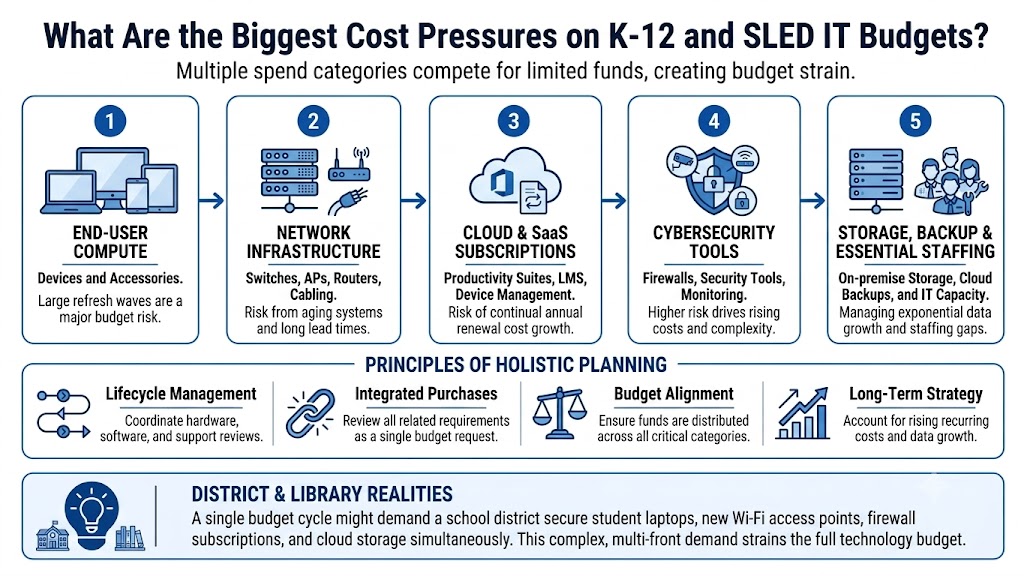
The biggest cost pressures are laptops, networking, Wi-Fi, cloud subscriptions, SaaS renewals, cybersecurity, storage, bandwidth, support, maintenance, and staffing. Each area may look manageable alone, but together they can strain the full technology budget.
A school district may need student laptops, staff devices, Wi-Fi 6 access points, firewall subscriptions, cloud storage, and new switching in the same budget cycle. A library may need public Wi-Fi upgrades, staff computers, better security, and higher bandwidth.
That is why budget planning should not treat each purchase as a separate request. Hardware, software, support, and lifecycle timing should be reviewed together.
| Spend Category | Common Examples | Budget Risk |
| End-user compute | Student laptops, staff devices, accessories | Large refresh waves |
| Network infrastructure | Switches, APs, routers, cabling, optics | Aging systems and lead times |
| Cloud and SaaS | Productivity suites, LMS, device management | Annual renewal growth |
| Cybersecurity | Firewalls, security tools, monitoring | Higher risk and rising cost |
| Storage and backup | On-prem storage, cloud storage, archives | Data growth and retention needs |
| Support and staffing | Maintenance, contracts, IT staff | Gaps in capacity |
A practical cost control plan can help teams reduce waste without weakening performance.
End-User Compute Costs
End-user compute includes student laptops, staff devices, refresh cycles, chargers, docks, cases, keyboards, and other accessories. These costs grow quickly because device programs rarely stop after the first purchase.
Many districts now manage one-to-one or shared device models. Libraries may manage public computers, staff workstations, and mobile devices. Devices also need repairs, spares, warranties, and replacement planning.
The pressure grows when device refresh cycles overlap with network refreshes. A school may need new laptops and better Wi-Fi in the same year because older access points cannot support higher classroom demand.
Network Infrastructure Costs
Network infrastructure includes switches, wireless access points, routers, firewalls, cabling, optics, power supplies, and related support. These systems carry daily traffic for students, staff, patrons, applications, and security tools.
Aging switches can limit speed and PoE capacity. Older APs can create weak coverage. Firewalls may need subscription renewals. Cabling and optics may need upgrades when bandwidth or building needs change.
OEM standards also matter. Buyers may compare Cisco Catalyst switching, HPE Aruba wireless, Fortinet firewalls, Juniper Mist, Juniper switching, or Arista for high-performance networking where the environment requires it.
A strong network refresh plan should look beyond the main hardware and include optics, mounting kits, licenses, support, and spares.
Cloud, SaaS, and Data Costs
Cloud and SaaS costs often rise through renewals, added users, storage growth, and new feature tiers. Common tools include productivity suites, learning management systems, device management, security tools, and cloud storage.
These tools can improve access and reduce local infrastructure needs, but they also create recurring obligations. A lower first-year cost can become a higher long-term cost when licenses, storage, and usage increase.
Data and storage planning also matters. Schools and agencies may need on-prem storage, backups, cloud storage, archival systems, and retention planning. A stronger cloud security plan can help teams avoid tool overlap and unmanaged risk.
Why Does E-Rate Help but Not Solve the Whole Budget Problem?
E-Rate can help eligible schools and libraries reduce costs for internet access, data transmission, and certain internal network infrastructure. It can support connectivity planning, but it does not replace the full IT budget.
For example, E-Rate may help with eligible switches, access points, cabling, and related network needs. It usually does not cover laptops, broad software tools, staff devices, many cloud platforms, or general IT staffing.
This is why E-Rate should sit inside a larger funding plan. Schools and libraries should use official FCC and USAC guidance for E-Rate rules, eligibility, forms, and filing steps.
| Need | Possible Funding Path |
| Internet access | E-Rate Category One, when eligible |
| Switches and APs | E-Rate Category Two, when eligible |
| Student laptops | Local funds, grants, device budgets |
| Cloud tools | Operating budget or software budget |
| Cybersecurity tools | Grants, security budget, local funds |
| Refresh spares | Local funds, refurbished sourcing, buyback value |
A buyer reviewing E-Rate basics should also separate eligible network needs from broader technology needs before building the hardware plan.
E-Rate can reduce part of the pressure, but it does not remove procurement work. Teams still need to compare price, compatibility, lead times, warranties, support, and lifecycle fit.
How Should Schools and SLED Buyers Plan Hardware Lifecycles?
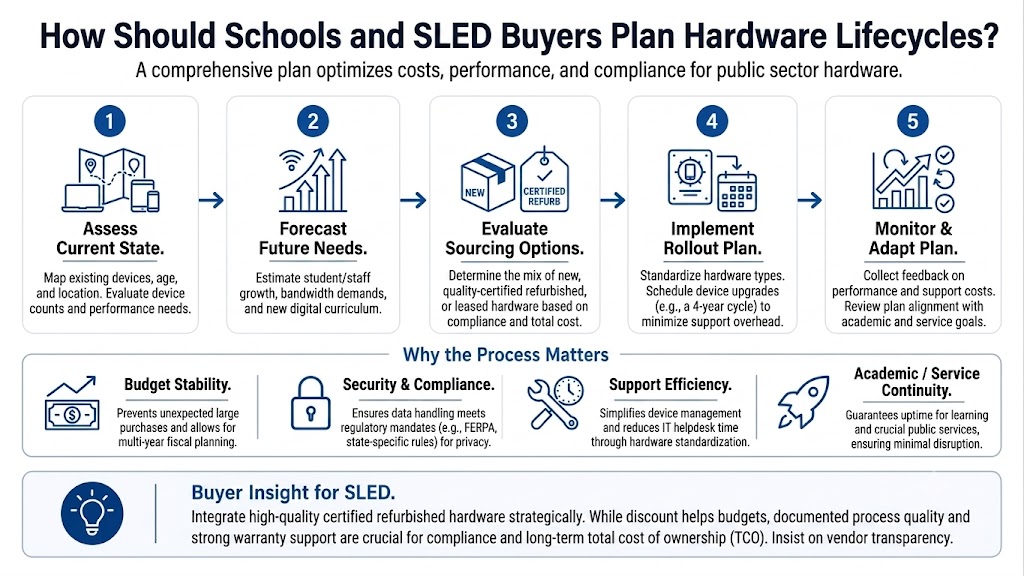
Schools and SLED buyers should plan hardware lifecycles by mapping age, risk, support status, performance needs, and replacement timing across each major system. This helps teams avoid emergency purchases and uneven refresh cycles.
Lifecycle planning works best when IT and procurement teams share the same view of the environment. That includes switches, APs, routers, firewalls, cabling, optics, servers, storage, endpoints, licenses, and support contracts.
A simple lifecycle review can show which systems need replacement now, which can be extended, and which can move into spare or secondary use.
| Lifecycle Question | Why It Matters |
| How old is the hardware? | Aging systems can raise failure risk |
| Is support still active? | Unsupported hardware may increase downtime |
| Does it meet current demand? | Older systems may limit speed or coverage |
| Are parts available? | Spares can prevent long outages |
| Does it match the standard? | Mixed environments can increase support work |
| Can it be reused? | Some hardware may support labs or spares |
A lifecycle view also helps buyers compare CapEx, OpEx, and total cost. A lower purchase price may not save money if it raises support issues, licensing gaps, or downtime risk.
For larger refreshes, a TCO buying model can help teams compare new hardware, refurbished options, support terms, and long-term value.
Where Can Channel Access and Alternative Sourcing Help?
Channel access and alternative sourcing can help when buyers need better availability, price comparison, compatible options, or hard-to-find hardware. This matters when OEM lead times, budget limits, or project deadlines create pressure.
Public-sector buyers often need more than one sourcing path. A project may start with a preferred OEM standard, then require distribution checks, equivalent options, refurbished spares, or phased fulfillment.
This does not mean every project should use refurbished hardware. New hardware often makes sense for standardization, warranty alignment, long lifecycle, and mission-critical deployments.
Alternative sourcing can help in other areas:
- Replacement switches for existing networks
- Spare APs for branch locations
- Optics and transceivers
- Power supplies and modules
- Lab or training environments
- Legacy systems that are still in use
- Budget-sensitive expansion
- Hard-to-find infrastructure
Teams should verify warranty, testing, compatibility, support, and procurement rules before choosing any sourcing path. If E-Rate funds are involved, buyers should not assume refurbished hardware is eligible unless verified for the exact product and request.
A practical hardware sourcing team can help compare availability across OEM, channel, distribution, and refurbished markets before the purchase becomes urgent.
How Can IT Teams Stretch Budgets Without Weakening Infrastructure?
IT teams can stretch budgets by separating urgent needs from long-term needs, building complete scopes, comparing OEM options, using lifecycle data, and avoiding incomplete quotes. The goal is not to buy the cheapest hardware. The goal is to buy the right hardware at the right time.
A weak quote can create hidden costs. Missing optics, licenses, mounting kits, power supplies, support, or cabling can delay the project and force extra purchases later.
Buyers should define the full project before requesting quotes. That includes location, current equipment, port counts, PoE needs, wireless coverage goals, firewall throughput, cabling needs, and support expectations.
| Planning Step | Practical Benefit |
| Define project scope | Reduces vague or incomplete quotes |
| Review current hardware | Shows what can stay, move, or retire |
| Compare OEM options | Improves fit across budget and lifecycle |
| Check availability | Reduces delay and fulfillment risk |
| Include accessories | Prevents missing parts |
| Plan spares | Lowers downtime risk |
Wireless projects are a common example. A buyer may budget for APs but forget PoE switch capacity, cabling, licenses, mounts, and controller or cloud management needs. A better wireless upgrade scope can reduce last-minute cost changes.
Cybersecurity also needs scope control. Firewalls, logging, monitoring, support, subscriptions, and renewal terms should be reviewed together. A practical security roadmap can reduce tool sprawl and improve budget planning.
What Should Buyers Define Before Requesting Hardware Quotes?
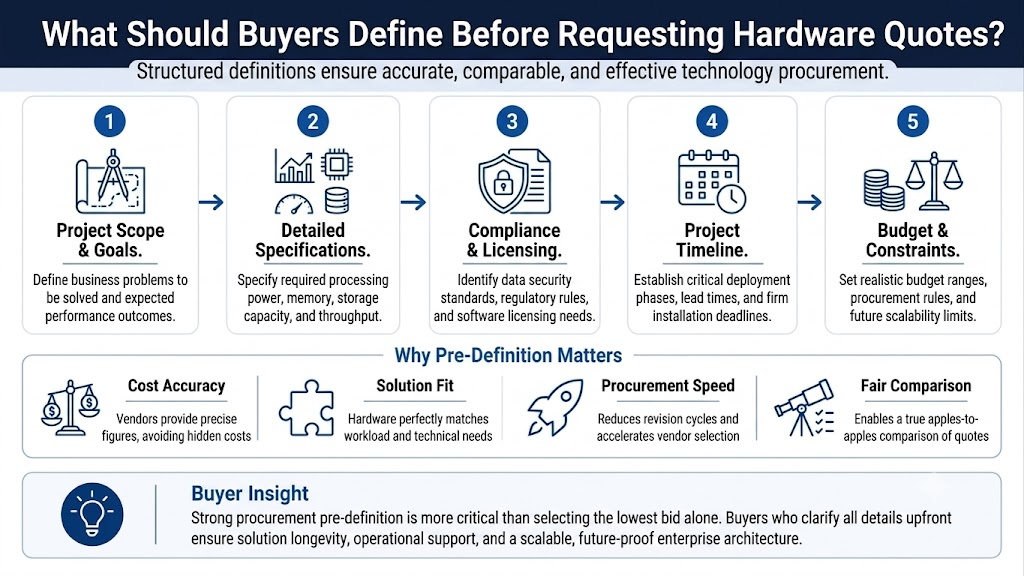
Before requesting quotes, buyers should define the project goal, location, existing environment, required hardware, compatibility needs, funding source, timeline, and approved purchasing path.
This step helps vendors build cleaner, quote-ready configurations. It also helps procurement teams compare bids more fairly across OEMs, channel partners, distributors, and refurbished options.
A buyer planning a network refresh should document:
- Current switch models
- Current wireless access points
- Firewall and router requirements
- Port counts and PoE needs
- Cabling type and building constraints
- Optics and transceiver needs
- Licensing and support terms
- Delivery deadlines
- Preferred OEM standards
- Approved equivalents, when allowed
For E-Rate-related projects, buyers should confirm eligibility and process details through official program sources and internal procurement teams. Catalyst can support hardware sourcing and quote planning, but it should not be treated as an E-Rate filing or compliance advisor.
A practical eligible services review can help teams separate network infrastructure needs from broader IT purchases before finalizing a scope.
Need Help Turning Tight IT Budgets Into Better Hardware Plans?
Tight budgets do not always require smaller plans. They often require clearer scopes, better timing, smarter sourcing, and a stronger view of total cost.
Catalyst Data Solutions helps schools, libraries, and public-sector buyers translate network needs into hardware scopes, compare OEM options, source products through channel and distribution access, and build quote-ready solutions for eligible infrastructure projects.
Catalyst can help teams compare Cisco Catalyst, HPE Aruba, Fortinet, Juniper Mist, Juniper switching, Arista, new, refurbished, and hard-to-find options based on budget, availability, compatibility, and timeline.
Need Help Comparing New, Refurbished, and Hard-to-Find Hardware?
Ask Catalyst to compare new, refurbished, and hard-to-find infrastructure options for switches, wireless access points, firewalls, optics, servers, storage, and refresh hardware. Catalyst can help check availability, build practical bundles, and review sourcing paths for budget-conscious K-12, library, and SLED projects.
FAQs
Why do IT budgets feel tight even when spending increases?
IT budgets feel tight because needs are rising across many areas at once. Devices, Wi-Fi, security, cloud tools, storage, bandwidth, support, and staffing all compete for the same budget.
What should schools prioritize when the IT budget is limited?
Schools should prioritize systems that affect daily access, safety, and uptime. This often includes Wi-Fi, switching, firewalls, internet access, backups, and devices that directly support teaching, testing, and operations.
How can libraries control public Wi-Fi and device costs?
Libraries can control costs by planning refresh cycles, documenting coverage gaps, comparing AP and switch options, using spares, and reviewing bandwidth, cabling, and support needs before buying equipment.
Is refurbished hardware a good option for K-12 or SLED buyers?
Refurbished hardware can help with spares, replacements, labs, legacy systems, and budget-sensitive expansion. Buyers should verify testing, warranty, support, compatibility, procurement rules, and funding eligibility before using refurbished equipment.
How can procurement teams avoid incomplete hardware quotes?
Procurement teams should provide clear scopes. They should include port counts, PoE needs, AP counts, optics, cables, power supplies, licenses, support terms, delivery needs, and approved OEM or equivalent requirements.
Does E-Rate cover all school technology costs?
No. E-Rate can help with eligible connectivity and network infrastructure, but it does not replace the full IT budget. Laptops, many cloud tools, software, staffing, and broad cybersecurity needs often require other funding sources.
When should a district start planning a network refresh?
A district should start before the current network becomes unstable. Early planning gives teams time to review equipment age, budget cycles, E-Rate timing, procurement rules, OEM options, lead times, and sourcing paths.